EasyManua.ls Logo

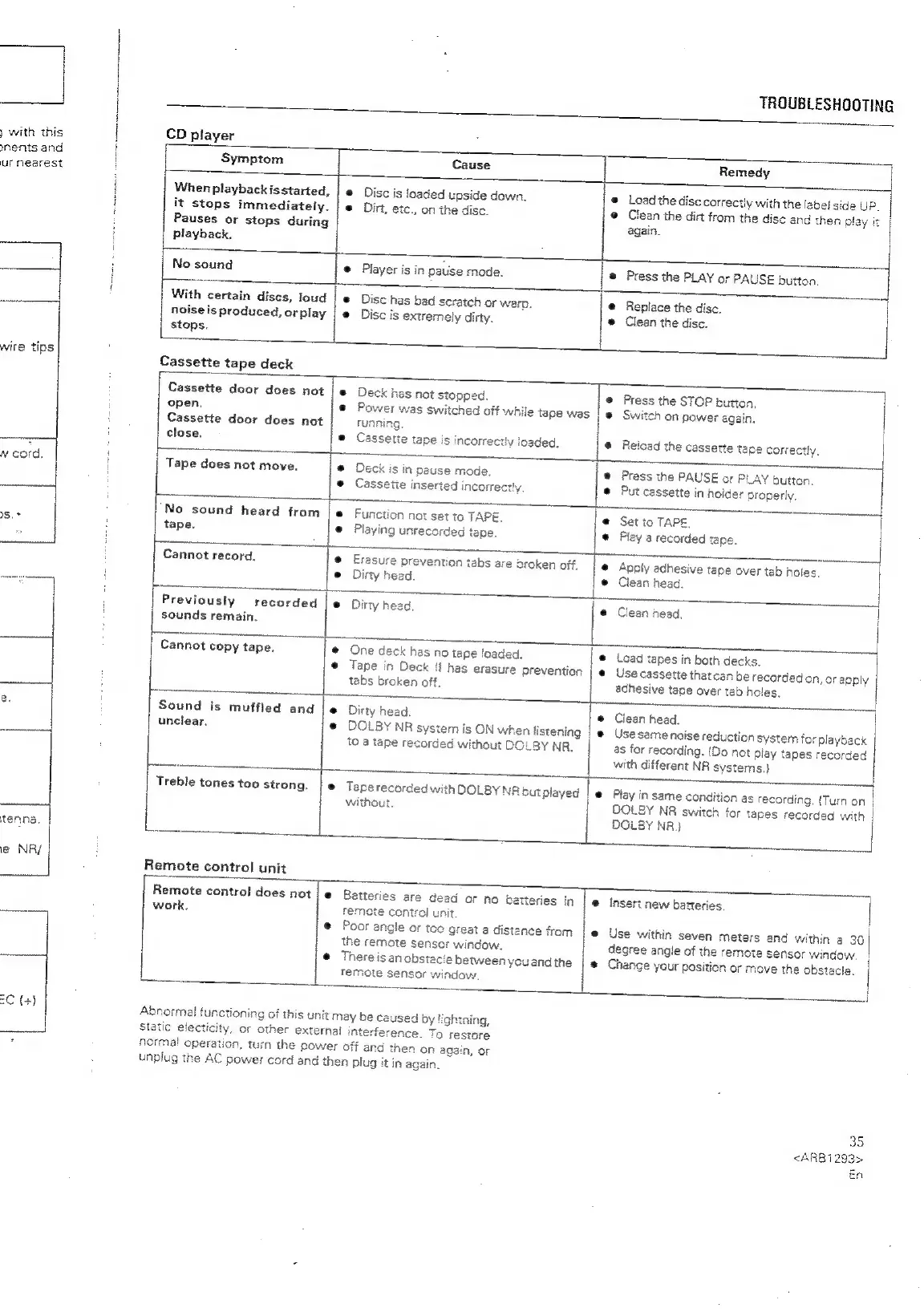
Pioneer XR-P310 - TROUBLESHOOTING (Components); CD Player and Cassette Deck Issues; Remote Control Malfunctions

Pioneer XR-P310
36 pages
Print Icon
To Next Page IconTo Next Page
To Previous Page IconTo Previous Page
Loading...
)
with
this
nents
and
ur
nearest
wire
tips
tenna.
ie
NR/
aC
(+)
TROUBLESHOOTING
CD
player
Symptom
Cause
Remedy
When
playbackisstarted,
|
©
Disc
is
loaded
upside
down.
®
Load
the
disc
correctly
with
the
label
side
UP
it
stops
immediately.
|
@
Dirt,
etc.,
on
the
disc.
®
Clesn
the
dirt
from
the
disc
and
then
play
it
|
Pauses
or
stops
during
again.
playback.
No
sound
@
Player
is
in
pause
mode.
®
Press
the
PLAY
or
PAUSE
button
With
certain
discs,
loud
|
Disc
has
bad
scratch
or
werp.
@
Replace
the
disc.
noise
is
produced,
orplay
|
@
Disc
is
extremely
dirty.
®
Clean
the
disc.
stops.
Cassette
tape
deck
pa
:
=
Cassette
door
does
not
|
®
Deck
hes
not
stopped.
®
Press
the
STOP
button,
|
open,
@
Power
was
switched
off
while
tape
was
|
@
Switch
on
power
again.
|
Cassette
door
does
not
running.
|
|
"
{
close.
e
Cassette
tape
is
incorrectly
ioeded.
@
Reicad
the
cassette
tace
correctly,
i
Tape
does
not
move.
@
Deck
is
in
pause
mode
@
Press
the
PAUSE
or
PLAY
button.
@
Cassetie
inserted
incorre:
@
Put
cassette
in
holder
properly.
No
sound
heard
from
|
Function
not
set
to
TAPE.
@
Set
to
TAPE,
tape.
@
Playing
unrecorded
tape.
©
Pley
a
recorded
tape.
Cannot
record.
@
Erasure
prevention
tabs
are
oroken
off,
@
Apply
adhesive
tape
over
tab
holes.
L
e@
Dirty
head.
®
Ciean
head.
|
Zi
s
oe
!
—$$
|
Previously
recorded
|
e
Dirty
head.
|
Clean
head.
;
sounds
remain.
=
enn
Sas
|
Cannot
copy
tape.
@
One
deck
has
no
tape
loaded,
@
Load
tapes
in
both
decks.
e
Tape
in
Deck
!f
has
erasure
Prevention
|
@
Use
cassette
thatcan
be
recorded
on,
or
apply
tabs
broken
off.
achesive
tape
over
tab
holes,
|
es
——______|
Sound
is
muffled
and
|e
Dirty
head.
@
Clean
head.
unclear.
@
DOLBY
NR
system
is
ON
when
listening
|
@
Usesame
noise
reduction
system
forplayback
to
a
tape
recorded
without
DOLBY
NR.
as
for
recording.
(Do
not
play
tapes
recorded
with
different
NR
systems.)
Treble
tones
too
strong.
|
®
Teperecorded
with
DOLBYNR
cutplayed
|e
Play
in
same
condition
as
recording.
(Turn
on
i
without.
DOLBY
NR
switch
for
tapes
recorded
with
|
DOLBY
NR}
|
com
=}
i
Remote
control
unit
t
Remote
control
does
not
|
e
Batteries
are
dead
or
no
batteries
in
|
@
insert
new
batteries.
|
work.
remote
control
unit.
H
;
®
Poor
angle
or
toc
great
a
distance
from
|
@
Use
within
seven
meters
and
within
a
30
the
remote
sensor
window.
degree
angle
of
the
remote
sensor
window
@
There
is
an
obstacle
between
youandthe
|
@
Temote
sensor
window,
2.
age
4
{
Change
your
position
or
move
the
obstacie.
i
Abnormal
tunctioning
of
this
unit
Static
electicity,
or
other
external
j
may
be
caused
by
lightning,
terference.
To
restore
norma!
operation,
turn
the
power
off
and
then
on
again,
or
unplug
the
AC
power
cord
and
then
plug
it
in
again.
35
<ARB1i293>
En

Related product manuals