EasyManua.ls Logo

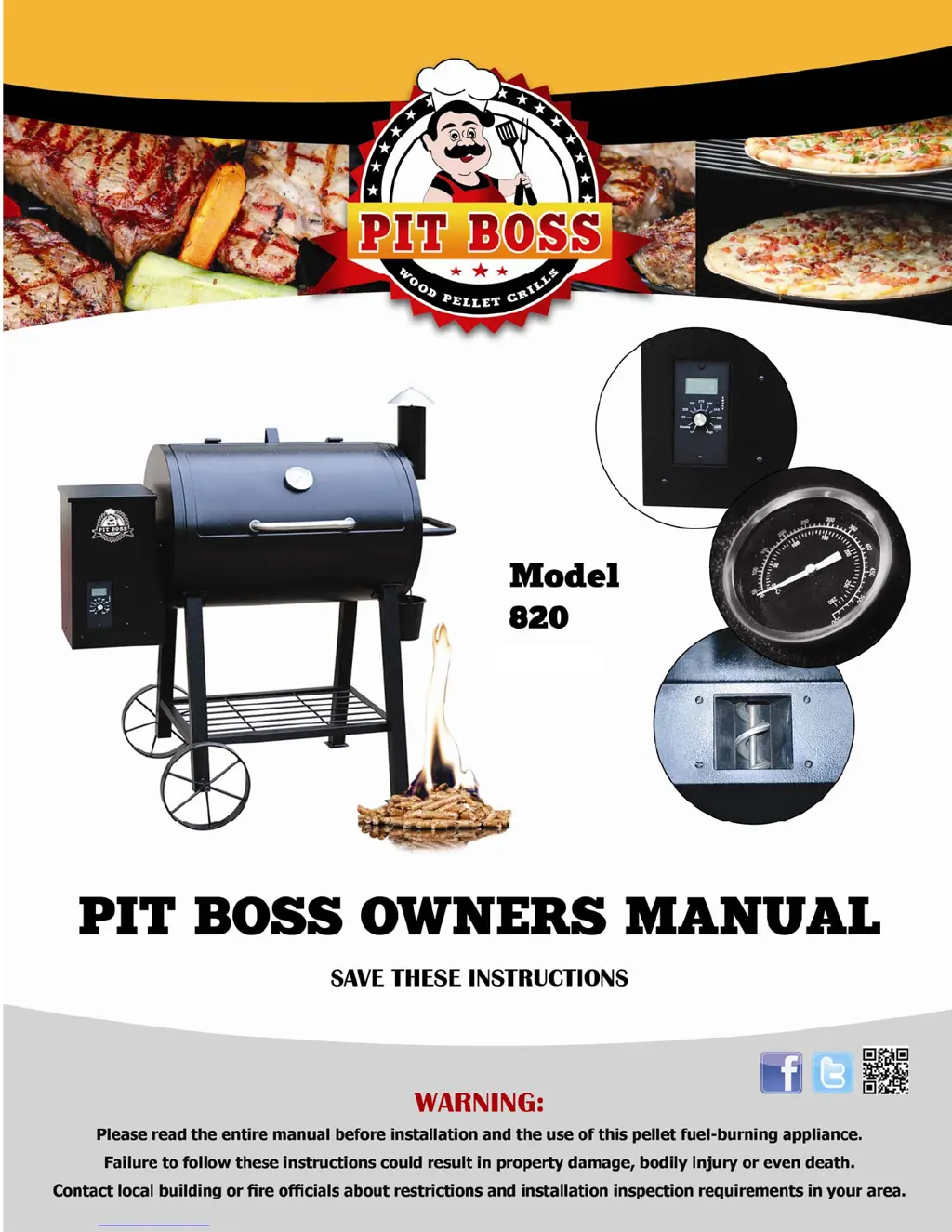
Pit Boss 820 - User Manual

Pit Boss 820
36 pages
Print Icon
To Next Page IconTo Next Page
Loading...

Questions and Answers

  • M
    Madison CollinsAug 19, 2025
    What to do if my Pit Boss 820 Grill displays "ErH" Error Message?
    • L
      Lisa GibsonAug 19, 2025
      If your Pit Boss grill displays an “ErH” error message, it indicates that the grill has overheated, possibly due to a grease fire or excess fuel. To resolve this: * Turn the grill off and allow it to cool. * Clean the grill interior. * Remove excess pellets. * Confirm the correct positioning of all component parts. To CLEAR the error: * Turn the Temperature Dial to OFF. * OPEN the lid. * Wait 3 or 4 minutes, then select the desired temperature. Another cause may be that the temperature probe wire is not making a connection, so ensure the probe wire is connected correctly to the control. Confirm wire connections and check for any damage.
  • M
    Michael PottsAug 22, 2025
    How to fix unstable temperature on Pit Boss 820?
    • C
      Christopher TurnerAug 22, 2025
      If your Pit Boss grill won't achieve or maintain a stable temperature, there are several potential causes and solutions: * **Insufficient air flow through burn pot:** Check the burn pot for ash build-up or obstructions. Ensure the fan is working properly, the air intake is not blocked, and there is no blockage in the auger tube. Perform a quick test by removing the cooking grids and flavor/grease plate, starting the grill, setting the temperature to pre-heat, and waiting 10 minutes to ensure the flame is bright, vibrant, and being pushed away from the hopper end. * **Insufficient or poor fuel:** Check the hopper for sufficient fuel. Check the fuel for size, dampness, and sawdust. Also, check and clean the temperature probe. * **Control Settings:** Ensure the “P” setting is correct.
  • J
    joseph01Aug 25, 2025
    Why is my Pit Boss Grill temperature flashing on LCD Screen?
    • R
      Richard GatesAug 26, 2025
      A flashing temperature on the LCD screen in SMOKE Mode, when the grill temperature is below 110°F, is not an error. It indicates a risk that the fire could go out. Check the hopper for sufficient fuel or blockage, the burn grate and pot for ash build-up or obstructions, the fan to confirm operation and speed, and the auger motor to confirm operation.
  • R
    Richard EatonAug 28, 2025
    How to stop excess smoke from Pit Boss 820 Grill?
    • K
      Kyle LoweAug 28, 2025
      Excess or discolored smoke from your Pit Boss grill can be due to several factors: * **Excess grease build-up:** Check and clean the interior grilling area. It's recommended to clean and do a controlled burn off of hidden excess grease after cooking greasy foods. * **Wood pellet quality:** Check and clear the hopper and burn pot of moist pellets, replacing them with fresh, dry pellets. * **Burn Pot:** Check for build-up of fuel in the burn pot.
  • J
    Joseph HesterAug 31, 2025
    What to do if my Pit Boss 820 Grill displays "ErP" Error Message?
    • J
      johnsoncharlotteAug 31, 2025
      If your Pit Boss grill displays an “ErP” error message, it means the Temperature Dial was not in the OFF position when the grill was connected to AC power. Turn the Temperature Dial to OFF, wait 2 minutes, then select the desired temperature. This safety feature prevents an inadvertent start.
  • J
    James ReyesSep 3, 2025
    Why is my Pit Boss 820 temperature displayed unexpectedly?
    • J
      Jessica EsparzaSep 3, 2025
      An unexpected grill temperature display can occur if the grill is exposed to high ambient temperature and direct sun. The interior temperature may have reached or exceeded 130° F. This will not harm the unit. To remedy this, place the unit in a shaded area and prop the lid open to reduce the inside temperature.
  • D
    Donald RodriguezSep 6, 2025
    Why is my Pit Boss 820 Grill Temprature when set at SMOKE is too high?
    • D
      David BowenSep 6, 2025
      If your Pit Boss Grill temperature is too high when set to SMOKE, it could be because the “P” Setting is too LOW. To correct this, turn the Temperature Dial to SMOKE and INCREASE the “P” setting by pushing the “P” SETTING Button.
  • J
    James Herrera MDSep 9, 2025
    Why Pit Boss Grill LCD screen will not light up?
    • M
      Marc RodriguezSep 9, 2025
      The LCD screen might not light up because the grill isn't properly plugged in. Make sure the Temperature Dial is in the OFF position, all wire connections are firmly connected, and the grill is plugged into a working GFCI outlet. Another cause may be that the circuit board fuse has been tripped, so the 5 amp fuse must be manually replaced. Also, the GFI outlet may have been tripped, so ensure all wire connections are firmly connected and dry, the GFCI is minimum 15 amp service, and you are NOT using over a 25’ extension cord.
  • G
    Gregory LopezSep 12, 2025
    How to prevent frequent flare-ups on Pit Boss Grill?
    • Y
      Yvette RiceSep 12, 2025
      Frequent flare-ups on your Pit Boss grill can often be attributed to the cooking temperature. Slow and Low is the recommended approach. Given that grease has a flash point, maintain a temperature below 350° F when cooking highly greasy food.
  • A
    Angela GarzaNov 15, 2025
    What to do if my Pit Boss 820 Grill will NOT Start?
    • J
      joshuamartinNov 15, 2025
      If your Pit Boss grill won't start, here are some things to check: * **Power:** Ensure the unit is plugged in and that there is power at the electrical outlet. Reset the Ground Fault Interrupter if needed. * **Temperature Dial:** Ensure the Temperature Dial is in the OFF position, then turn it to SMOKE. The LCD SCREEN should light up. * **Igniter:** Remove Cooking Grids and Flavor/Grease Tray. Turn the unit on and visually inspect the igniter. If it's not working, check the 5 amp fuse on the back of the control and replace it if necessary. If the fuse is good, call Customer Service for a replacement part. You can also start the unit using manual start instructions. * **Auger Motor:** Remove Cooking Grids and Flavor/Grease Tray. Turn the unit on and visually inspect the auger feed...

Summary

Dangers & Warnings

General Safety Precautions

Key safety instructions and warnings to prevent injury, fire, and damage. Covers hot surfaces, clearances, and maintenance.

Fuel Pellets and Creosote Risks

Guidelines on appropriate wood pellets, creosote formation, its risks, and how to prevent fires.

Carbon Monoxide Safety

Information on preventing carbon monoxide poisoning and recognizing its symptoms.

Introduction

Welcome and Important Tips

Provides a welcome message and essential tips for initial setup, cleaning, pellet usage, and fuel storage.

Section One: Assembly Instructions

Parts and Hardware Identification

Lists and illustrates all components and hardware required for assembly, ensuring all items are present.

Attaching Legs to Barrel

Step-by-step guide for attaching the legs to the grill barrel, including legs with and without wheel axles.

Installing Bottom Shelf and Wheels

Instructions for attaching the bottom shelf and installing the wheels to the leg assembly.

Assembling Lid Components and Smoke Stack

Procedures for installing the lid stopper, handle, dome thermometer, and smoke stack.

Attaching Handles and Grease Bucket

Steps for attaching the trolley handle and the grease bucket to the main grill body.

Placing Cooking Components

Guide on correctly positioning the flame diffuser, grease tray, and cooking grids inside the grill.

Connecting to Power and Initial Firing

Instructions for connecting the grill to power and performing initial firing procedures before first use.

Section Two: Operation

Getting Started and Grill Placement

Guidance on initial setup, grill placement considerations, and general operating tips for optimal cooking.

Operating the Grill: Modes and Controls

Explanation of the control panel, operating modes (Smoke, High), temperature settings, and error codes.

Lighting Procedures and Ignition Failure

Step-by-step guides for standard and manual lighting, including troubleshooting ignition failures.

Shutting Off and Grill Maintenance

Procedure for safely shutting down the grill and essential maintenance steps for cleaning after cooking.

Section Three: Tips & Techniques

Wood Pellet Usage and Flavor Guide

Information on 100% natural hardwood pellets and a flavor guide for different wood types.

Seasonal Cooking Adjustments

Tips for adjusting cooking techniques and grill performance in cold and hot weather conditions.

Food Safety Guidelines

Essential food safety rules and hygienic practices for preparing and cooking food on the grill.

Section Four: Trouble Shooting

Pit Boss Error Messages and Display Issues

Explains common error messages ('ErH', 'ErP', 'ErR') and LCD screen issues like no light or flashing dots.

Troubleshooting Performance Problems

Addresses issues like grill not starting, unstable temperature, discolored smoke, and flare-ups.

Wire Diagram and Replacement Parts

Details electrical components, the wire diagram, and lists replacement parts for troubleshooting.

Section Five: Grill Recipes

Beef and Pork Recipes

Recipes for brisket, sausage, ribs, and hamburgers, including ingredients and preparation steps.

Steak and Poultry Recipes

Recipes for steaks, Cornish hens, smoked turkey, and various chicken preparations.

Seafood and Other Recipes

Recipes for shrimp dishes and other grilling preparations.

Section Six: Limited Warranty

Warranty Terms, Conditions, and Exceptions

Details the limited warranty, its terms, conditions, exclusions, and procedures for service.

Model and Serial Number Identification

Guidance on locating the grill's model and serial number for warranty and service purposes.

Pit Boss 820 Specifications

General IconGeneral
Cooking Area820 sq. in.
Fuel TypeWood Pellets
Temperature Range180°F to 500°F
MaterialSteel
Grate MaterialPorcelain-coated cast iron
IgnitionElectric
Warranty5 years

Related product manuals