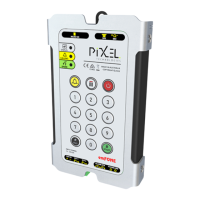
Telephone Line Powered Auto Dialing emFONE
Copyright © 2014 Pixel Technologies Pty. Ltd
6. Unit Testing Procedure
6.1. Test the Programmed Help Number
1. Press and hold the ALARM button for 3 seconds on the unit’s keypad.
2. The telephone line will turn ON and the STATUS LED will illuminate RED.
3. The unit will dial the first help number.
4. If the call is not answered, the unit will dial the second, then third help numbers until the call
is answered.
5. Once the call has been established communication can begin.
6. To end the call, press the ON/OFF button.
6.2. Dial a Telephone Number and Test the Telephone Line
To dial any telephone number directly from the unit's keypad follow the steps below:
1. Press and hold the ON/OFF button for 3 seconds on the unit’s keypad.
2. The telephone line will turn ON and the STATUS LED will illuminate.
3. Using the numeric keys on the membrane keypad, dial the telephone number you wish to call.
4. Once the call has been established communication can begin.
5. To end the call, press the ON/OFF button.


 To Next Page