8
4. Terminal Setup (IGS-4215-16T2S and IGS-4215-
16T2S-U)
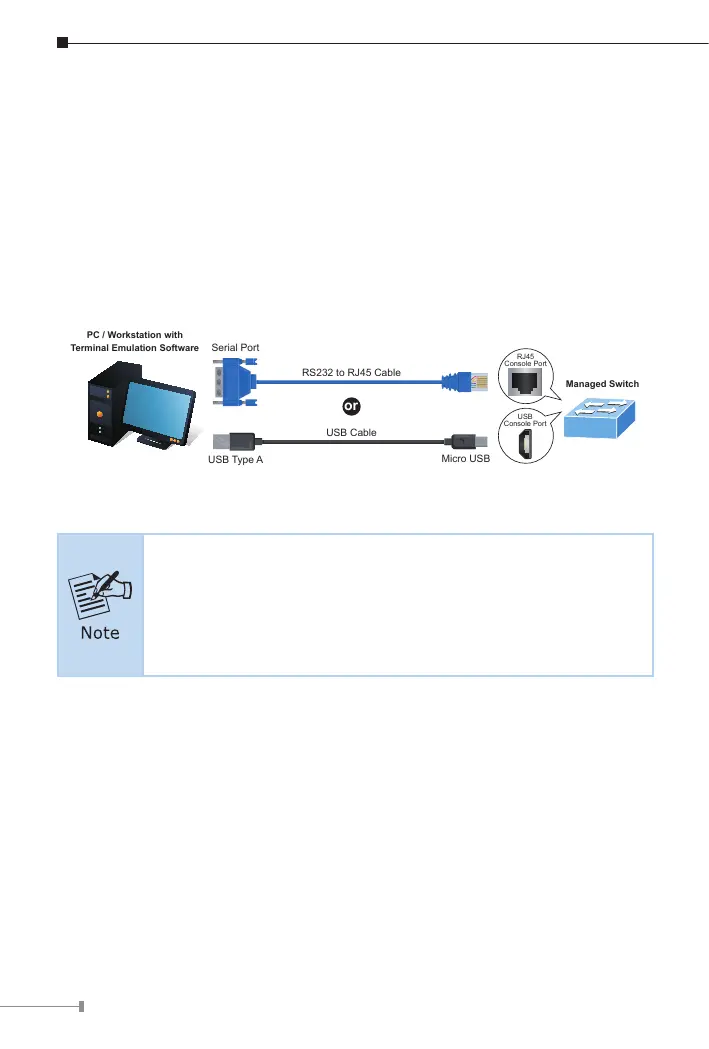
To congure the system in IGS-4215-16T2S, connect a serial cable to a COM
port on a PC or notebook computer and to the RJ45 type serial (console) port
oftheIndustrialManagedSwitch.
To congure the system in the IGS-4215-16T2S-U, connect a USB cable to a
USB port on a PC or notebook computer and to the micro USB connector
(console)oftheIndustrialManagedSwitch.
RS232 to RJ45 Cable
Serial Port
USB Type A
Micro USB
USB Cable
RJ45
Console Port
USB
Console Port
Managed Switch
PC / Workstation with
Terminal Emulation Software
or
Figure 4-1: Industrial Managed Switch Console (RJ45 or USB) Connectivity
1. The box of the IGS-4215-16T2S-U does not contain any USB
cable.
2.The USBcable connecting to device must be aligned with the
interfaceofthedevice.
A terminal program is required to make the software connection to the
Industrial Managed Switch.



 To Next Page
 Loading...









