User Manual of WRE-1200
6.2 Networking Settings
6.2.1 LAN-side IP Address
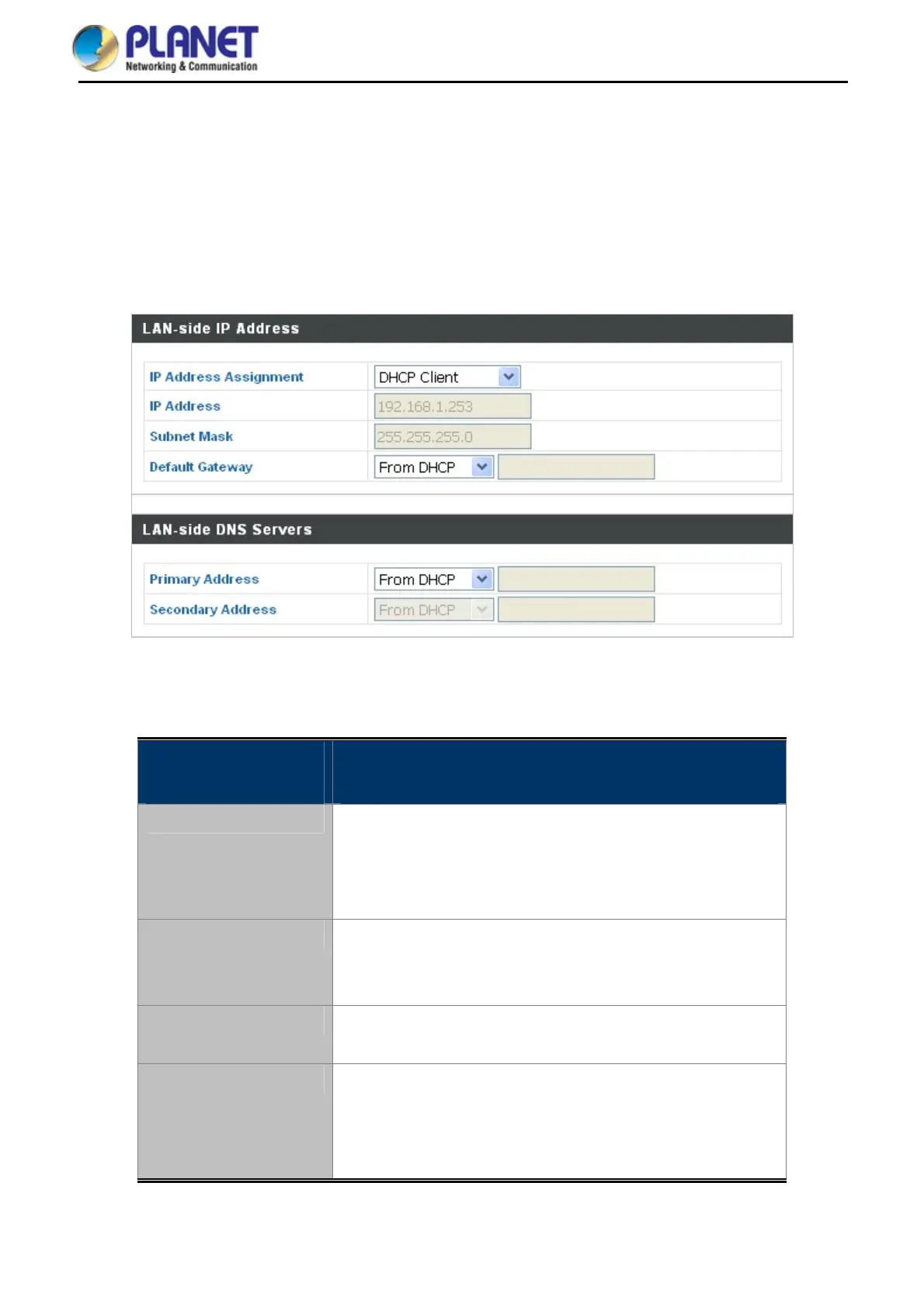
The “LAN-side IP Address” page allows you to configure your range extender on your Local Area Network
(LAN). You can enable the range extender to dynamically receive an IP address from your router’s DHCP server
or you can specify a static IP address for your access point, as well as configure DNS servers.
Figure 6-4 Network Settings -- LAN-side IP Address
The page includes the following fields:
Object Description
IP Address Assignment
Select “DHCP Client” for your access point to be assigned a
dynamic IP address from your router’s DHCP server.
Select “Static IP” to manually specify a static/fixed IP
address for your range extender (below).
IP Address
Specify the IP address here.
This IP address will be assigned to your range extender and will
replace the default IP address.
Subnet Mask
Specify a subnet mask.
The default value is 255.255.255.0
Default Gateway
For DHCP users, select “From DHCP” to get default gateway
from your DHCP server or “User-Defined” to enter a gateway
manually.
For static IP users, the default value is blank.
DHCP users can select to get DNS servers’ IP address from DHCP or manually enter a value. For static IP users,
39


 To Next Page