User Manual of WRE-1200
41
6.3 Wireless Settings .3 Wireless Settings
6.3.1 2.4GHz 11bgn Basic Settings 6.3.1 2.4GHz 11bgn Basic Settings
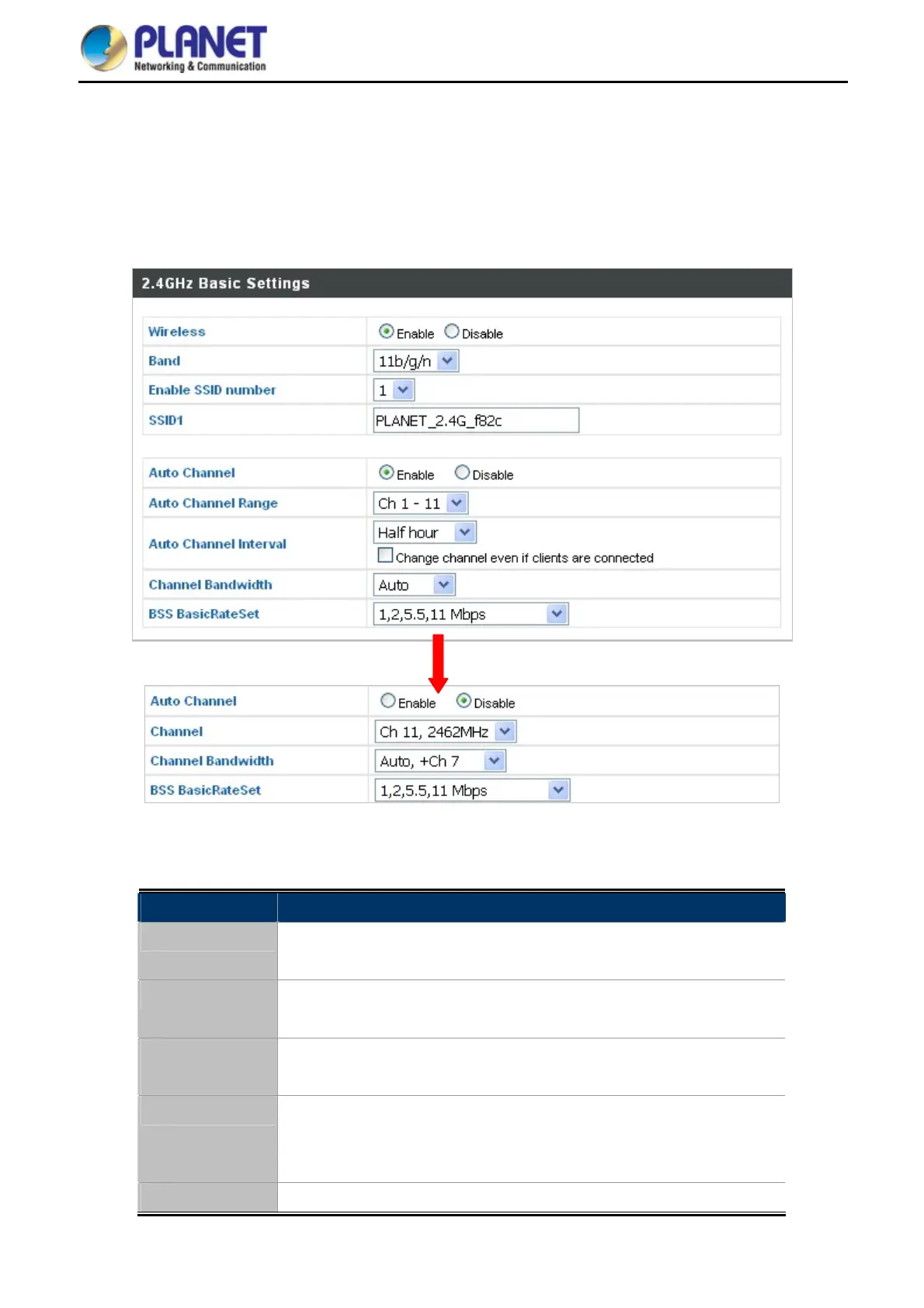
The “2.4GHz 11bgn” menu allows you to view and configure information for your range extender’s 2.4GHz
wireless network across three categories: Basic, Advanced and Security.
The “2.4GHz 11bgn” menu allows you to view and configure information for your range extender’s 2.4GHz
wireless network across three categories: Basic, Advanced and Security.
Figure 6-5 2.4GHz Wi
reless Settings
The page includes the following fields:
Object Description
Wireless
Enable or disable the access point’s 2.4GHz wireless radio.
When disabled, no 2.4GHz SSIDs will be active.
Band
Select the wireless standard used for the range extender. Combinations
of 802.11b, 802.11g and 802.11n can be selected.
Enable SSID
Number
Select the 2.4GHz frequency from the drop-down menu.
SSID1
Enter the SSID name for the specified SSID.
The SSID can consist of any combination of up to 32 alphanumeric
characters.
Auto Channel
Enable/disable auto channel selection.


 To Next Page