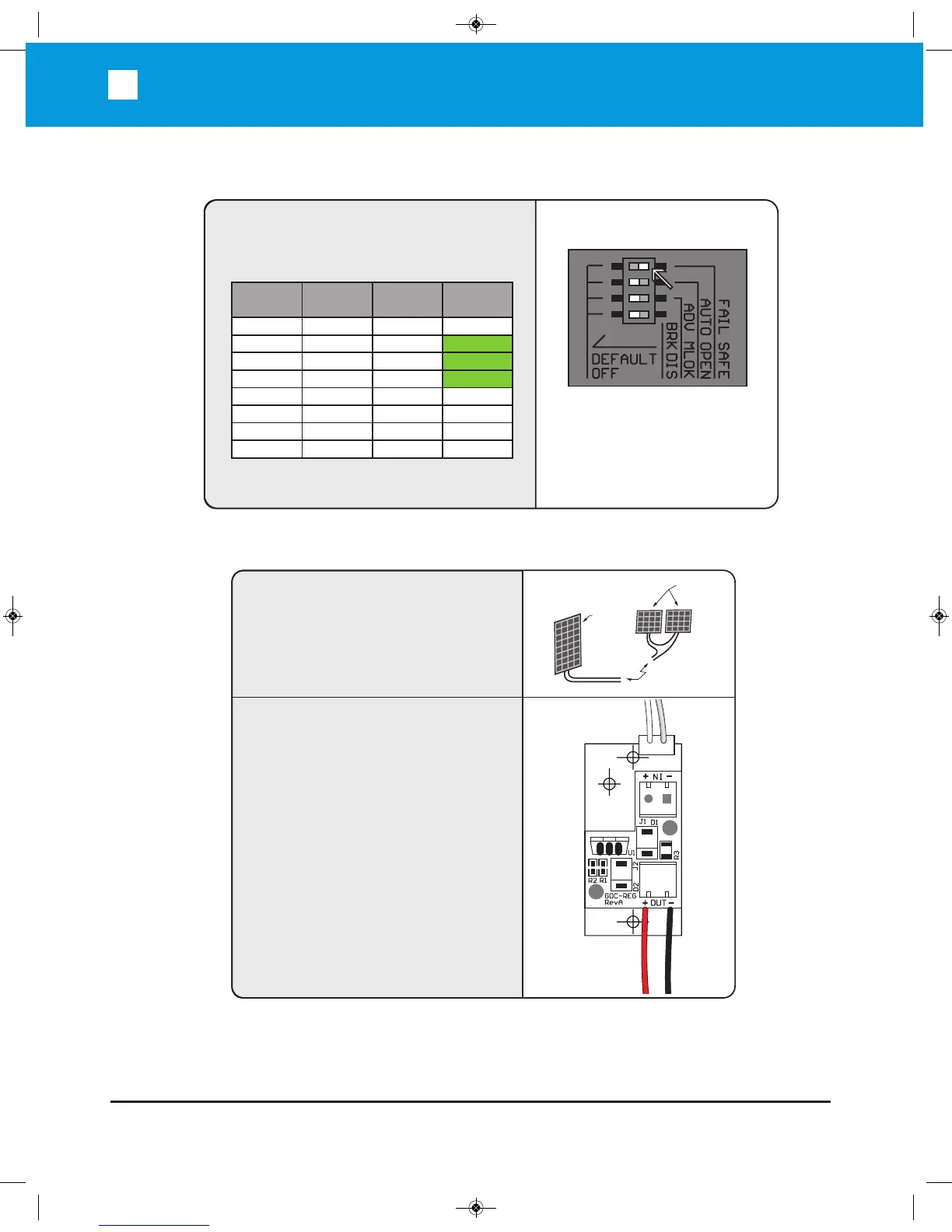
SOLAR INSTALLATION:
From Solar
Panel
GOC-REG24V-A
Step 1
Step 2
Connect the solar panel cables to the Solar
Regulator as shown.
+
–
+
–
Connect To Solar
Regulator Input
24 VDC
Panel
12 VDC
Panels
B
L
A
C
K
R
E
D
To Power Supply
(Pre-wired)
Optional Solar Installation: For Solar Panel controller installation, please call Tech nic al Support.
FAIL SAFE/SECURE:
Fail Safe/Secure
On = Fail Safe
Off = Fail Secure
Fail/Safety
(Input)
ON
ON
ON
ON
OFF
OFF
OFF
OFF
Battery
Detection
Normal
Normal
Low/OFF
Low/OFF
Normal
Normal
Low/OFF
Low/OFF
AC
Detection
Normal
OFF
Normal
OFF
Normal
OFF
Normal
OFF
Output
Secure
Fail Safe
Fail Safe
Fail Safe
Secure
Fail Secure
Fail Secure
Fail Secure
Note: When the output is "Fail Safe", there is
less resistance to push the gate open manually.
A 24V solar panel or two 12V solar panels with
minimum 80 watts capacity, Maximum Power Voltage
(VPM) > 31V and Open Circuit Voltage (VOC) >38V
is required.


 To Next Page