13
It is important that you connect your power amplifier/s (outputs) and source components (inputs) to your
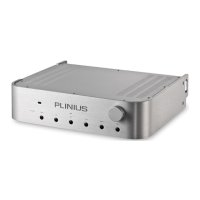
Plinius M16 Preamplifier correctly to ensure the preamplifier is not damaged, and sounds its best within
your system. Now that you have read and familiarised yourself with the various connections on the
preamplifier, as covered in previous sections, we will describe in detail the way in which you can connect
the preamplifier to your system.
Connect your phono turntable, CD player, tuner, tape deck, etc, to the corresponding RCA inputs on the
back of the Plinius M16. Make sure you connect the red coded cable to the red RIGHT RCA input, and the
black (or white) cable to the black LEFT RCA input. Also make sure the RCA connectors are a snug fit and
are inserted all the way in. If you are using balanced XLR cables note that only the CD input caters for this
type of connection. Remember to flick the CD selection switch to the XLR position to activate the XLR
circuitry.
Next, connect your power amplifier/s cables to the output sockets. Ensure that you observe polarity on all
cables (red is right, black is left) to ensure correct channel phasing.
RECORDING MUSIC
In order to record music to tape, or some other line level recording device, these devices will need to be
connected to the tape 1 and tape 2 outputs. Set the record rotary encoder on the front panel to the input
you wish to record from, and the preamplifier will now send signal to both tape 1 and tape 2 outputs.
Note that the volume control does not adjust the recording level: this is done at the recording device itself.
TERMINATION QUALITY
Quality of the connections must be examined to ensure that high-performance, trouble-free operation is
enjoyed. Check that all interconnection cables are snug fitting and inserted all the way in. In the case of
balanced XLR sockets, ensure that they click in positively.
PHASING (OR POLARITY)
It is important to achieve good stereo imaging in your listening room. By observing the wiring
instructions above, each preamplifier/power amplifier/loudspeaker combination should be in phase. If
you experience poor stereo image and/or a lack of bass, check that all interconnection cables and
loudspeaker wires have been connected correctly. We recommend that you use one of the easily
obtainable ‘test discs’ to help you ensure both phasing and channel orientation are correct. If in doubt,
consult your PLINIUS
PLINIUSPLINIUS
PLINIUS dealer for advice.


 To Next Page