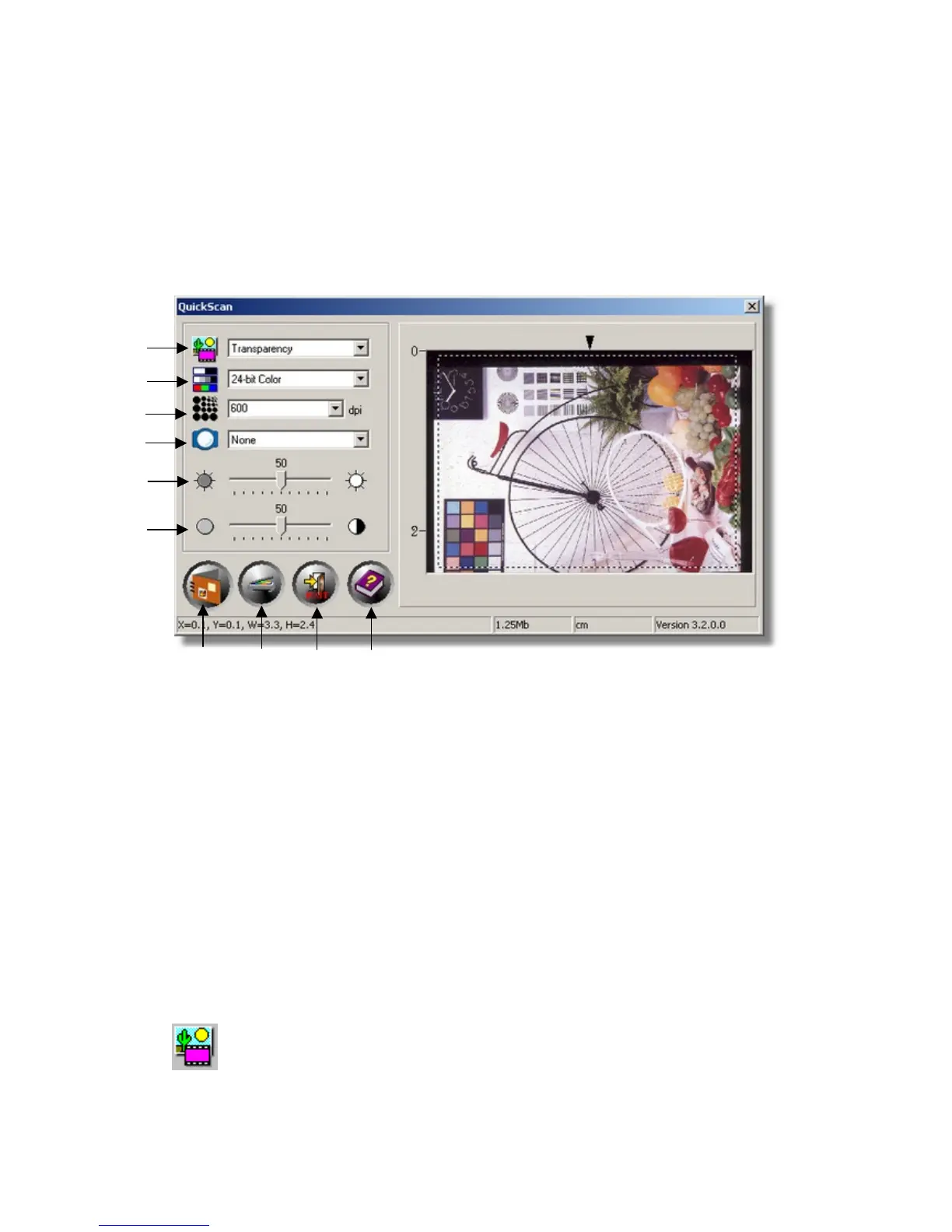
You can alter scanning Mode, Resolution, Filter, Brightness, Contrast and
Gamma settings.
3. Preview window
This window is only operational if ‘Enable’ and ‘Confirm’ are both checked in
Preview section.
1
2
3
4
5
6
7 8 9 10
1. Scanning source
2. Scanning mode
3. Resolution
4. Filter
5. Brightness
6. Contrast
7. Scan and save to album
8. Preview
9. Exit
10. On-line help
Q
Q
u
u
i
i
c
c
k
k
S
S
c
c
a
a
n
n
S
S
e
e
t
t
t
t
i
i
n
n
g
g
s
s
a
a
n
n
d
d
P
P
r
r
e
e
v
v
i
i
e
e
w
w
W
W
i
i
n
n
d
d
o
o
w
w
f
f
e
e
a
a
t
t
u
u
r
r
e
e
s
s
Source - Tells the scanner the method you will use to scan images.
• Transparency - Use this mode for scanning transparency films.
• Negative Film - Use this mode for scanning negative films.
16











 To Next Page