PH/PHX-2 Manual
44
Pressure Balance Control
If the Pressure Balance Control box is not working properly, follow these steps to resolve the
potential issue:
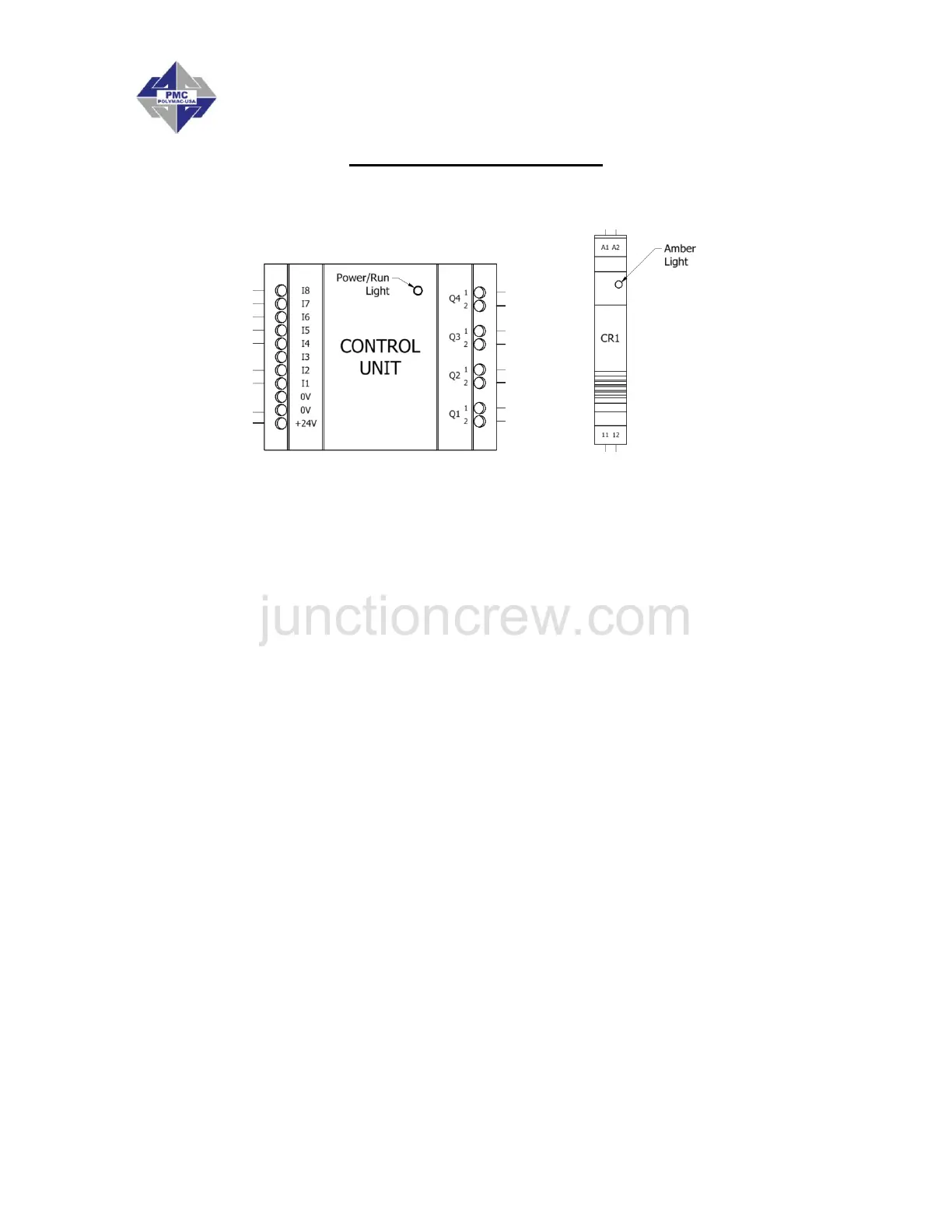
1. With the Main Power ON, check the Power/Run light on the Control Unit:
a. If OFF, the Control Unit is not getting power. Check for loose or poor wire
connections. If the Power/Run light still does not turn on, contact your
authorized PMC distributor.
b. If SOLID, the Control Unit has power but no program. Contact your authorized
PMC distributor.
c. If BLINKING, the Control Unit has power and is programmed properly.
Proceed to the next step.
2. With Main Power ON, turn the Rotary Switch to a Pressure Differential Number and
check the Amber light on CR1:
a. If OFF, CR1 is not activating properly. Check for loose or poor wire
connections between the Control Unit and CR1.
b. If ON, CR1 is activating, but the mechanical switch inside the relay may not be
functioning properly. If the system has faulted (i.e. a pressure imbalance exists,
the ON light turns off, and the FAULT light turns on), but the pumps do not shut
off, check for continuity between contacts 11 and 12 on CR1. If there is
continuity, contact your authorized PMC distributor. If there is discontinuity,
proceed to the next step.
3. With Main Power OFF:
a. Check all remaining wires to ensure secure and proper connections.
b. Check for continuity across the ON light terminals and the FAULT light
terminals. These light units are LEDs (light emitting diodes) which means that
only one direction has continuity (similar to a check valve). When checking for
continuity, make sure to use the correct terminals on the multimeter.
4. Contact your authorized PMC distributor for further assistance.


 To Next Page