-9-
REturn button
Return activated
Return button
(joystick pressure)
(3)
(1)
Initialization of the drone
(2)
Activation of the Return
(long press)
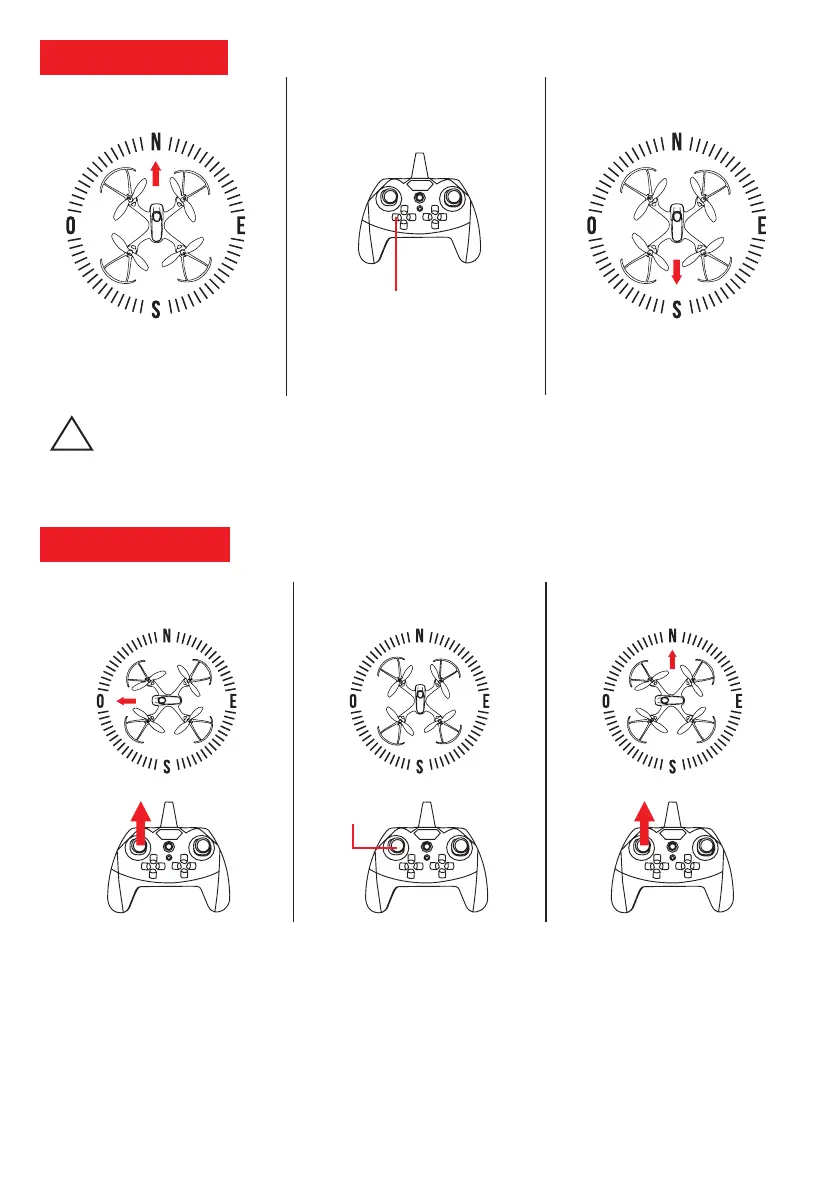
How the Return Button Works:
During its initialization, the drone detects its orientation and memorizes it (North for example). By pressing
the return button the drone will automatically move in the opposite direction to the one memorized (so South).
The DR-Eagle Wifi is not equipped with a GPS function, so it is necessary to regain control in order to land it at
the desired location. The drone is always controllable during the return phase.
The drone detects its starting
orientation and memorizes it
(North).
Long press the Return button
to activate the function.
The drone automatically returns
in the opposite direction (South).
!
HEADLESS MODE
Activation: At the time of the command the drone saves its orientation and memorizes it (Figure 2: North).Long press
the "CF Mode" button (Figure 2) to activate the direction / orientation lock (Figure 2: North). The radio control will beep
(beep) and the 4 LEDs of the drone flash simultaneously when you activate the CF Mode function.
Explanation: This mode allows you to control the drone without worrying about its direction of flight. If you point the
right joystick forward the drone will go north regardless of its orientation (North / South / East / West) flying at the time
of command (Figure 3). When the CF mode is off, you must always worry about the flight direction / orientation of the
drone (Figure 1). CF mode is ideal for learning to fly.
Warning : If a collision occurs it is possible that the CF mode is no longer functioning properly. In this case, set the
drone immediately and reset the gyroscope and the trimmers (see page 10).
CF mode on(1) CF mode off CF mode activation
(long pressure)
(2) (3)
Mode CF
(pression du joystick)



 To Next Page