-17-
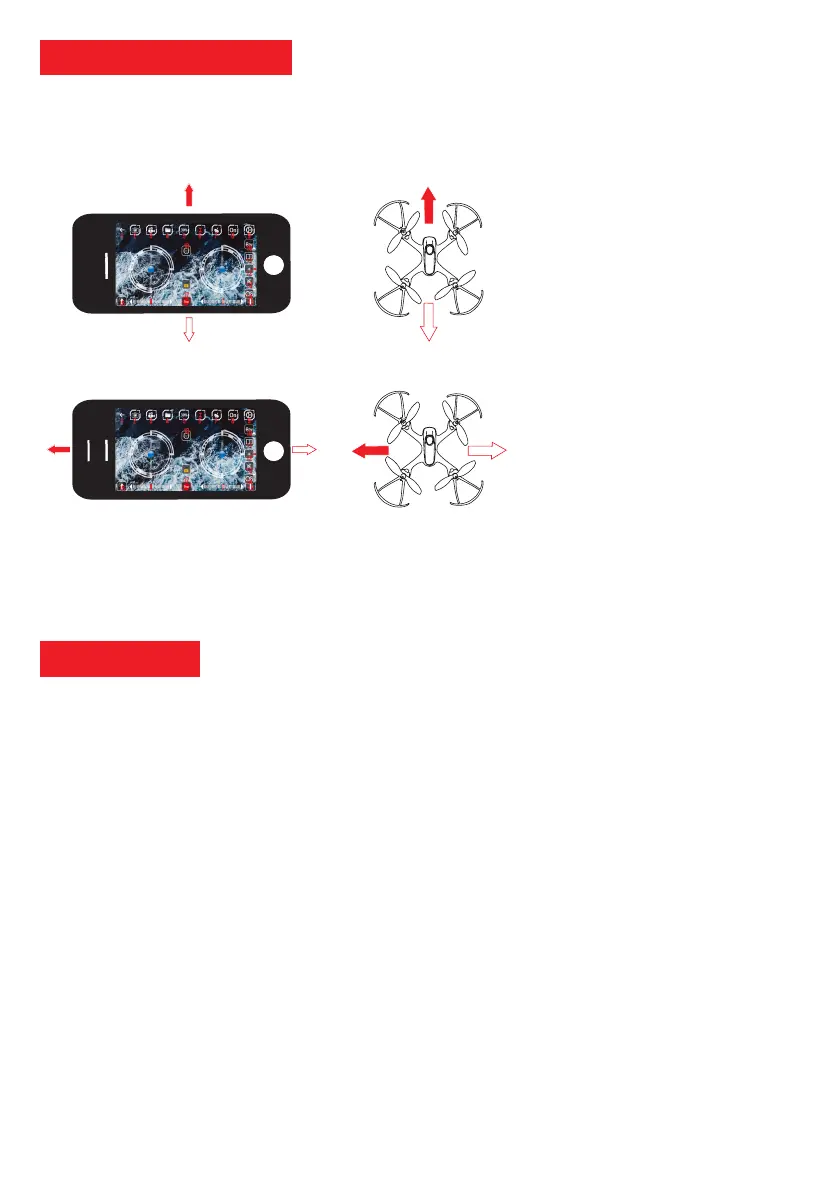
To activate the tilting of the smartphone please touch the icon 7. The right joystick will then follow the tilt of your
smartphone. You must control the left joystick with one hand and tilt your smartphone according to the direction you
want to follow.
Gyroscopic Control
Flight backward
Flight forward
LONGITUDINAL INCLINATION
• Tilt of the smartphone:
- tilt forward to advance
- tilt backward to back up
LATERAL INCLINATION
• Tilt of the smartphone:
- tilt left to fly left
- tilt to the right to fly right
- The battery should be kept in a dry, ventilated place. The storage temperature is between 18 ° C and 25 ° C. Avoid
ex
cessive charging and discharging to prolong battery life. Be sure to charge the battery before storing it, if it is left
unused for a long time.
- To avoid any problems, we strongly advise you to take the habit of also removing the battery of the drone when not in
use.
- Keep your equipment in a dry place, away from water and heat. Do not place the drone on a wet surface or in the vicinity
of liquid substances. This could cause irreversible damage.
- Maintenance can only be carried out by the After Sales Service of the warehouse or distributor. If you have a problem
with your drone, please contact us directly. It is not recommended to change the engine or the motherboard on your
own.
- Use only accessories specied by the manufacturer.
- Find all our products and accessories on our website www.pnj.fr
Maintenance



 To Next Page