-8-
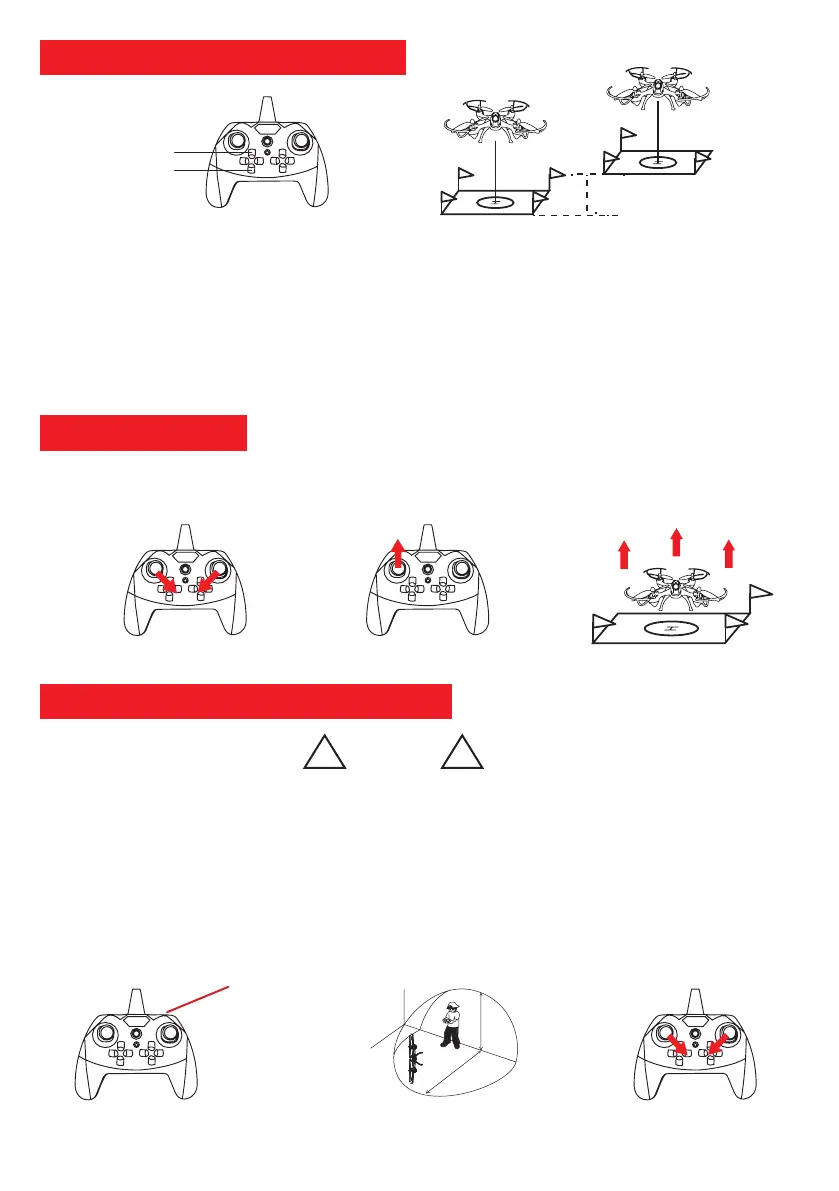
Figure 1: Engine ignition
2m
2m
The drone rises 2m regardless
of its starting altitude.
Take off
Landing
Automatic take off and landing
1. Take-off: After the automatic take-off / landing button has been pressed for a long time, the drone rises and
stabilizes at an altitude of 2m above its starting position.
2. Landing: After the automatic take-off / landing button has been pressed for a long time, the drone will automatically
descend to the vertical position until it lands on the ground.
After turning on the engines (Figure 1) you can manually lift the drone by holding the left joystick up (Figure 2).
Warning:
1. Always place the drone on a flat surface before pressing the autostart button.
2. You can still maneuver the drone during the take-off and auto landing phases.
3. Too fast acceleration can cause air depression around the sensor and cause altitude losses.
Figure 2: Manual take off
Emergency stop
button (long press)
Bouton Arrêt d’urgence
(longue pression)
Figure 1: Emergency stop Figure 3: Resume flightFigure 2: Vertical crash
!
Warning
!
Emergency stop and vertical crash
1. Emergency stop: In case of crash, collision or loss of control of the drone please use the emergency stop function.
Hold the button on the upper right of the remote control to stop the motors immediately.
2. Vertical Crash: If the drone crashes to the upright position and turns around, it will automatically shut down its
engines for safety to protect the rotors and your environment from damage (Figure 2).
3. Resume flight: After using the emergency stop function or having crashed into a vertical position, please check the
condition of the drone and then place it on a flat surface. To take off again, simply press the automatic take-off / landing
button or simultaneously hold the two joysticks down and inside to unlock the engines. (Figure 3).
Manual Take off



 To Next Page