-7-
Start To Fly
1. Initialization (radio control off): Place the drone on a flat surface and pull the On / Off button, the light indicators of the
drone will flash indicating search pairing.
2. Pairing: Press the ON / OFF button to turn on the remote control. It will beep (beep beep) indicating the frequency
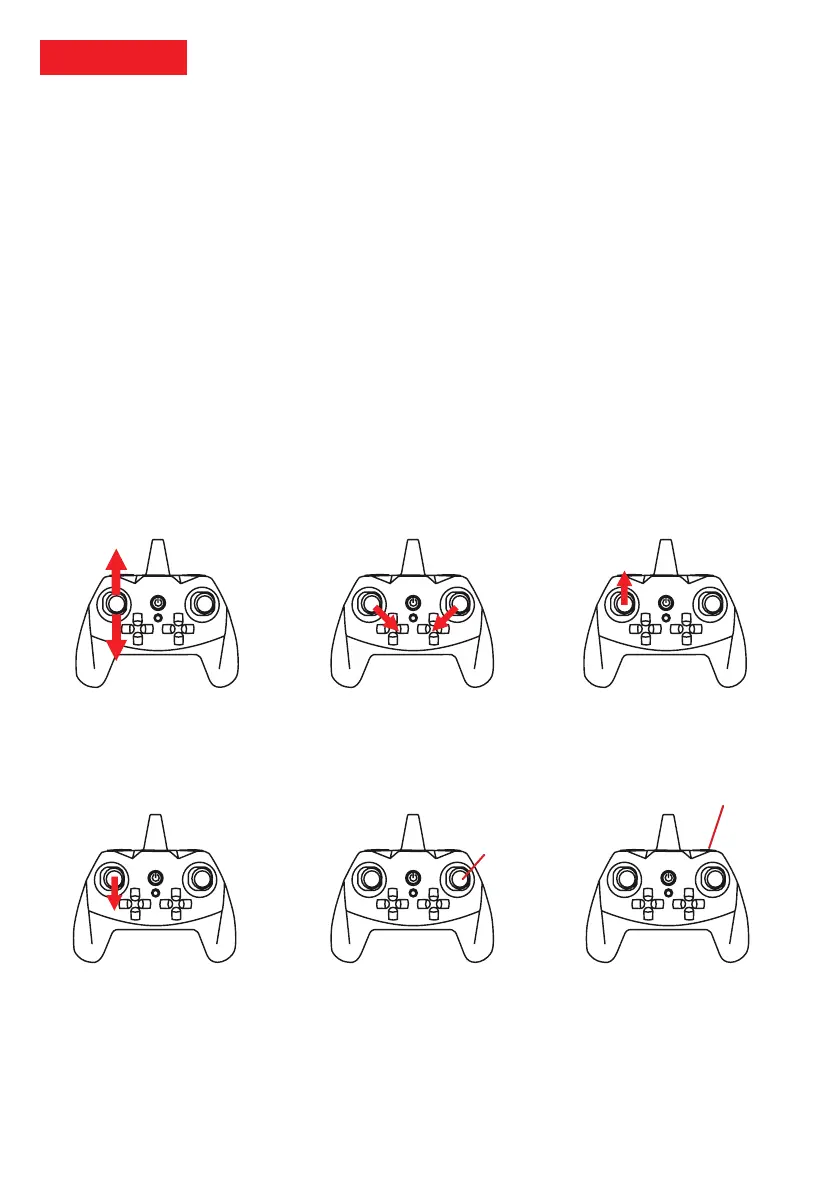
search, the radio control indicator light will begin to flash. Aim the joystick left down (beep) and then up (beep) to connect
the drone to the remote control (Figure 1).
3. Indicator: Once the connection is established the lights of the drone and the remote control will stop flashing.
4. Ignition: To start the engines of the drone, please simultaneously orient the two joysticks diagonally inwards (Figure 2).
The engines come on and the propellers start to turn slowly, the drone is ready to take off.
5. Takeoff: To take off the drone manually, gently move the joystick left up (Figure 3). You can also use the autostart /
landing button, the drone will rise to an altitude of 2m.
6. Landing: To land hold the left joystick down until the drone lands on the ground (Figure 4). You can also use the
autostart / landing button, the drone will land regardless of its altitude.
7. Photo / Video: To take a photo press the right joystick (short press). To start / stop a video recording, press and hold the
right joystick (Figure 5).
8. Emergency stop: In case of crash, collision or loss of control of the drone please use the emergency function.
9. Manual Engine Shutdown: When the drone is on a level surface and the engines are unlocked (started), you can stop the
engines by simultaneously pointing the left joystick on the lower right and the right joystick on the lower left.
10. Battery: When the lights on the drone start flashing quickly: land and charge the battery.
Note: Please always keep your drone on view. In case of low battery level or loss of signals with the radio control, the
drone will land automatically. PNJ does not guarantee the loss of your drone.
Emergency stop
button (long press)
Photo (short press)
Video (long press)
Figure 2: Ignition
Figure 5: Ignition
Figure 3: Take off
Figure 4: Landing Figure 6: Emergency stop
Figure 1: Pairing



 To Next Page