-6-
1. Make sure that the voltage of the USB charger ts the local electricity supply.
2. The charging plug will overheat if overcharged. In this case unplug the battery immediatly to avoid accident.
3. Do not charge the battery unattended.
4. Do not use others charger other than the one supplied with the drone.
5. Wait 30 minutes after the y in other to let the battery cool down before recharging it.
6. Do not leave the battery in the re, sunlight or in environment too hot.
7. Do not short circuit the battery.
8. Keep the battery away from metal parts or magnets.
Warning
Propellers and propellers guardes
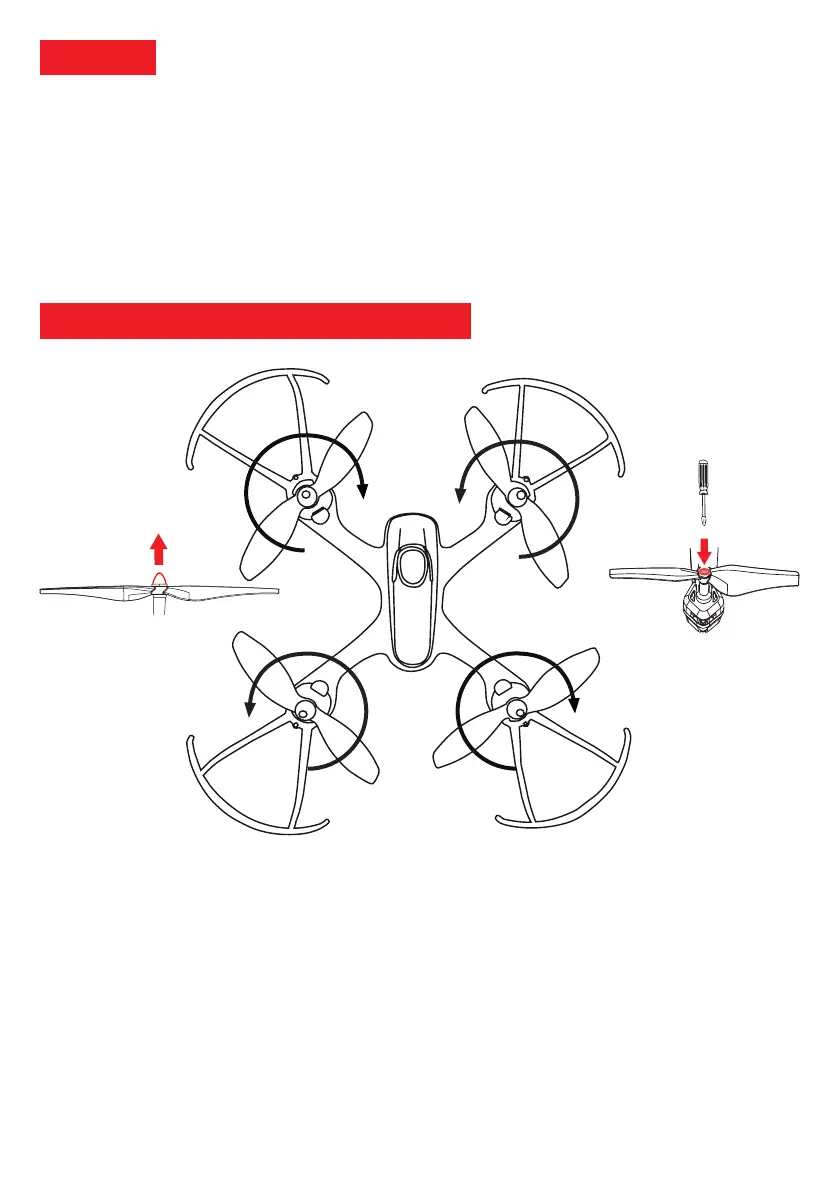
The propellers of the drone are provided with marks A and B and are diagonally
opposite. Each propeller fits on the rotor in one direction.
1. Clockwise rotating propeller (A on the diagram) on the left front engine and the right rear engine.
2. Anti-clockwise rotation propeller (B in the diagram) on the right front engine and the left rear engine.
3. To replace a propeller first remove the protective cover and unscrew the screw on the top of the rotor.
4. Pull the damaged propeller up to remove it from the rotor
5. Replace the damaged propeller with a new propeller of the same type (A or B).
6. New propellers must be fully depressed. Then replace the protective cover and tighten again.
Note:
Any maintenance or repair work on the drone must be done with the battery disconnected. Broken or damaged
propellers must be replaced by new propellers, to ensure optimal operation, always use original propellers. To ensure
your safety and that of those around you, always drive with the propeller protections.
Figure 1: Protective cover
Figure 2: Protective screws
BA
B A



 To Next Page