-13-
Import photos & Videos
(1) (2)
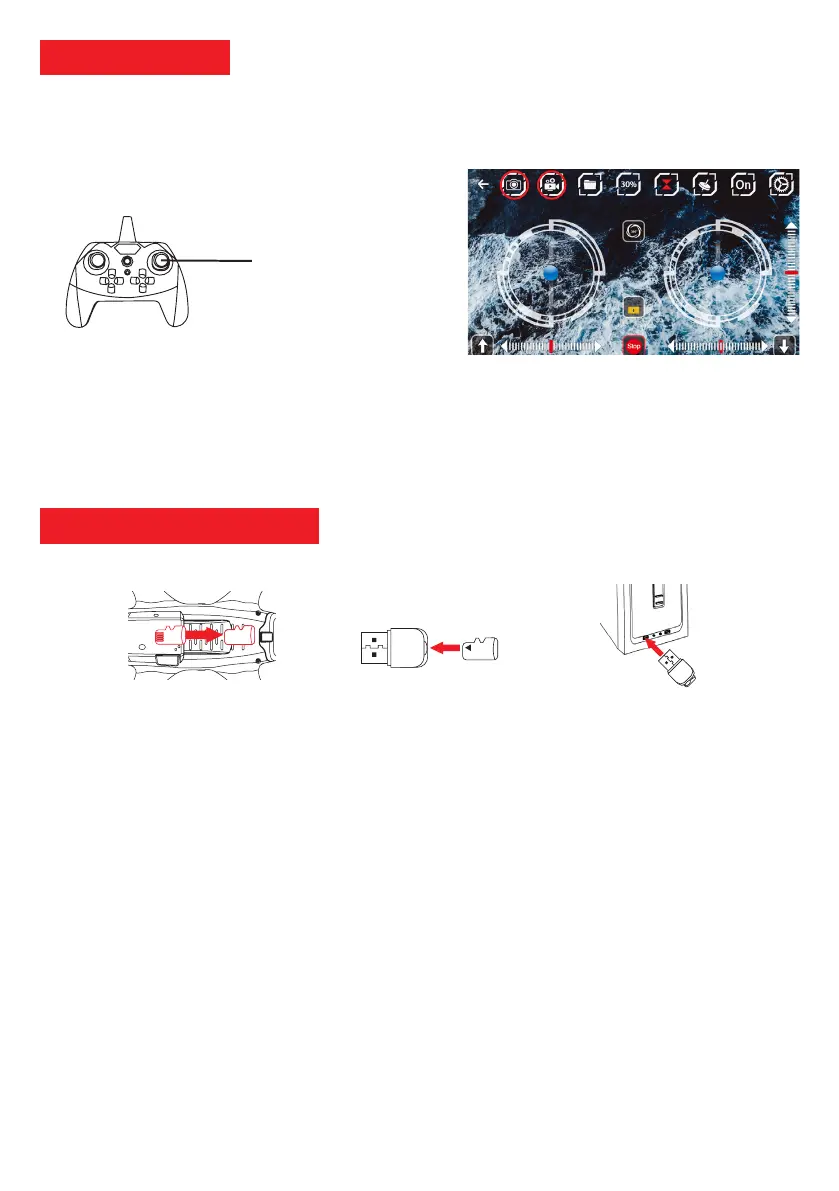
Photo (short press)
Video (long press)
Radio control: Photos and videos are recorded on the SD card. To import them, you must extract the SD card (not
included) from the drone, by pressing it and then insert it into a card reader (not included). You can then insert this Micro
SD card reader to a computer to import your files.
Mobile Application (PNJ VISION): Photos taken from the mobile application are automatically saved in the photo gallery
of your smartphone or tablet.
Photo & Video
Make sure you have correctly installed the Micro SD card at the bottom of the drone then:
1. Radio control: Press the photo / video button on the remote control to take a photo or video.
2. Mobile App (PNJ VISION ): Touch the 2 or 3 icons to take a photo or video (circled in red).
1. Remove the SD card located under the drone (Figure 1).
2. Insert the SD card into the card reader (Figure 2).
3. To import your files from the SD card to your computer please follow these steps:
Windows: My Computer → Removable Disk (SD Card) → Video or Photo Files → Copy / Paste
Mac: Finder → Removable Disk (SD Card) → Video files or photos →
Copy / Paste
Figure 1: Remove the SD card Figure 2: Card Reader Figure 3: Importation
SD
SD
SD card
(Non included)
SD
4G
B



 To Next Page