-10-
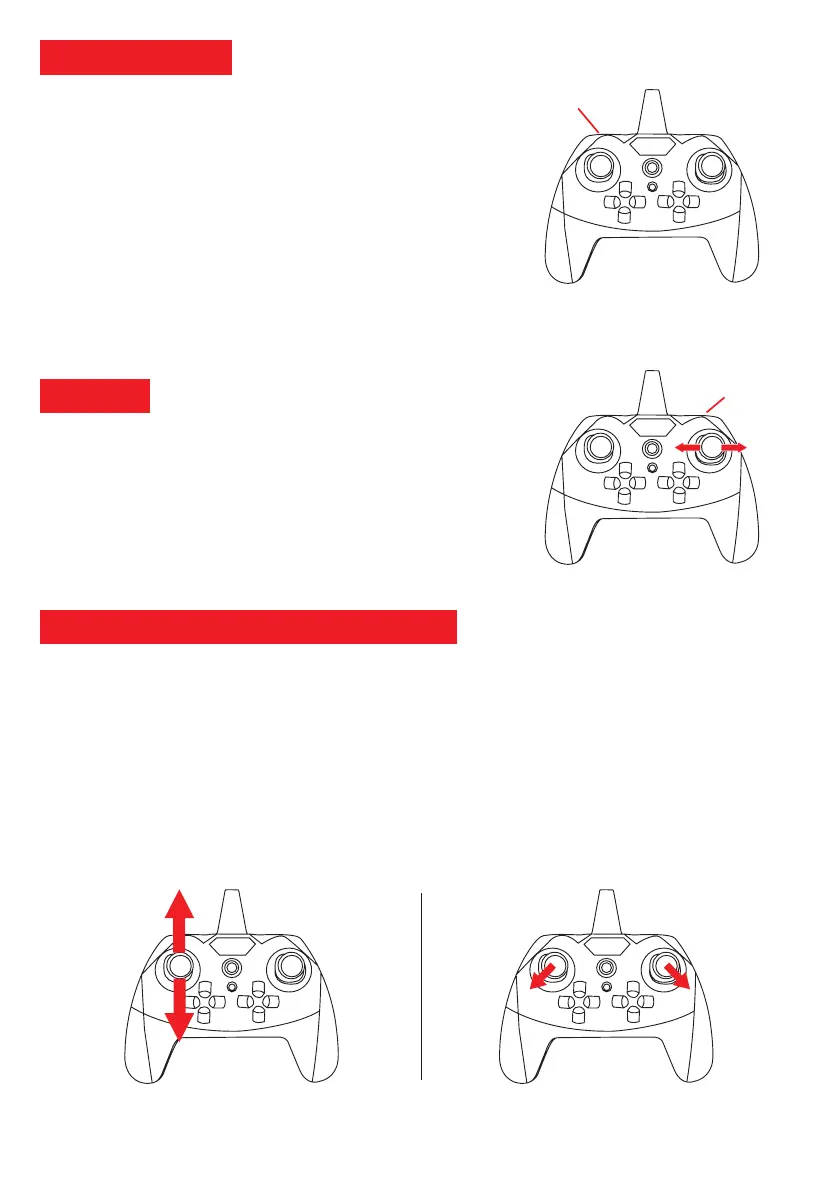
Speed selection
button
The drone has three movement speeds:
When you turn on the drone the first time, it is set by default in
slow speed (30%).
1. Press the speed button once to switch to Medium Speed
(70%). You will then hear: "beep beep".
2. Press the speed button again to change to Fast Speed
(100%). You will hear: "beep beep beep".
3. Press the speed button again to return to Slow Speed
(30%). You will hear a single "beep
Speed selector
Tip: To learn to drive, we advise you to stay slow and increase speed as you train. You can change gears on the ground
as well as in full flight. We recommend driving at 3 speed (100%) in windy weather.
360˚ flip
(short press)
Your DR-Eagle Wifi is able to perform acrobatics like Flip 360˚. To make
a Flip 360˚ please:
1. Check the surroundings (large spaces required) then take off.
2. Press the "Flip 360˚" button on the remote control (short press).
3. Move the joystick to the left or right to perform a 360˚ Flip in the chosen
direction.
Gyroscope and joystick calibration
We recommend to regularly recalibrate the joysticks of the radio control and the gyroscope of the drone. After modifying
the flight adjustments via the trim / correction or if you notice a lack of precision during the piloting please follow the
following steps to recalibrate the radio control:
1. Position the drone on a flat surface and turn it on. Turn on the radio control.
2. Connect the radio control to the drone by pushing the left joystick up and down (Figure 1).
3. Then simultaneously hold the two joysticks for 3 seconds diagonally outward (Figure 2).
4. The indicator lights on the top of the drone flash during calibration.
5. Once the calibration is complete, the light indicators of the drone will stop flashing.
You are ready to take off!
Figure 1: Pairing
Figure 2: Calibration
360˚ Flip



 To Next Page