-15-
Tip: The instructions for using the "PNJ VISION" application are also available in the help menu of the application. To
access the help menu, go to the main menu and then touch the question mark: "?".
Right
rotation
Left
rotation
PNJ VISION
Figure 1: Icon of the App Figure 2: Main Menu
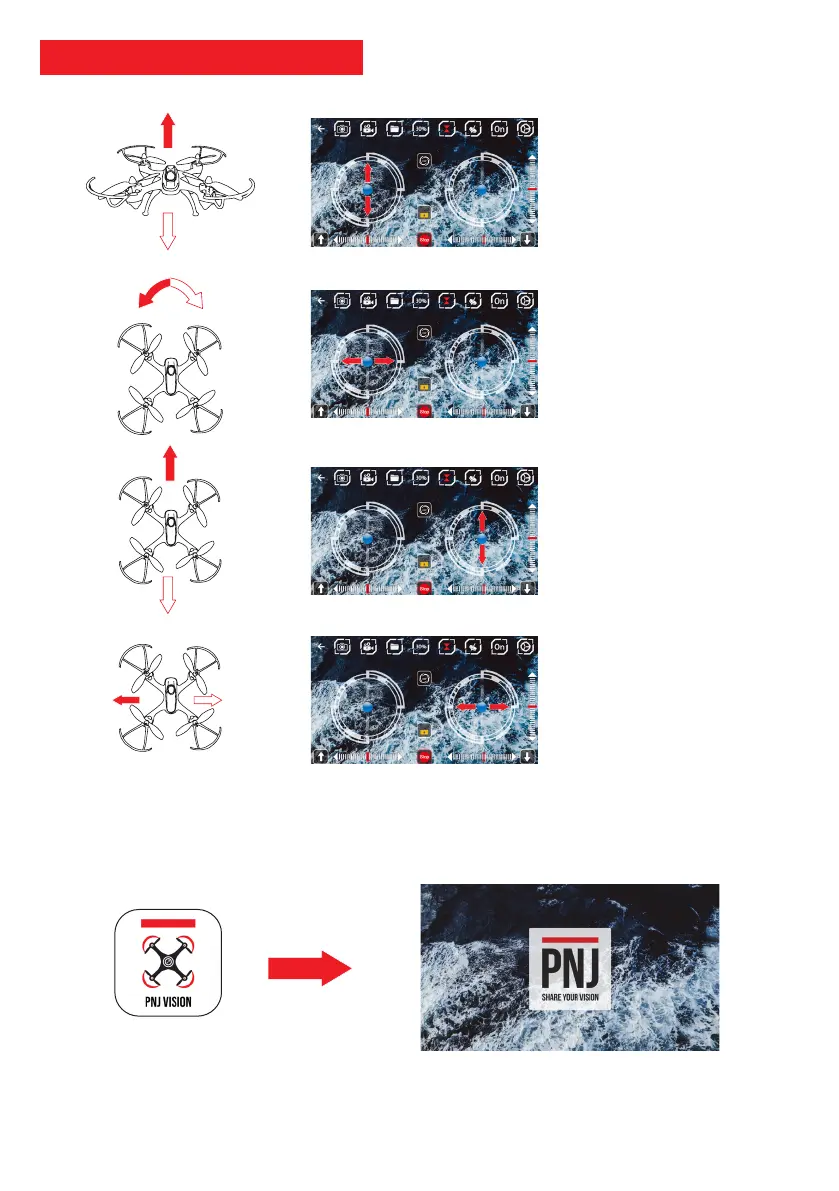
App - How to use joysticks
Elevation
• LEFT JOYSTICK
- Touch up to go up
- Touch down to go down
Note: Always gently manipulate
the elevation joystick
Descent
Elevation
ROTATION
• LEFT JOYSTICK
- Touch to the left to turn left
- Touch to the right to turn right
LONGITUDINAL MOVEMENTS
• RIGHT JOYSTICK
- Touch up to move forward
- Touch down to go backward
Note: Always gently manipulate
the motion joystick
Backward
Forward
LATERAL MOVEMENTS
• RIGHT JOYSTICK
- Touch to the left to fly to the left
- Touch to the right to fly to the
right
Fly to the
left
Fly to the
right



 To Next Page