-5-
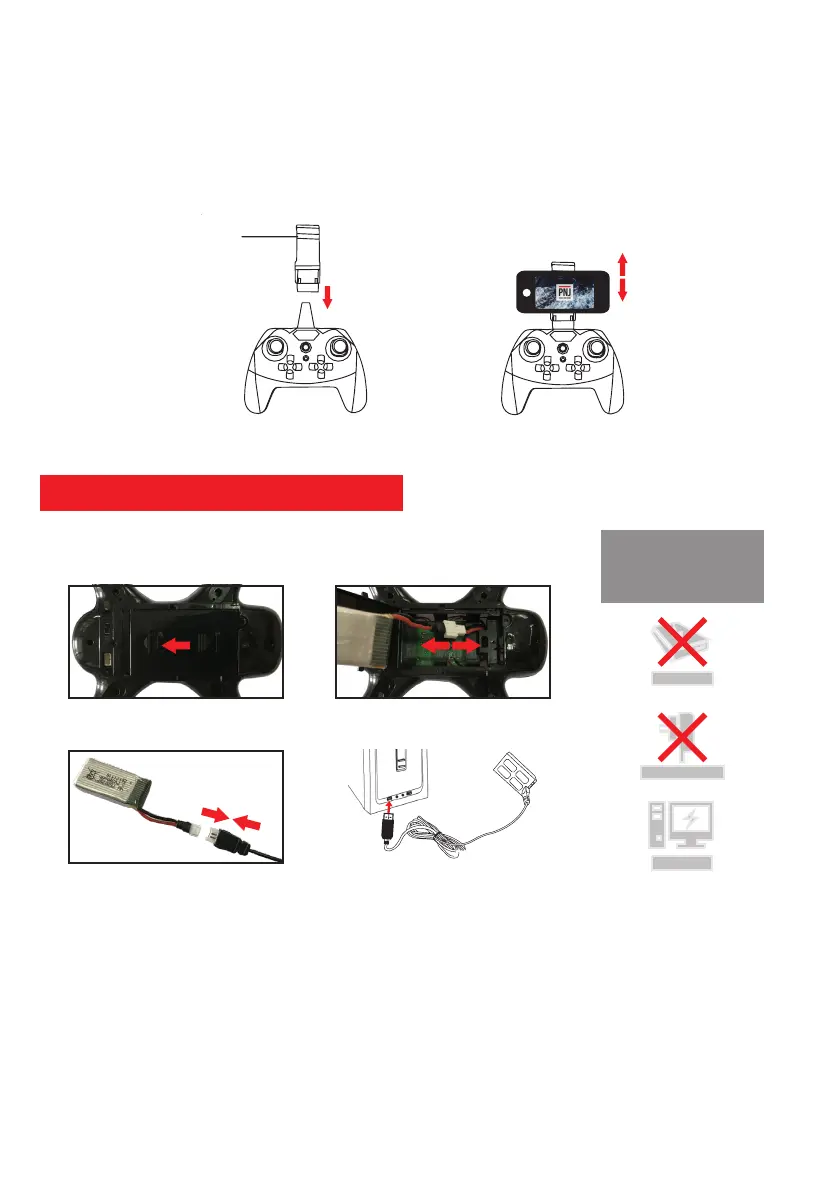
How to remove or install the battery:
1. Remove: To remove the battery from the drone, first unscrew the screw on the battery compartment. Then unlock the
compartment by sliding it towards the rear of the drone then carefully unplug the battery connector (Figure 2).
2. Install: The battery installs in one direction only. Please replace the battery in its compartment without bending or
crushing the cables and then connect the battery connector (female) to the connector of the drone (male). To securely
close the battery compartment, please first slide it and then replace the security screw with the screwdriver included in
the pack.
How to charge the battery:
1. Connect the charging cable to the battery connector (Figure 2).
2. Insert the USB cable into your computer (Figure 4). The indicator light (red LED) will light until the battery is fully
charged
install and charge the battery
Figure 1: Installing the support Figure 2: Installing the smartphone
How to install / remove smartphone support:
The expandable radio remote control bracket adjusts to different smartphone sizes (Figure 2). To safely install or
remove the radio control holder, please refer to the diagrams below.
1. Install the stand: Insert the stand on the top of the remote control (in stop).
2. Install the smartphone: Gently pull on the extensible bracket mount and insert your smartphone (Figure 2).
3. Remove the stand: After removing your smartphone from the stand, firmly hold the stand of the smartphone, and then
remove it.
Note: Check that your smartphone is correctly installed and that it does not move to avoid any risk of breakage.
Extensible attachment
WARNING !
Do not leave batteries
charged unattended.
(2)
(4)
(1)
(3)
Computer
Powerbank
Wall charger



 To Next Page