23
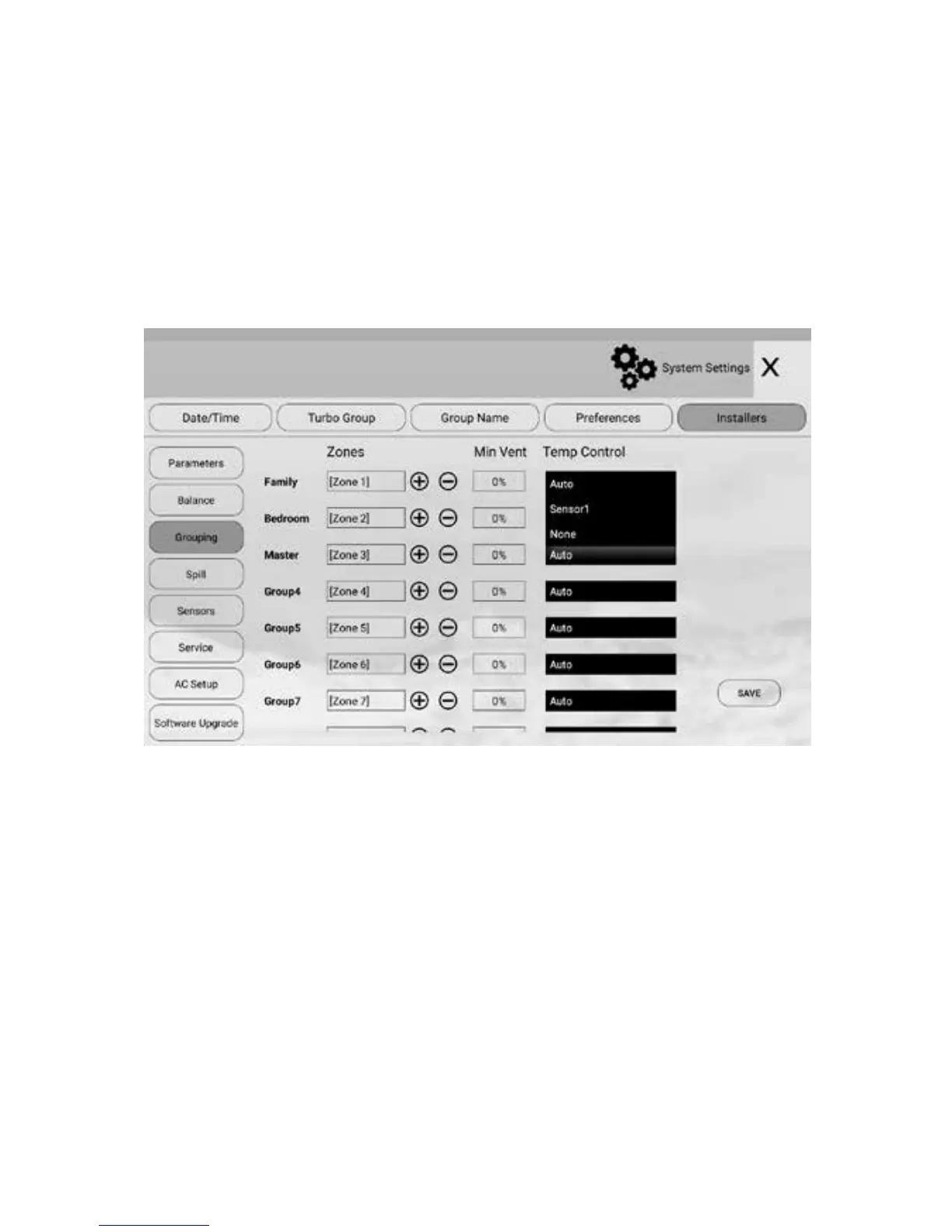
5.5 Choosing Group Temperature Control
If more than one sensor is assigned to the same group, options of using dierent
sensor combinations are available in Grouping section. Touch the eld after TC to
choose a wireless or console sensors as control temperature for the group. If there
is no sensor in the group, there will be no list for the group. If there is more than
one sensor, there will be a list for selection. The chosen sensor or average of all
sensors in the group will be used for controlling the temperature in the group.
Press Save button to save the setting.
If the group has only one temperature sensor, its temperature will be the control
temperature for the group. In default, the Auto is selected. The system will
automatically choose none, one sensor or average of two sensors when there is
no sensor, one sensor or two sensors,
When the group control temperature is activated, all zone dampers in the same
group will act against this temperature.
NOTE: The maximum number of zones in a group is four. The zones to be
grouped will be consecutive zones. The factory default for grouping is that
each group has one zone.
Choosing Group Temperature


 To Next Page