27
5.9 Setting up AC Control
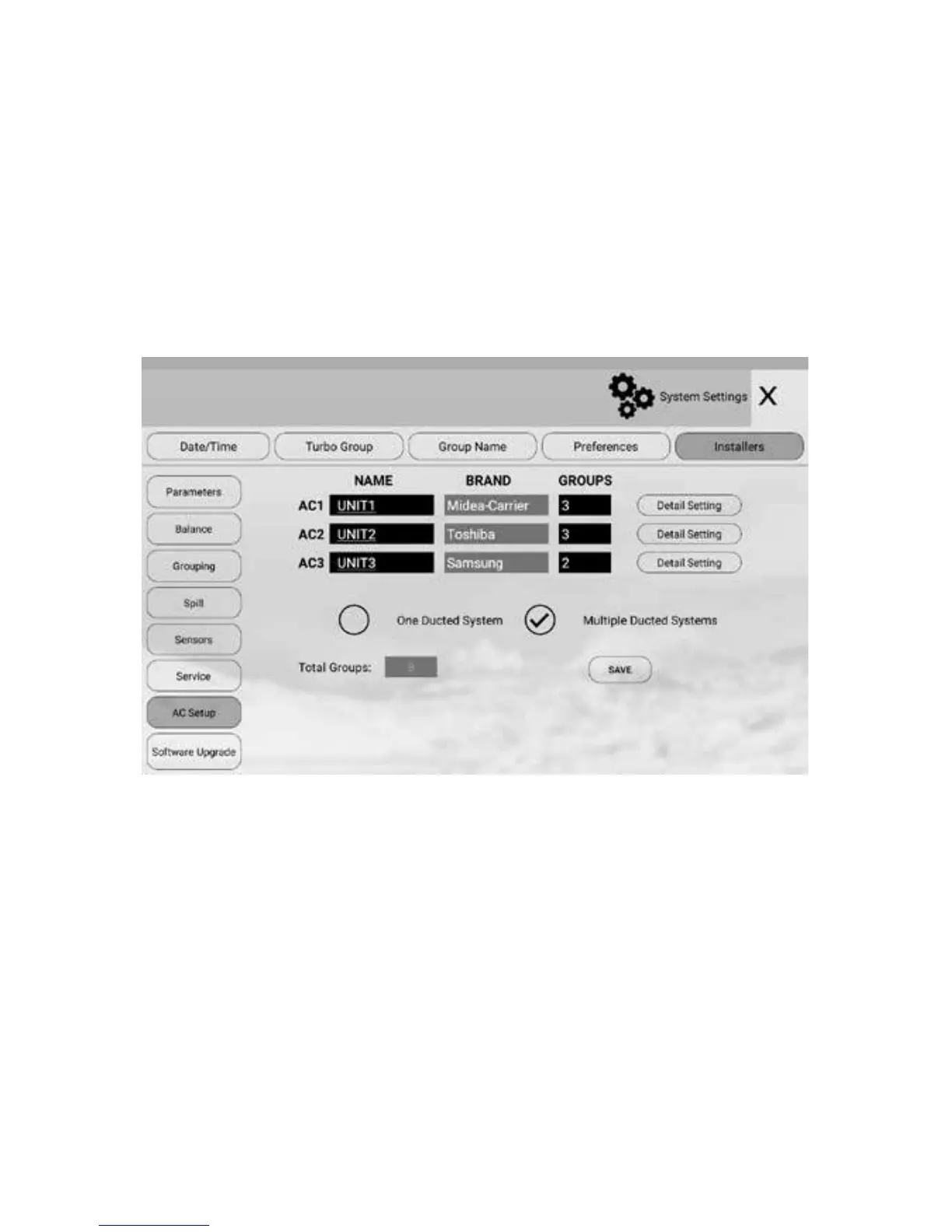
If relevant gateways are connected to the AirTouch 4 main module, AirTouch 4
will automatically recognize the connected AC brands. The brands will be listed in
inactive color and cannot be changed. But the AC names are still editable.
In this case, AirTouch 4 will have full control of the ACs such as operation modes,
fan speeds and set point. The available gateways for the relevant ACs are Daikin,
Panasonic, Fujitsu, Mitsubishi Electric, Mitsubishi Heavy Industries, Toshiba, LG,
Hitachi, Samsung, Carrier, Rinnai, Actron (Slim), Midea, Braemar and Gree.
The wiring diagrams for full AC control are on section 6.
5.9.1 Name AC Units
The names of the AC can be edited as required. The default names are Unit and
Unit 2 for AC1 and AC2 respectively. Touch the name box will bring up keyboard
for editing. Touch Enter to conrm the new name. The maximum length of the AC
names is 8 characters. Touch Save button to save.
5.9.2 AC Detail Settings
The detail settings will have the exibility to use dierent sensors for AC control
and to congure fan speed options for various AC models and brands.
Setting up AC control


 To Next Page