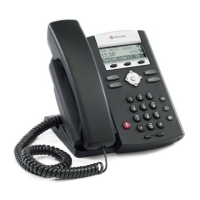
Polycom VVX600 Series Phone Polycom 670 Series Phone
Home Button
Dialpad
Headset
Speaker Phone
Volume Keys
Handset
Mute
Display
Message Waiting
Indicator
Softkeys
Line Keys
Hold
Headset
Speaker Phone
Volume Keys
Handset
Feature Buttons
Navigation Arrows
Mute
Display
Message Waiting
Indicator
Polycom VVX1500 Series Phone
Dialpad
Headset
Speaker Phone
Volume Keys
Handset
Mute
Display
Message Waiting
Indicator
CUSTOMER TRAINING
Customer training is provided via online, interactive sessions, and ensures your end
users have what they need. Below please find a schedule of regular sessions that
you and your users can join at any time. To register, visit business.comcast.com/
getstarted.
Overview & Feature
Demo
High level basics of VoiceEdge Monday, Tuesday
Basic Phone Training How to use your VoiceEdge phone Wednesday,
Thursday
Unified Communications Advanced features for desktop and
mobility integration
Thursday
Tech Admin Training Manage users and group features
via Business VoiceEdge portal
Friday
Trainer On The Phone Ask a trainer any questions you
have about VoiceEdge
Friday
Reception Console Learn the software based
Reception Console software
Custom session
Typically, individual users attend Basic Training. Power-users who want to integrate with
mobility features, attend the Unified Communications Training. Technical administrators
attend Tech Admin Training to learn how to manage individual users as well as group
features such as auto attendants and hunt groups. If you ordered Reception Console,
CB_BVE_BRO_Rev_0715.indd 2 5/7/15 12:35 PM



 To Next Page
 Loading...