Remote Menu
Page 2/3
Page 3/3
OBM-U/X Series
4K LCD Professional Monitor
with 12G-SDI, Quad Link 4K
28
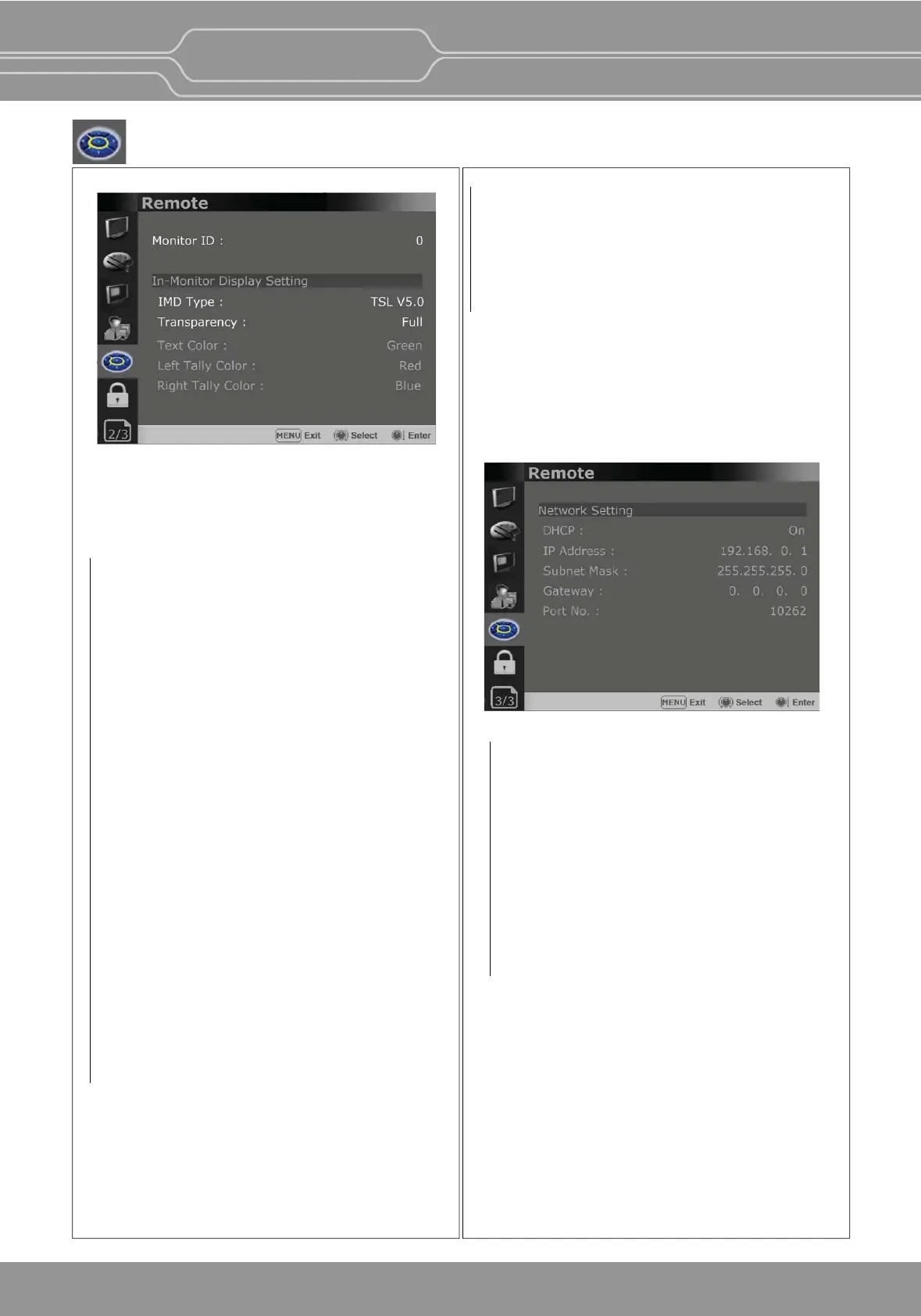
Monitor ID
Sets the ID of the monitor to control the monitor
through Serial Remote or Network.
In-Monitor Display Seng
The monitor supports “TSL UMD Protocol – V3.1
& V5.0” provided by Television System Ltd.
[Transparency], [Text Color], [Le Tally Color],
[Right Tally Color] can be set in the seng menu.
** The monitor displays English alphabet,
numbers, Symbolic codes.
** Up to 16 characters can be displayed in English.
IMD Type
- Selects the In-Monitor Display type.
Available modes are [Off],[TSL V3.1],[TSL V5.0].
Transparency
- Selects [Full] or [Half] for the background of IMD.
-[Full]: The background is black. Displayed image
is hidden behind the background.
-[Half]: The background is transparent. Displayed
image can be seen indisnctly behind the
IMD display.
Text Color
- Selects the color of text displayed in IMD.
- The user can select from among [White],
[Gray], [Red], [Green], [Blue], [Yellow], [Cyan],
[Magenta].
Network Seng
DHCP
- Toggle DHCP On or Off.
DHCP allows your monitor to receive an IP
address from your network for remote control
via various programs.
IP Address, Subnet Mask & Gateway
- The user can manually configure network
sengs when DHCP is disabled.
Port No.
- Sets the port number.
Le Tally Color
- Selects the color of le tally lamp displayed in IMD.
- The user can select from among [White], [Gray],
[Red], [Green], [Blue], [Yellow], [Cyan], [Magenta].
Right Tally Color
- Selects the color of right tally lamp displayed in IMD.
- The user can select from among [White], [Gray],
[Red], [Green], [Blue], [Yellow], [Cyan],
[Magenta].


 To Next Page