User Configuraon Menu
User Configuraon consists of the adjustment
menus such as[User Preset Seng],[Funcon
Buon Seng],[Input Seng], [Output Seng],
[Speaker Out / Audio Level Meter Seng],
[Marker Seng],[WFM/Vector Seng], [Closed
Capon Seng], [System Seng].
Page 1/8
User Preset Seng
[Load] : Load the saved sengs in [User Preset1],
[User Preset2], [User Preset3], [User Preset4],
[User Preset5] and [Factory Preset].
[Save] : Save the current seng status to [User
Preset1], [User Preset2], [User Preset3],
[User Preset4], or [User Preset5].
** When [User Preset Lock] of [Password] is
set [On], [User Preset 1] seng values are
protected by password. If you want to save the
changed seng values to [User Preset 1], you
can enter the password first to set [User Preset
Lock] to [Off] and then save the values.
Funcon Buon Seng
- Assigns the funcon for F1 to F5 buons on the
front panel.
The following funcons can be assigned. :
*
[Color Space Compare],[H/V Delay],[Color Temp.],
[Audio Level Meter],[Time Code],[Zebra],[Focus
Assist],[WFM/Vector],[Camera Log],[Closed
Capon], [OBM-HDR],[Freeze],[Fast Mode]
(OBM-U170/U171/U090 only), [Black Stretch],
[False Color Compare],[Gamut Error],
[Camera Log Mapped SDI-Out],[ITU-R BT.709],
[ITU-R BT.2020]
* [HDR&Cam.Log Compare] funcon is allocated
to OBM-U090.
OBM-U/X Series
4K LCD Professional Monitor
with 12G-SDI, Quad Link 4K
22
Page 3/3
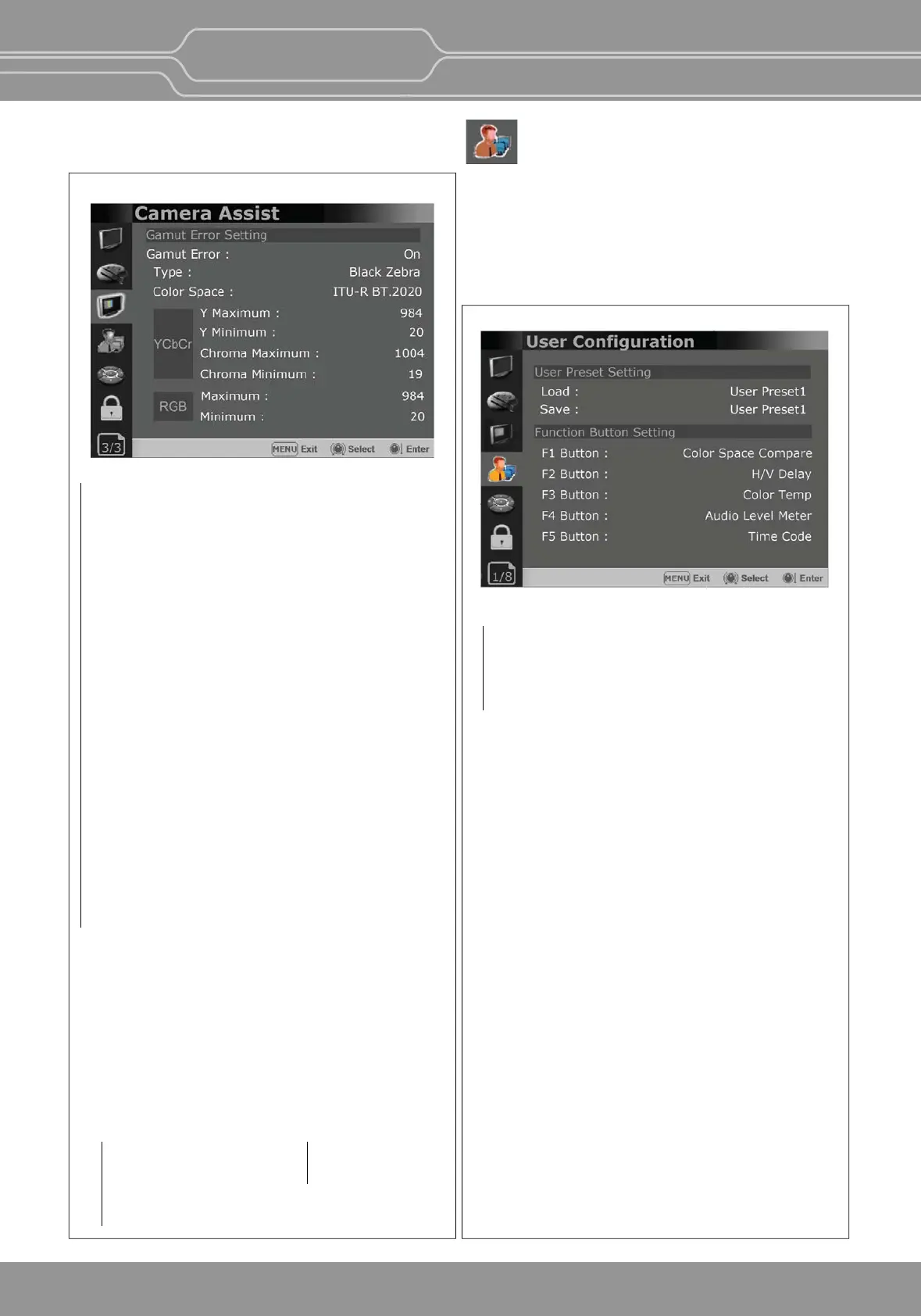
Turns the Gamut Error [On]/[Off]. Zebra paern or
Color is displayed on the poron whose Y, Cb, Cr
and R, G, B are out of the range of the adjusted
values based on the color space selected below
in [Color Space].
Type
- Black Zebra: The porons outside of the adjusted
values are displayed as Black Zebra.
- Black & White Zebra: The porons over Y
Maximum, Chroma Maximum, RGB Maximum are
displayed as Black Zebra, and the porons below
Y Minimum, Chroma Minimum, RGB Minimum
are displayed as White Zebera.
- Mono: The porons inside of the adjusted values
are displayed as Mono, and the porons outside
of the adjusted values are displayed as the color.
In this type, black and white area is not recognized.
Color Space
Selects the target color space among [ITU-R
BT.601], [ITU-R BT.709], [ITU-R BT.2020].
The default values of Y Maximum/Minimum,
Chroma Maximum/Minimum, RGB Maximum/
Minimum are in compliance with EBU R 103
standard.
And, the values can be adjusted by the user.
- Default Values
YCbCr
Y Maximum : 984
Y Minimum : 20
Chroma Maximum : 1004
Chroma Minimum : 19
RGB
Maximum : 984
Minimum : 20
Gamut Error


 To Next Page