Remote Menu
** [--]: No funcon is assigned
*7 Pin: For Power On and Off only
*8 Pin: For Ground only
*** OBM-U171/U241/U311/U551/X241/X310 only
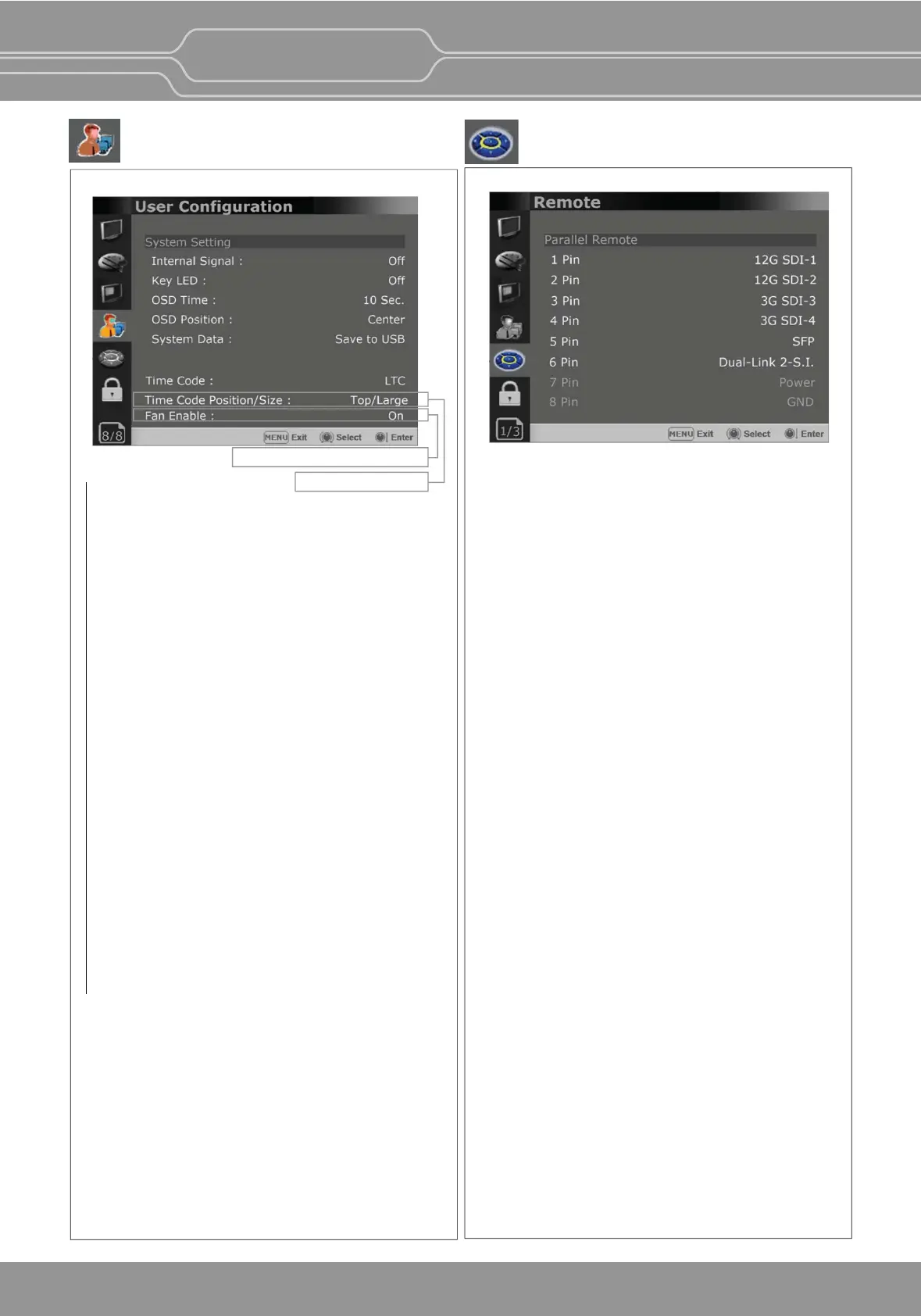
User Conguration Menu
Parallel Remote
Selects the Parallel Remote connector pins for
which you want to change the funcon.
Various funcons can be assigned to pin 1 to 6.
The following is the lists of the funcons which
can be assigned to the pins.
Page 8/8
Page 1/3
Internal Signal
Generates the White Paern and Color Bar
internally. The selectable range for the white
Paern is from 100%(White) to 0%(Black).
Key LED
Sets On to turn on the LED of the keys, and sets
Off to turn off the LED of the keys.
OSD Time
Adjusts the display me of the OSD menu.
[10 Sec.]: The OSD menu will be disappeared
aer 10 seconds.
[20 Sec.]: The OSD menu will be disappeared
about 20 seconds.
[30 Sec.]: The OSD menu will be disappeared
about 30 seconds.
[On]: The OSD menu will not be disappeared.
OSD Posion
Sets the posion of OSD. Selects [Center] to
[Le Boom].
System Data
-[Save to USB]
Saves the current sengs of the monitor to the
USB memory.
-[Copy from USB]
Recalls the sengs saved in the USB memory,
and load them to the monitor.
- Saves and adjusts the sengs of User 1 of User
Preset.
Time Code
-
Selects the type of the me code to be displayed.
[VITC]: To display the VITC me code
[LTC]: To display the LTC me code
Time Code Posion/Size (OBM-U170/U171 Only)
- Adjusts the size and posion of the Time
Code among [Top/Large], [Top/Small],
[Boom/Large], [Boom/Small].
Fan Enable(This funcon is applied to
OBM-U310/U311/X241/X310 Only)
[On]: Turn on the fan. [Off]: Turn off the fan.
System Seng
OBM-U/X Series
4K LCD Professional Monitor
with 12G-SDI, Quad Link 4K
27
OBM-U170/U171 Only
OBM-U310/U311/X241/X311 Only
(OBM-U170/U171/U240/U241
U310/U311/U550L/X241/X310)
[--]
[12G SDI-1]
[12G SDI-2]
[3G SDI-3]
[3G SDI-4]
[SFP] or [SFP-1]***
[Dual-Link 2-S.i.]
[Quad-Link 2-S.i.]
[Square SDI]
[HDMI]
[Zero Scan]
[1:1 Scan]
[4:3 Aspect]
[16:9 Aspect]
[Auto Aspect]
[H/V Delay]
[Blue Only]
[Mono]
[Marker]
[TALLY R]
[TALLY G]
[User Preset1]
[User Preset2]
[User Preset3]
[User Preset4]
[User Preset5]
[ITU-R BT.709]
[ITU-R BT.2020]
[OBM-HDR]
[Cam. Log Default]
[Cam. Log User]
[SFP-2]***
[Dual-Link 2-S.I.(SFP)]***
(OBM-U090)
[--]
[12G SDI-1]
[12G SDI-2]
[3G SDI-3]
[3G SDI-4]
[Analog]
[Dual-Link 2-S.i.]
[Quad-Link 2-S.i.]
[Square SDI]
[HDMI]
[Zero Scan]
[1:1 Scan]
[4:3 Aspect]
[16:9 Aspect]
[Auto Aspect]
[H/V Delay]
[Blue Only]
[Mono]
[Marker]
[TALLY R]
[TALLY G]
[User Preset1]
[User Preset2]
[User Preset3]
[User Preset4]
[User Preset5]
[ITU-R BT.709]
[Nave]
[OBM-HDR]
[Cam. Log Default]
[Cam. Log User]


 To Next Page