3. Location and Function of Parts and Controls
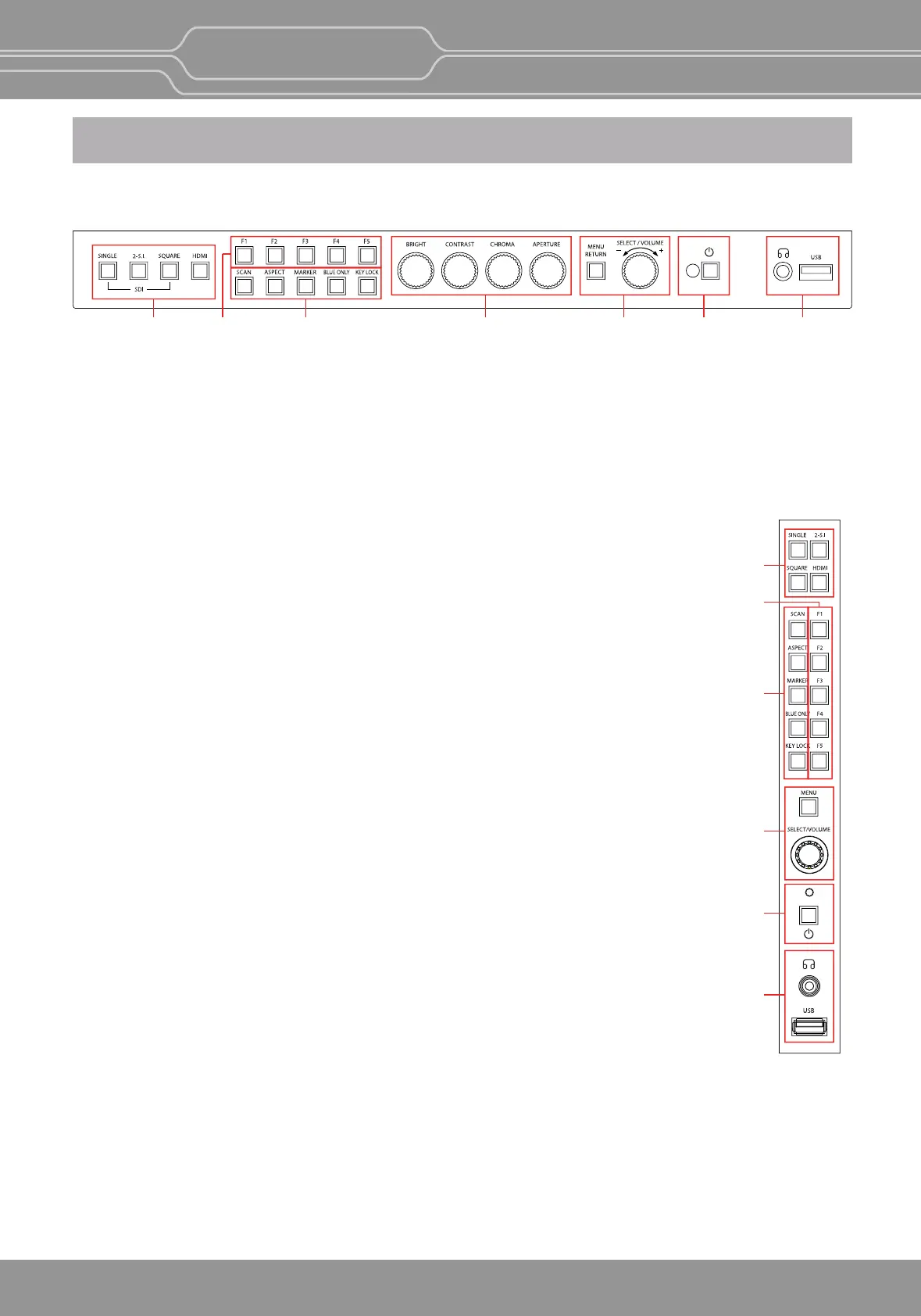
Front Panel (OBM-U170/U240/U241/U310/U311/U550L/U551/X241/X310)
AB C D E F G
OBM-U/X Series
4K LCD Professional Monitor
with 12G-SDI, Quad Link 4K
6
A
B
C
E
F
G
A : Input select Buons/Lamp
Press to monitor the signal input to each connector.
[SINGLE] Buon/Lamp
- Press the buon to select SDI input or SFP input for one channel.
- Mode changes in the order of [12G SDI-1], [12G SDI-2], [3G SDI-3], [3G SDI-4], [SFP]*.([SFP-1],[SFP-2]*)
*SFP input is set deacvated in the default seng. Change the menu seng to acvate SFP input.
-OBM-U170/U240/U310/U550L : [SFP]
-OBM-U171/U241/U311/U551/X241/X310 : [SFP-1], [SFP-2]
MENU > User Configuraon > [2/7] > SFP Enable > Enable
**Note
How to make a quick input change: When you push [SINGLE] buon and the current
input indicator is displayed, turn the [SELECT/VOLUME] knob to select another input
and push the knob, then you can go to another input directly.
[2-S.I.] Buon/Lamp
- Press the buon to select 2-Sample Interleave SDI input signal through two or four
SDI input connectors.
-
Mode changes in the order of [Dual-Link 2-S.I.], [Quad-Link 2-S.I.].[Dual-Link 2-S.I.(SFP)*]
*[Dual-Link 2-S.I.(SFP)] is supported by OBM-U171/X310 only.
[SQUARE] Buon/Lamp
- Press the buon to select [Quad-Link Square Division] mode.
[HDMI] Buon/Lamp - Press the buon to select HDMI input.
B : F1 ~ F5 Buon/Lamp
Press to adjust or turn on/off the assigned funcon.
The following funcons are assigned at the factory.
[F1]: Color Space Compare
[F2]: H/V Delay
[F3]: Color Temp
[F4]: Audio Level Meter
[F5]: Time Code
C : Funcon Buon/Lamp
Press to adjust or turn/off each funcon.
[SCAN] Buon - Press the buon to adjust the scan mode. (Zero Scan, 1:1 Scan).
[ASPECT] Buon
- Press the buon to select the Aspect Rao of the signal.
- Mode changes in the order of [16:9], [4:3], [2.35:1] ,[1.85:1], [15:9], [16:10], [AUTO].
[MARKER] Buon - Press the buon to acvate and deacvate the Marker.
[BLUE ONLY] Buon
- Press the buon to acvate and deacvate the Blue Only funcon.
- You may remove R(red) and G(green) from the input signal and display the screen only with B(blue) signal.
This funcon is convenient to adjust Chroma and Phase and to observe the signal noise.
- The buon may be pressed twice to change the screen to MONO mode.
(This mode uses only Luminance value.)
[KEY LOCK] Buon - Press the buon to lock all buons except Power.
OBM-U171



 To Next Page