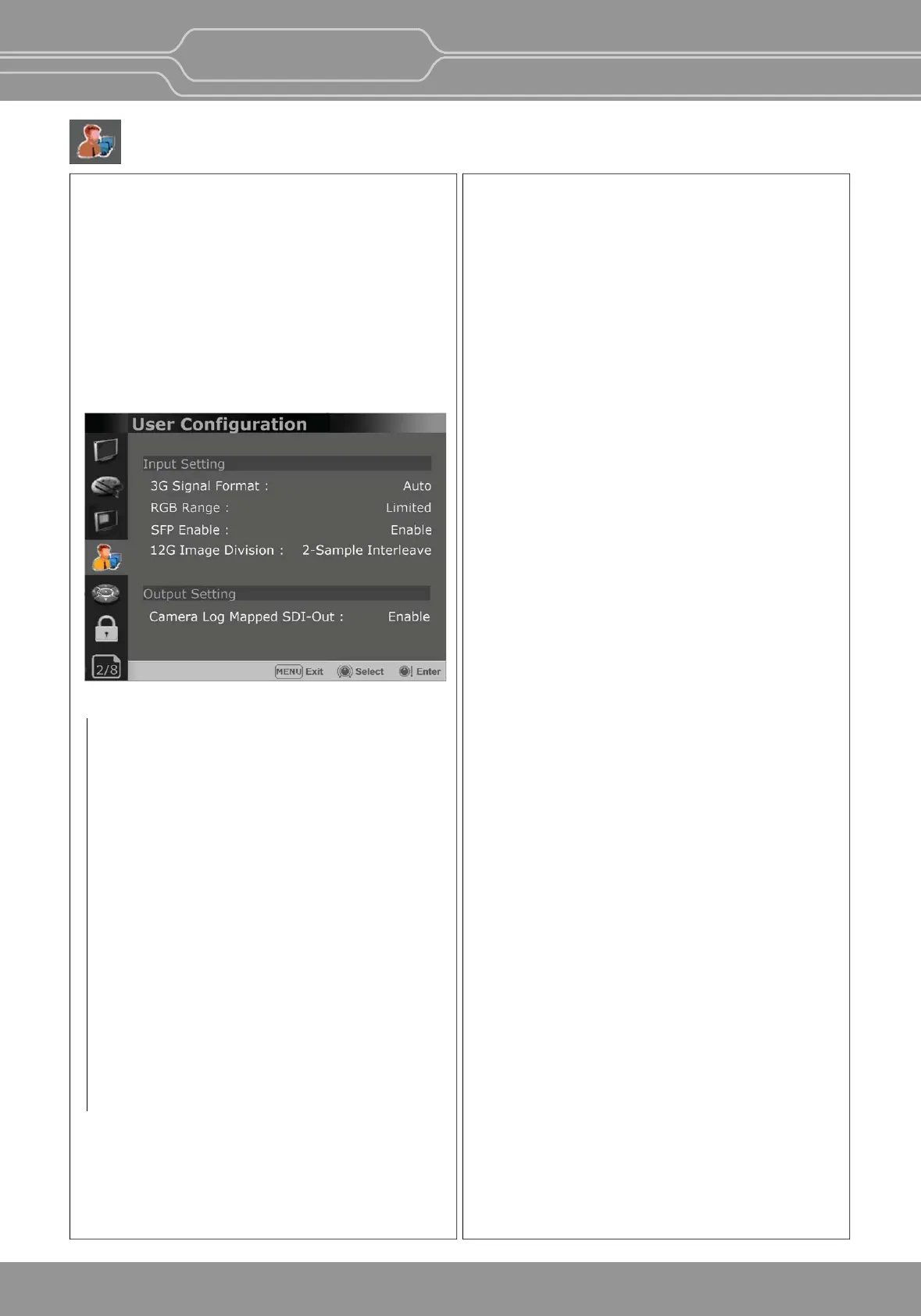
User Conguration Menu
Input Seng
3G Signal Format
- Selects the format of 3G SDI input signal.
: [Auto], [A 4:4:4 YUV 10b], [A 4:4:4 GBR 10b],
[A 4:4:4 YUV 12b], [A 4:4:4 GBR 12b],
[A 4:2:2 YUV 12b], [B DL 4:4:4 YUV 10/12b],
[B DL 4:4:4 GBR 10/12b], [B DL 4:2:2 YUV 12b],
[B DL 4:2:2 YUV 10b 60p]
RGB Range
-
Selects Black Level and White Level of RGB format
.
*Limited : 64(10bit)/256(12bit) ~
1023(10bit)/4095(12bit)
*Full: 0(Black Level) ~ 1023(10bit)/4095(12bit)
SFP Enable (OBM-U090 is not supported.)
- Allows for SFP input to be selected by pushing
[SINGLE] buon on the front panel.
12G Image Division
- Selects the image division of the 12G-SDI Single
Link signal between [2-Sample Interleave] and
[Square]
Page 2/8
OBM-U/X Series
4K LCD Professional Monitor
with 12G-SDI, Quad Link 4K
23
-
The following funcons are assigned in the factory.
[F1 Buon] : Color Space Compare
(OBM-U170/U171/240/310/550L/X310)
[F1 Buon] :
HDR&Cam.Log Compare(OBM-U090)
[F2 Buon] : H/V Delay
[F3 Buon] : Color Temp
[F4 Buon] : Audio Level Meter
[F5 Buon] : Time Code (OBM-U090 is not
supported)
**Payload ID of 12G-SDI 2-Sample Interleave signal
and 12G-SDI Square division signal is the same. So,
Image Division cannot be detected automacally,
and the user has to select it.
The default seng is [2-Sample Interleave].
Output Seng
Camera Log Mapped SDI-Out
This funcon
enables the camera log to be loaded
to the original image and then sends the camera log
mapped
image to another monitor through SDI loop
out.


 To Next Page