Page 3/8
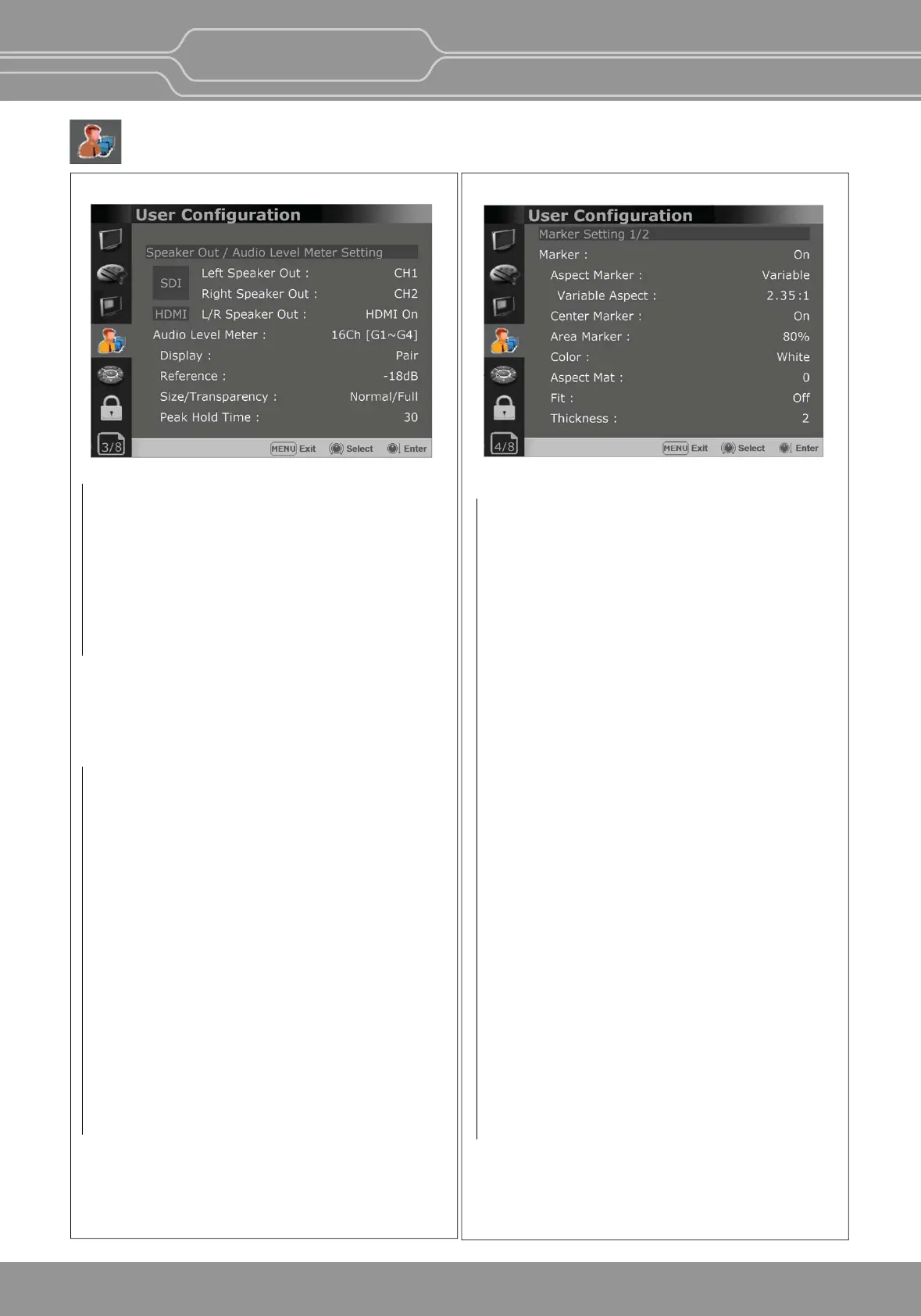
Speaker Out / Audio Level Meter Seng
- Selects the audio channel of the SDI & HDMI
input signal.
SDI : Le Speaker Out / Right Speaker Out
- Selects the embedded audio channel for the
le
and right audio out of the Headphone jack
on the
front panel of the monitor.
Audio channel can be selected among Ch1 ~
Ch16, Analog.
HDMI : L/R Speaker Out
- Selects the embedded audio channel of the
HDMI signal. The available modes are [Off],
[HDMI On], [Analog On].
Audio Level Meter
Selects the embedded audio mode.
: [Off], [8Ch [G1+G2]], [8Ch [G2+G3]],
[8Ch [G3+G4]],[8Ch [G1+G3]], [8Ch [G1+G4]],
[8Ch [G2+G4]],[16Ch [G1~G4]]
** In HDMI input, either [Off] or [HDMI 2Ch]
can be selected.
Display
Selects the display method for Audio Level Meter.
Available modes are [Group] and [Pair].
** In HDMI input, the mode is fixed to [Pair].
Reference
Selects the default value of Audio Level Meter.
Available opons are [-18dB] and [-20dB].
Size/Transparency
Selects the size and transparency of Audio Level
Meter.
Available opons are [Normal/Full],
[Normal/Half], [Large/Full], [Large/Half].
Peak Hold Time
Controls the speed rate of Peak Hold Decay
Time occurring when the audio volume decreases.
Page 4/8
Marker Seng
Marker
- Selects On to display the marker, and Off to
deacvate it.
Aspect Marker
Selects the aspect rao of the marker.
You can select from among [Off], [16:9], [4:3],
[4:3 ON AIR], [15:9], [14:9], [13:9], [1.85:1],
[2.35:1], [2.39:1], [1.85:1 & 4:3], [1.66:1],
[1.896:1], [Variable], [Custom].
*Variable Aspect
Allows the user to select the aspect rao from
the range between 1.00:1 and 3.00:1.
Center Marker
Selects On to display the center marker and Off
not to display it.
Area Marker
Selects the size of the area marker.
You can select from among [Off], [80%], [85%],
[88%], [90%], [93%], [100%], [EBU Acon 16:9],
[EBU Graphic 16:9], [EBU Acon 14:9],
[EBU Graphic 14:9], [EBU Acon 4:3],
[EBU Graphic 4:3].
Color
Selects the color of the marker.
You can select from among [White], [Gray], [Red],
[Green], [Blue], [Yellow], [Cyan], [Magenta].
Aspect Mat
Darkens the outside of the area of the Aspect
Marker. You can select from 0 to 7.
Fit
With Fit On, the Area Marker is displayed relave
to the Aspect Marker in use.
With Fit Off, the Area Marker is displayed relave
to the incoming video source.
Thickness
Adjusts the thickness of the marker lines.
You can select it from 1 to 7.
** This menu is acvated in OBM-U090,
OBM-U170, OBM-U171 model only.
User Conguration Menu
OBM-U/X Series
4K LCD Professional Monitor
with 12G-SDI, Quad Link 4K
24


 To Next Page