OBM-U/X Series
4K LCD Professional Monitor
with 12G-SDI, Quad Link 4K
36
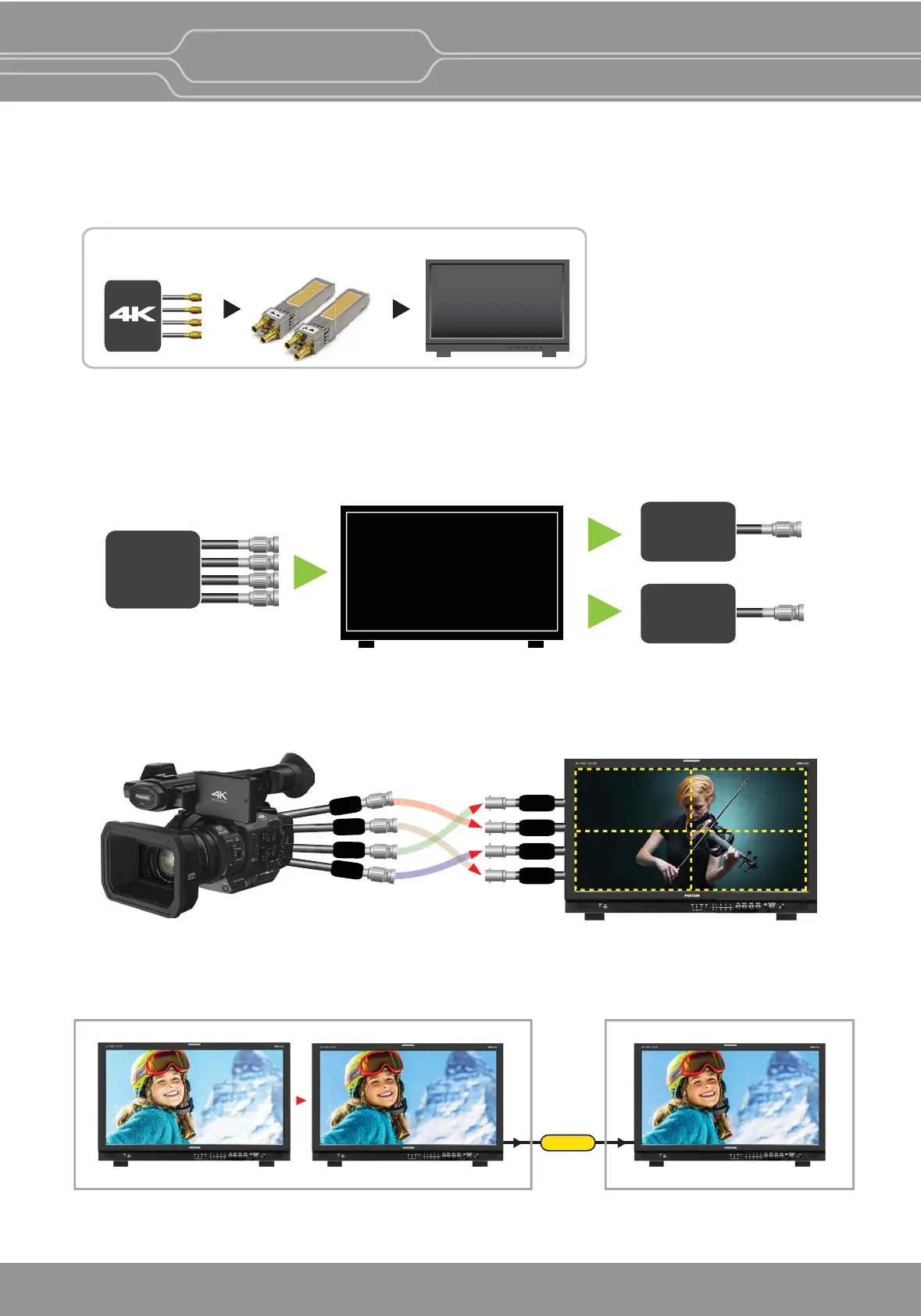
The OBM-X310 and OBM-U171 jave the dual SFP Input cages, which enable the monitor to accept and display
the Quad-Link square division and 2-Sample Interleave 4K signals over IP supporng SMPTE ST 2022-6.
OBM-X310/U171
Quad-Link SQD/2-S.I.
over IP
Dual
SFP Modules
Dual SFP Module Inputs supporng Quad-Link 4K over IP(OBM-X310/U171)
3G-SDI Quad Link Input ⇒ 12G-SDI/3G-SDI Single Link Output
The OBM 4K Monitors can receive the 3G-SDI Quad Link 4K video signal and then loop out the signal with the
single link 12G-SDI or the scaled down 3G-SDI. This funcon enables you to monitor the same 4K signal with
the normal HD monitor next to the OBM-4K Monitors at the same me.
SDI-1
SDI-2
SDI-3
SD
I
-4
12G SDI-1
12G SDI-2
3G SDI-3
3G SDI-4
12
34
Image Division & Link Order
Even though the 3G-SDI quad link Square Division signals or the 3G-SDI quad link 2-Sample Interleave(2-S.I.)
signals are input to the OBM-4K monitor in the wrong order, if the signal has the normal payload ID, the
OBM-4K monitor can detect the link order automacally and display the video in the correct order on the screen.
Camera Log Mapped SDI Loopout
This funcon allows to load the camera log to the original image and then send the camera log mapped image to
another monitor through SDI loop out.
Camera Log applied image
Original Image
Camera Log applied image
OBM Monitors
Another Monitor
Loop Out
3G-SDI
Quad Link
Input
12G-SDI
Single Link
Output
OBM-U170/U071/U240/U241
U310/ U311/U550L/U551
X241/X310
Loop Out
or
3G-SDI
Output
(Scale Down)


 To Next Page