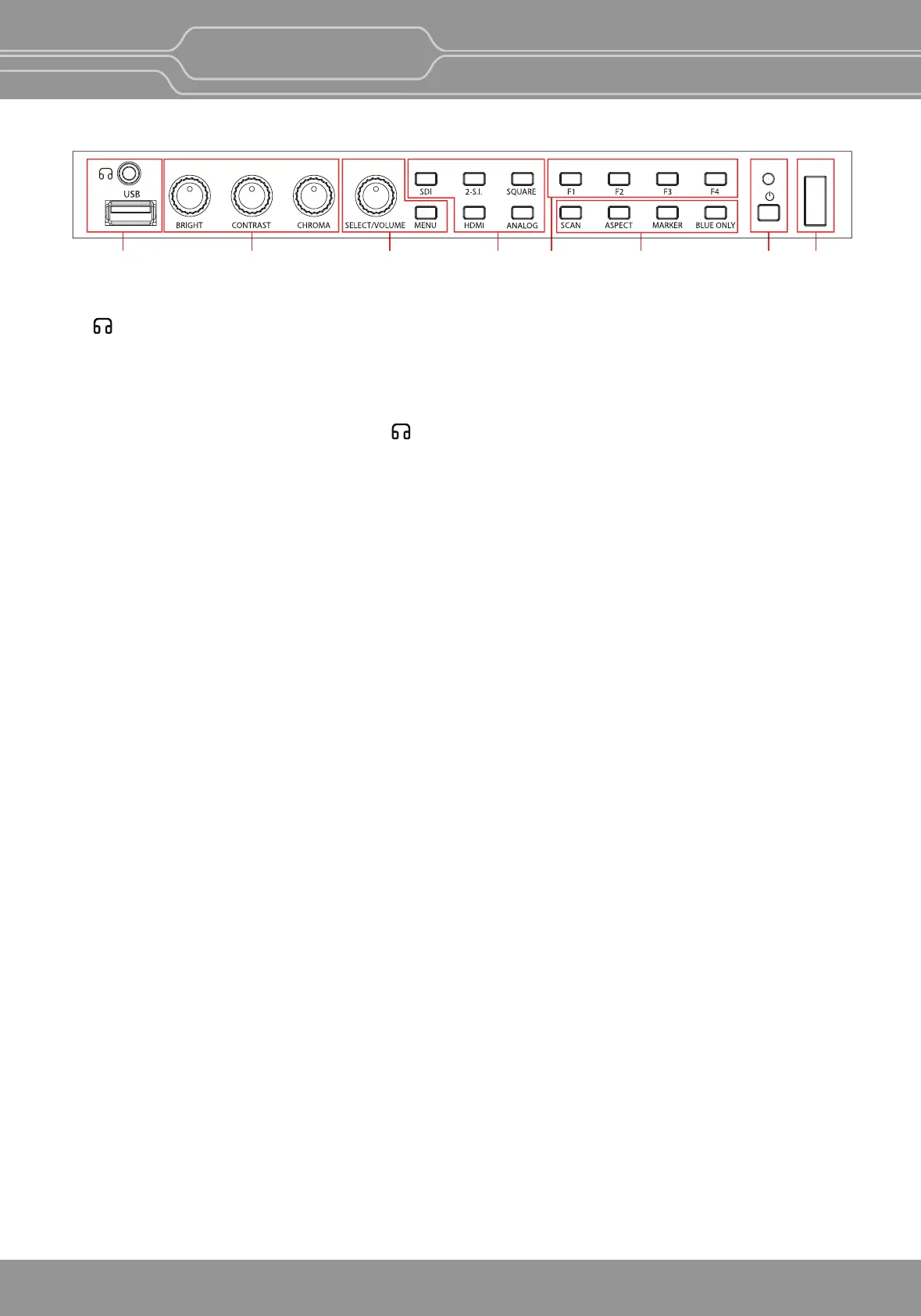
AB CDEFGH
Front Panel (OBM-U090)
A : (headphone) Jack and USB Connector
Headphone Jack
- The audio signal which is selected using the input select buon is output in stereo sound.
- When SDI signals are input, the audio signals of the channels selected with SDI Audio Seng in the User
Configuraon menu are output.
- When the headphone is connected to the jack, audio signals will not be output from speakers.
[USB] Connector
- To update CPU, GPU, FPGA program.
- To connect the monitor with the Color Calibraon program provided by the manufacturer and perform
the color calibraon.
- To connect the monitor with the control program provided by the manufacturer and control funcons.
- To impot the custom 3D LUT file
(*.cube,
32^³, 33^³, 64^³ and 65^³).
B : Rotary Encoder
[BRIGHT] knob
Press this knob to display the adjustment screen and adjust the picture brightness. Press again to hide the
adjustment screen. Turn the knob right to increase the brightness and turn le to decrease it.
[CONTRAST] knob
Press this knob to display the adjustment screen and adjust the picture contrast. Press again to hide the
adjustment screen. Turn the knob right to increase the contrast and turn le to decrease it.
[CHROMA] knob
Press this knob to display the adjustment screen and adjust the color intensity. Press again to hide the
adjustment screen. Turn the knob right to increase the color intensity and turn le to decrease it.
**Note: If you push the knob for 2 seconds, the adjusted value returns to the default value.
C : Menu Operaon Buons
Displays or sets the on-screen menu.
[MENU/RETURN]
- Acvates and deacvates the display of the Main Menu.
- When the on-screen menu is not displayed, if this buon is pressed the main menu is displayed.
When the menu is displayed, press the buon to return to the previous menu.
[SELECT/VOLUME] knob (Menu selecon control)
- When the menu is displayed, turn the knob to select a menu item or a seng value, and then press the
knob to confirm the seng.
-
If this knob is pressed when the menu is not displayed
, the adjustment screen of [VOLUME] is displayed
to adjust the audio volume.
- Press this knob to change the modes in the order of [Focus Frequency], [Zebra Level], [Line Posion],
[Variable Marker] and adjust each mode’s value.
[Focus Frequency]: When Focus Assist funcon is acvated, this mode is displayed.
[Zebra Level]: When Zebra funcon is acvated, this mode is displayed.
[Line Posion]: When WFM/Vector funcon and Line Select funcon is acvated, this mode is displayed.
[Variable Marker]:
When Marker funcon is acvated and Aspect Marker is set Variable, this mode is displayed.
OBM-U/X Series
4K LCD Professional Monitor
with 12G-SDI, Quad Link 4K
8


 To Next Page