19
4.2.2.1 To enter station data using MENU – Tx add:
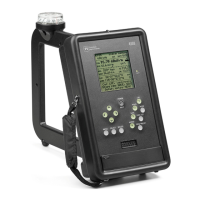
Press POWER/BKLT to turn on the 4100.
Press MENU after the field strength screen appears; the menu screen appears.
Press the Down arrow key to go to Tx add; press SELECT. The Tx data entry screen appears,
listing six data items to be entered, and with the reverse video cursor on the first item, Call - Site. Call is
the station identifier; if there is more than one antenna site for the call, each one can have a separate Tx
entry with the same call but a different dash number. As many as eight characters can be entered. Press
SELECT; reverse video appears on the first character. Press the Up key to scroll through the numbers
and the alphabet, or press the Down key to scroll backwards, to change this character to the desired one.
Press the Right arrow key to go to the next character and change it the same way. Continue this
procedure until all characters are as desired, then press SELECT to exit Call-Site.
Press Down to go to Freq, and press SELECT. Proceed as for Call-Site, using the arrow keys
to change each frequency digit to the desired value. When done press SELECT, as before, to exit Freq..
At this point it is possible to exit Tx add, if the location data is not available or not of interest,
and the new entry will appear in the Tx select list.
To enter location data, move to each of the remaining data items and enter the required data.
Latitude and Longitude are the transmitting antenna location coordinates in degrees, minutes,
and seconds.
Var is the magnetic declination, also known as variation, the angular difference in degrees and
minutes between the bearing of true north and magnetic north. It can be calculated from the latitude and
longitude at this NOAA web site: http://www.ngdc.noaa.gov/geomagmodels/Declination.jsp.
Modulation is the modulation system used by the station. Going to Modulation and pressing
SELECT gives the available choices. AM refers to normal double-sideband amplitude modulation. DRM
with a number refers to Digital Radio Mondiale; the number is the occupied bandwidth in kHz. HD-ad
refers to the all-digital mode of HD Radio. When a DRM or HD station is selected in the 4100, a
correction is automatically added to the field strength reading to account for the difference between the
measuring bandwidth, 1.0 kHz, and the occupied bandwidth. The DRM correction would be valid for any
digital modulation system of the same bandwidth in which the power per unit bandwidth is uniform
across the band.
When the required data has been entered, press MENU to go back to the main menu, and
press MENU again to return to the field strength screen. The station just entered becomes the active
station, meaning that the receiver is tuned to its frequency. Its antenna coordinates are used to calculate
distance, the azimuth of the 4100 from the station, and the magnetic bearing of the station from the 4100.
4.2.2.2 To enter station data using the Data Downloader Program: With this program, data
can be entered from the keyboard of a connected computer. To do this see the Downloader program
instructions, Sec. 4.5.4, p. 28.
4.2.2.3 To change existing station data: MENU – Tx edit: Press MENU, go to Tx select, and
select the station needing a change. Press SELECT to return to the menu, go to Tx edit, and press
SELECT again. All data items for the selected station can then be entered or edited as described above
for TX add.


 To Next Page