• Android phone with Android 5.0 or higher is
required. Update to the latest OS version
before use.
• Your Android phone needs to support
Android Auto. For details on compatible
models, refer to the compatibility list on the
support site on the back cover.
• Download the Android Auto app on Google
Play.
• For details about Android Auto, refer to the
manual supplied with your Android phone, or
visit
https://android.com/auto
or
https://support.google.com/android-
auto
• Since the GPS on your Android phone is used,
place your Android phone where it can easily
receive a GPS signal.
• Android Auto may not be available in your
country or region the website of Android Auto.
Notes on using Android Auto
Note:If you have Android 9 or below,
get the Android Auto app on your phone.
With Android 10, Android Auto is built
in—so you don’t need the app to get
started.
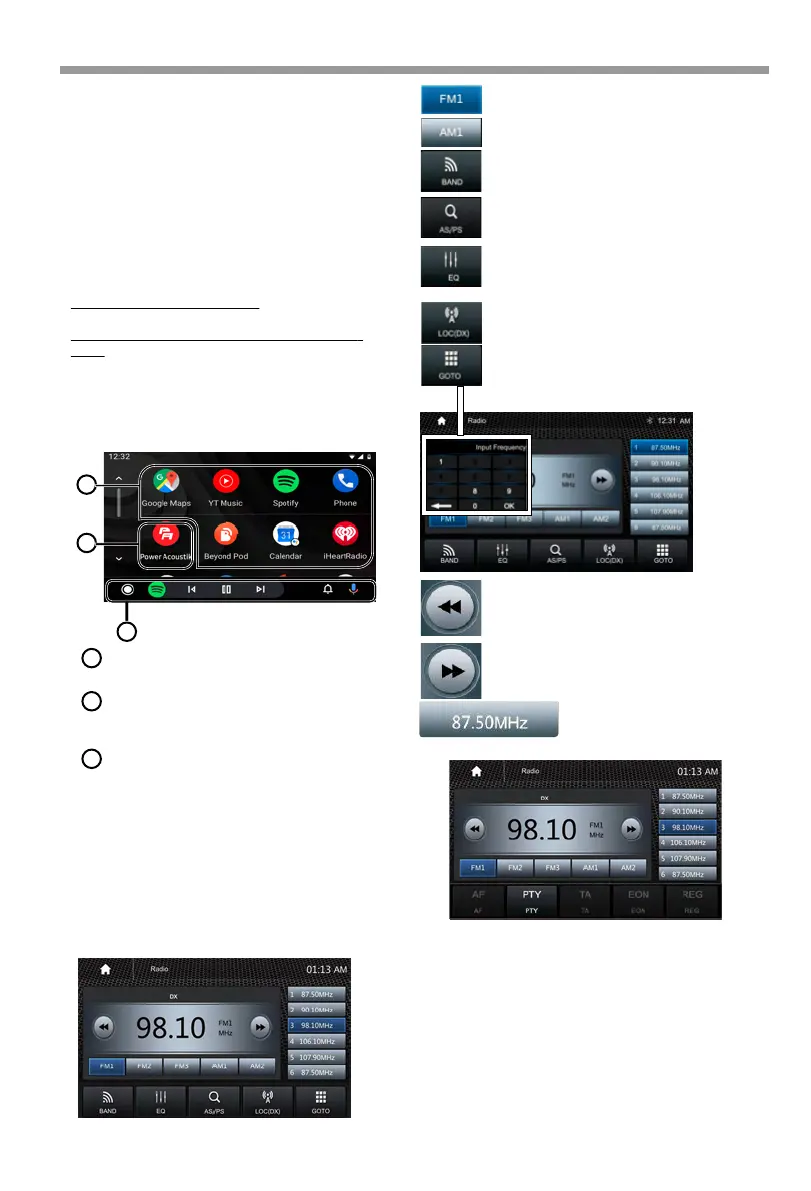
1
2
3
Start the application.
Application keys
Exit the Android Auto screen and displays
Home screen.
Home
Operation Bar
1
Starts the application or displays informa-
tion.
3
2
Radio mode
Touch the Radio mode icon to enter Radio.
Touch FM1 to select FM1 Band.
Touch AM1 to select AM1 Band.
Touch to select Band, FM1>FM2
>FM3>AM1>AM2
Touch to enter EQ settings.
Touch to switch LOCAL or DX.
Touch to input tune directly.
Short touch to Seek down;
Long touch for Step down.
Short touch to Seek up;
Long touch for Step up.
Short touch to prescan searching, each
scanned station will be played 10s. Long
touch for auto searching.
Preset station,6 preset store
and recall station for each
band.
RDS Function
TA: "TA" is displayed during a switched-through
traffic announcement.
PTY: Shows program types, and allows you to
search for stations according to different programs
as below:
RDS will allow you to display information such as
traffic status, radio station name and more.
The unit can automatically switch to the strongest
station based on the similar program.
Android Auto
®
Radio
16



 To Next Page