HD-14KIT
1
3
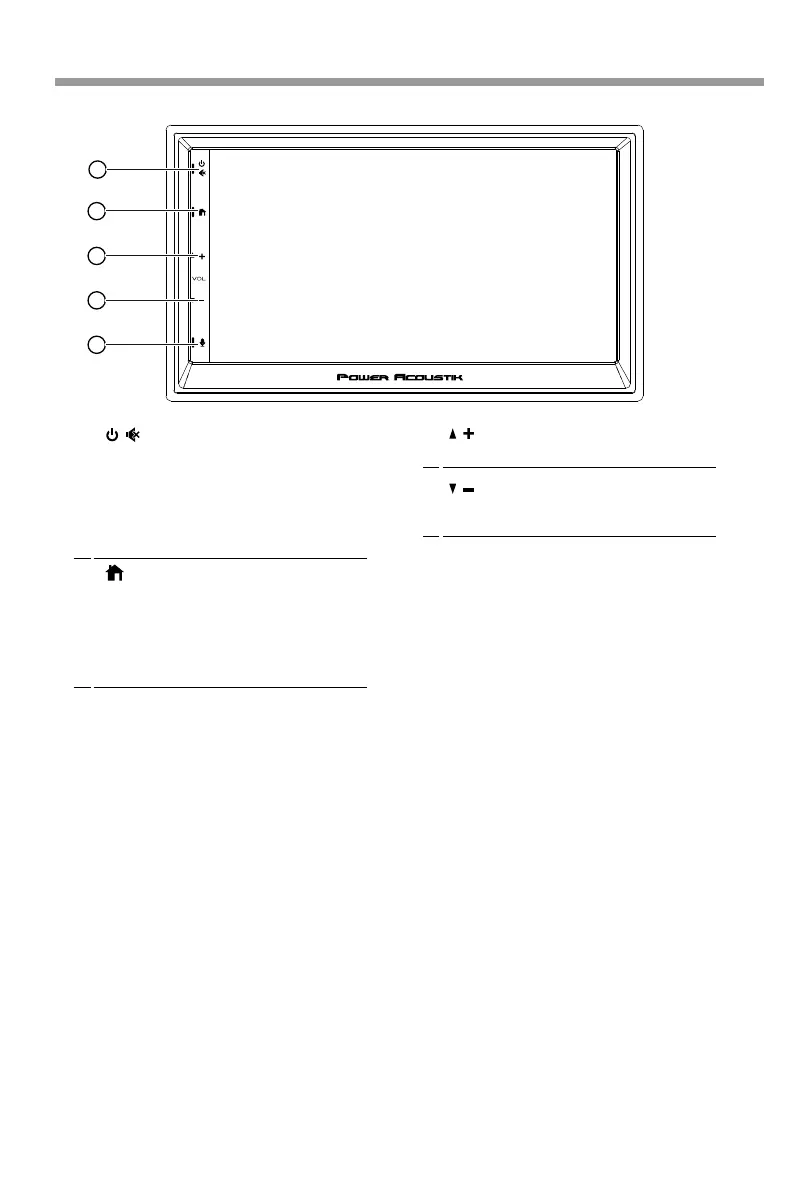
(Volume +)
•
Press to increase the volume value.
Home button
2
• Press to toggle between Home screen and
active media.
•
6
Power / Mute
1
Siri Button(Voice Recognition)
4
(Volume -)
•
Press to decrease the volume value.
2
3
4
5
When the iPhone/Android phone is
connected, press Siri button to start the
voice control function.
• When the power is off, press to power
on.
• When the unit is working, short pressing
for Mute, press again for unmute.
• Pressing and hold to turn the source unit
power off.
Available selections: Radio, Apple
CarPlay®/Android Auto®, BT Music, BT
Phone, USB,Settings.
Headunit Control
12






 To Next Page