BluetoothBluetooth
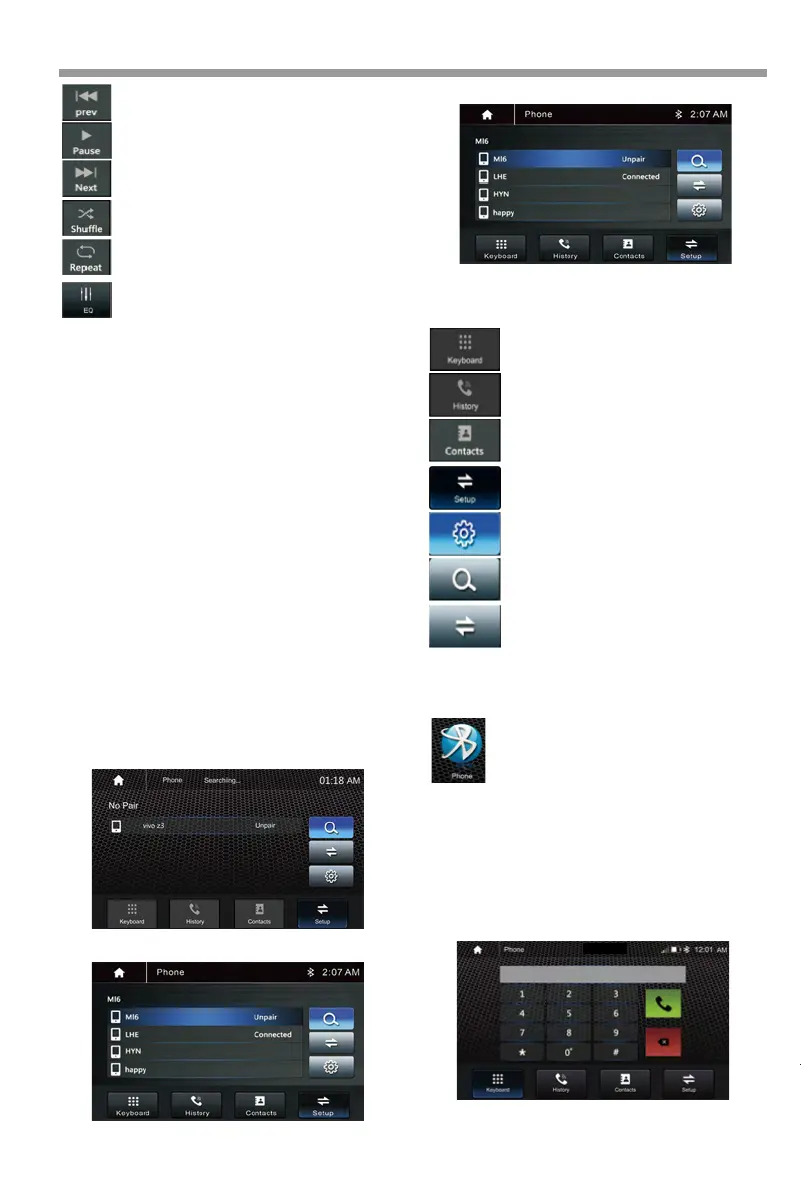
Press to skip previous track.
Press to select Repeat All >
Repeat 1> Repeat Folder.
Press to select Audio setting or
set the prefer EQ of each band
in custom mode.
Press to switch Random is
On or Off.
Play or Pause button.
Press to skip next track.
Pair/Connect
or
Connect your phone to the unit using the below
steps:
1. Turn On the Bluetooth of the mobile phone and
HD-14KIT. Access the Bluetooth connection
interface in your phone.
2. Search for Bluetooth devices from phone. You can
see the HD-14KIT, select the HD-14KIT for pairing
and connection.
3. The phone will pop up the pairing code and click
"pairing" to complete the connection.
Connect the unit to your phone using the below
steps:
1. Turn On the Bluetooth of the HD-14KITand Phone.
Access the Bluetooth connection interface in your
unit.
2. Search for Bluetooth devices from unit. Select the
desired device for pairing and connection.
3. The phone will pop up the pairing code and click
"pairing" to complete the connection.
No Paired
Paired
Dial Pad. Tap it to enter call mode.
Call logs. Tap to show the call record,
missed, received and dialed calls
Contact. Tap to show the phone-
book connected phone.
Show the usable devices.
BT Setup. Tap to set auto answer
and load phonebook.
Search the available devices.
Manage the connected device.
If the Bluetooth is not connected, press Reconnect
the paired phone or paring to pair the new device.
Bluetooth Phone
Make a call
Touch the Phone icon in main menu to go
to Phone mode. After the mobile phone
is connected with the source unit via
Bluetooth(HFP), user can through the
source unit to make a phone call. Please
note it needs to connect the microphone for
phone call.
This unit allows for hands free calling, using your
phone’s Bluetooth connection to the unit, you’ll be
able to dial, answer, access phone book .
HD-14KIT
18



 To Next Page