USB Bluetooth
Store a Station
1 . Tune radio to desired station.
2. Touch and hold the one of the preset station
for more than 3 seconds, then the preset button
will be highlighted on the screen,and the preset
station will be stored.
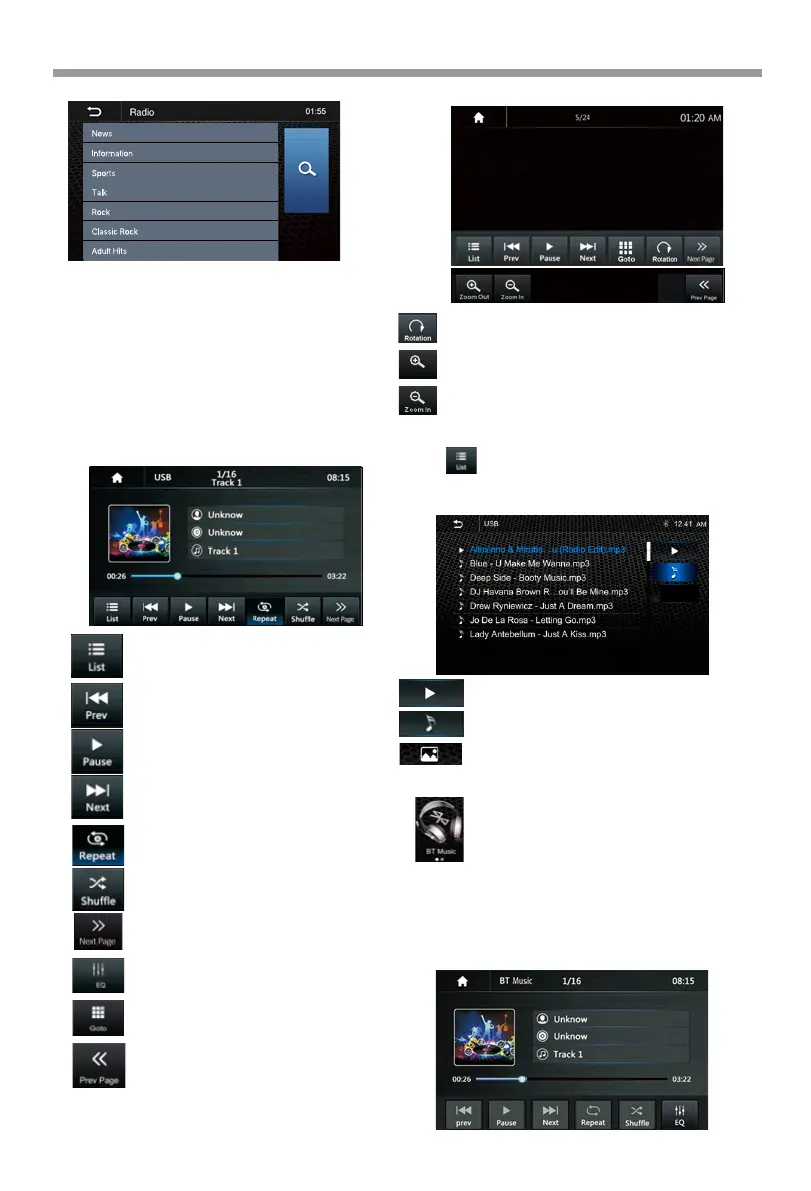
USB
Plug the USB, the USB icon will be colorful.
Press to list Audio files in USB.
Short press to skip previous track,
Long press to fast rewind.
Music Playback
Photo Playback
Short press to skip next track,
Long press to fast forward.
Press to select Repeat All >Repeat 1>
Repeat Folder.
Press to switch Random is On or Off.
Press to select Audio setting or set the
prefer EQ of each band in custom mode.
Touch to handle Goto page for
inputting the track number directly.
Play or Pause button.
Touch to select the second page of the
keypad.
Touch to select the first page of the
keypad.
Touch to browse the folder and file list
of the USB device.
You can select the multi-media type.
Return to playing previous file.
Select Audio or Music files.
Select Photo files.
File List browsing
Bluetooth Music
Note:
Bluetooth Music Playback
Touch the BT Music icon to enter Bluetooth
Audio playing mode.
If the Bluetooth is connected, the music
will be playing as following shown;
When Apple CarPlay /Android Auto is
connected to the source unit, the
Bluetooth function will be prohibited. (Both
BT Music and Phone will be prohibited.)
17
Press to Zoom Out the picture.
Press to Rotare the picture for playback.
Press to Zoom In the picture.
Zoom Out



 To Next Page