Bluetooth Bluetooth
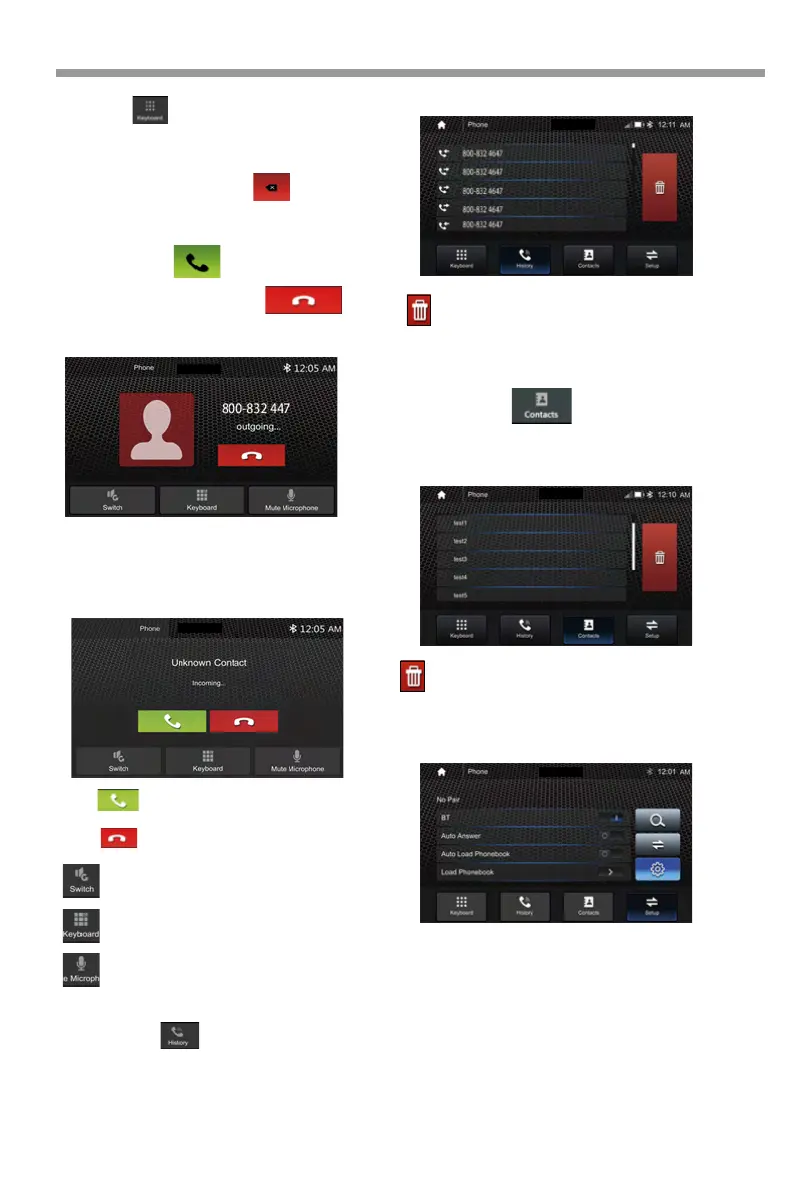
1. Touch the icon to enter below screen.
2. Using the keypad, touch 0-9,*,#, enter the phone
number you wish to dial. If you input
an incorrect number, touch the icon on the
keypad to delete the incorrect number.
3. Once the correct number appears on the
screen, touch the icon. To go to dialing
interface.
4. To end the call, touch the icon
on the screen.
If the Phone is connected with the source
unit via Bluetooth, when an incoming call,
below screen will be shown:
Receive an incoming call
HD-14KIT
HD-14KIT
Touch to switch call audio to phone
or AV receiver.
Press to answer the incoming call.
Press to reject the incoming call.
Touch to show the keyboard.
Touch to Microphone Mute.
Touch the icon to display the Call
combined list.
Check for dialed/answered/missed calls history.
Call Logs(History)
HD-14KIT
: Delete desired calls.
Slide the bar at right side up and down to display
a call logs up to 20 records.
Contacts
BT Setup
: Delete desired calls.
Slide the bar at right side up and down to display
a call logs up to 20 records.
BT On /OFF, Power On or Off BT function.
Auto Answer On /OFF, incoming call
auto answer.
Auto Load Phonbook, On /OFF, when connect
phone auto load phonebook
on or off.
Load Phonebook, Manually load phone book.
Touch the icon to access the phone
book of the connected mobile phone.
To make a call from the phonebook, simply
touch the contact name.
HD-14KIT
HD-14KIT
19



 To Next Page