www.powerbox-systems.com
15
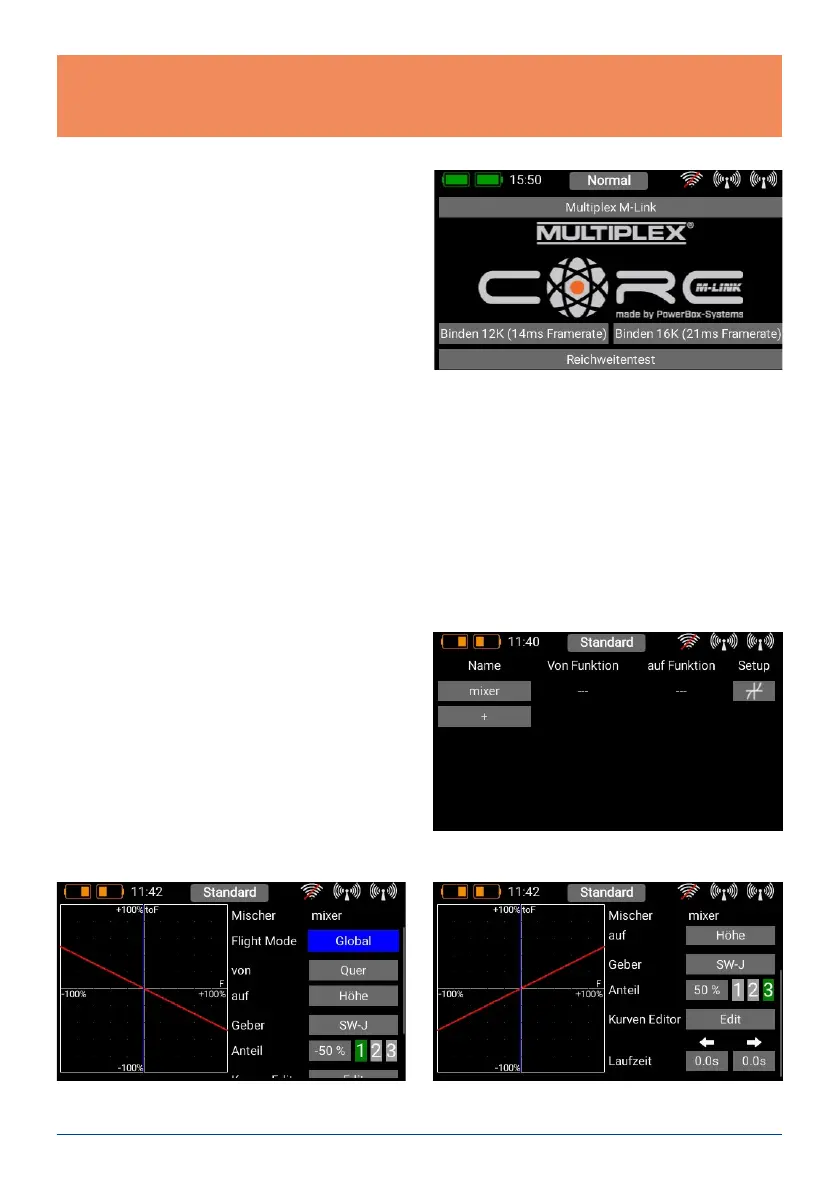
d) Selecting Core / M-Link
If your transmitter is equipped with a supplemen-
tary Multiplex M-Link aerial, you will nd the button
for switching from the CORE system to the M-Link
system right at the top.
The M-Link system offers two binding modes:
a) 14 ms frame rate, 12 channels
b) 21 ms frame rate, 16 channels
Choose your setting. If you do not need more than
twelve channels, you should always give preference
to Option a), as the servos are addressed at a higher rate in this mode. This can be advantageous in respect of
smooth running, transit speed and precision.
In contrast, Option b) offers sixteen channels and a slower frame rate; this is the best choice for use with older
servos.
Your choice applies to the current model, and is stored in the model le together with the relevant Bind in-
formation. If you change the setting for a model which has already been bound, you will need to re-bind the
receiver!
5. MIXER
The free servo mixers represent an additional method
of mixing functions with each other. Servo mixing by
servo assignment has already been described in the
Function menu, but this option also enables you to
mix functions with each other with a response curve.
You can create a new mixer by selecting the Mixer
menu and pressing +. You can also immediately re-
name the Mixer to your own choice by touching the
Mixer button.
Press the Setup button on the right in order to program the mixer. The following display appears:
Note: it is possible to adjust settings such as channel shift, frame rate, iGyroSAT and others at the receiver
itself. These settings are usually accessed using a Telemetry widget, but are also available if you press the
Receiver image in the Bind menu.



 To Next Page