4 PowerBox-Systems − World Leaders in RC Power Supply Systems
b) Entering the menu
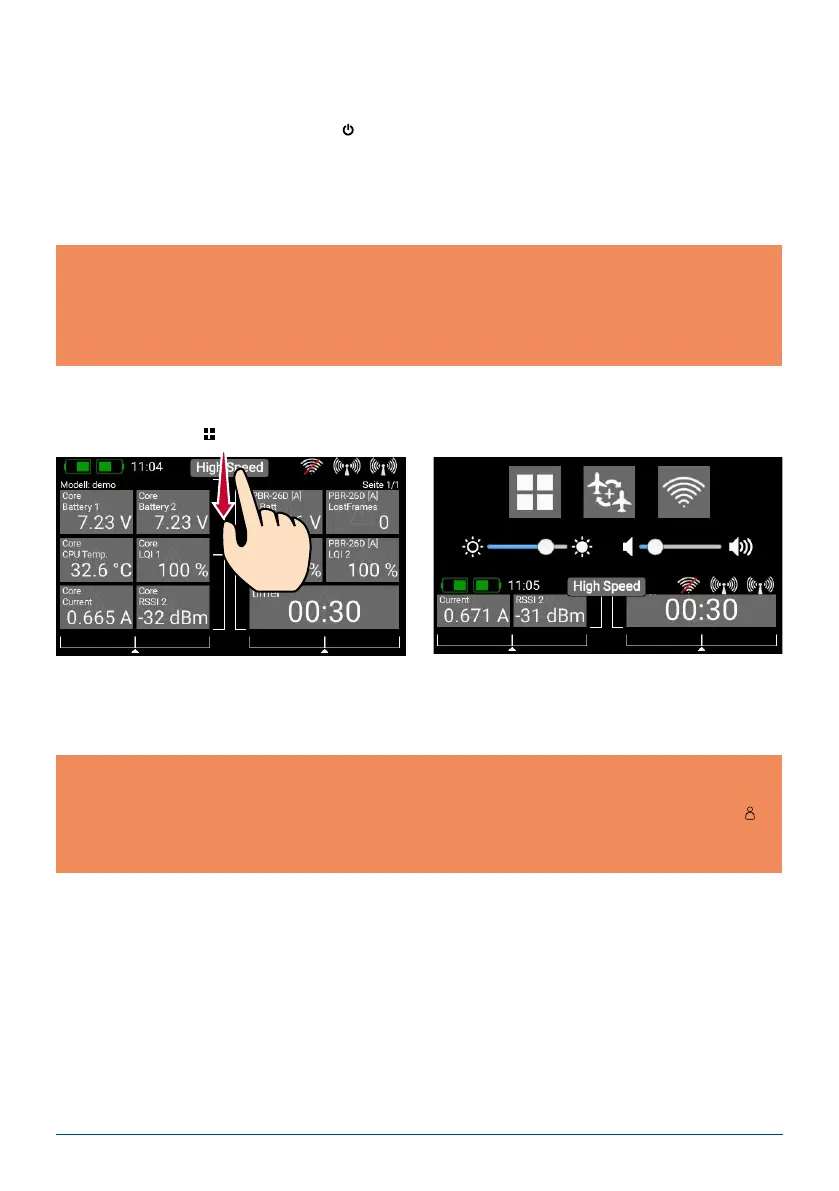
The main menu is accessed by swiping a nger downwards from the top edge. You can now touch the left-
hand menu symbol
:
There is no need to press rmly, as the capacitive touch-screen simply responds to touch, like all modern
smartphones.
The symbols in the Main menu are arranged in order of importance.
2. INITIAL STEPS
a) Switching on
The CORE is switched on by holding the
-button pressed in until it lights up red. Release the button briey,
then conrm the power-on process by briey pressing the button a second time. The transmitter is switched
off in exactly the same way. The button changes to green when the Linux system has booted; this process
takes about 25 seconds. Once the CORE is running, you will see the Home display on the screen: this shows
elds containing telemetry values, timers, servo positions or quick-select buttons for menus. These elds are
known as widgets.
Note: you can transfer any menu point to your own personal menu. This is accomplished simply by holding
your nger on the appropriate menu for a few seconds. When the “Person symbol” appears, the menu point
is transferred into your personal menu, which you can access conveniently using the quick-select button
at
the bottom of the screen. If you wish to remove a menu point again, use the same procedure: keep your nger
on the menu symbol in question, and that entry is duly erased.
Note: the CORE is tted with a fully redundant power supply system, which is deliberately kept separate
from the Linux computer and the other processors. This means than any malfunctions in the complex Linux
system cannot possibly result in the transmitter switching itself off. The two real-time processors also func-
tion completely independently of the Linux computer. The model remains fully controllable even if the Linux
computer is pulled out when the system is running!



 To Next Page