20 PowerBox-Systems − World Leaders in RC Power Supply Systems
The most important thing to know at this point is that the CORE prioritises the ight modes. Priority runs from
left to right, i.e. the ight modes in the left-hand tree diagram have the highest priority, and those on the right the
lowest priority. Even when the ight mode structure is complex, this means that you can, for example, overrule all
other switch positions with a single switch, returning you very quickly to “normal” ight mode.
Before you set up ight modes it is worthwhile consi-
dering which ight modes are important, and which
are of secondary importance.
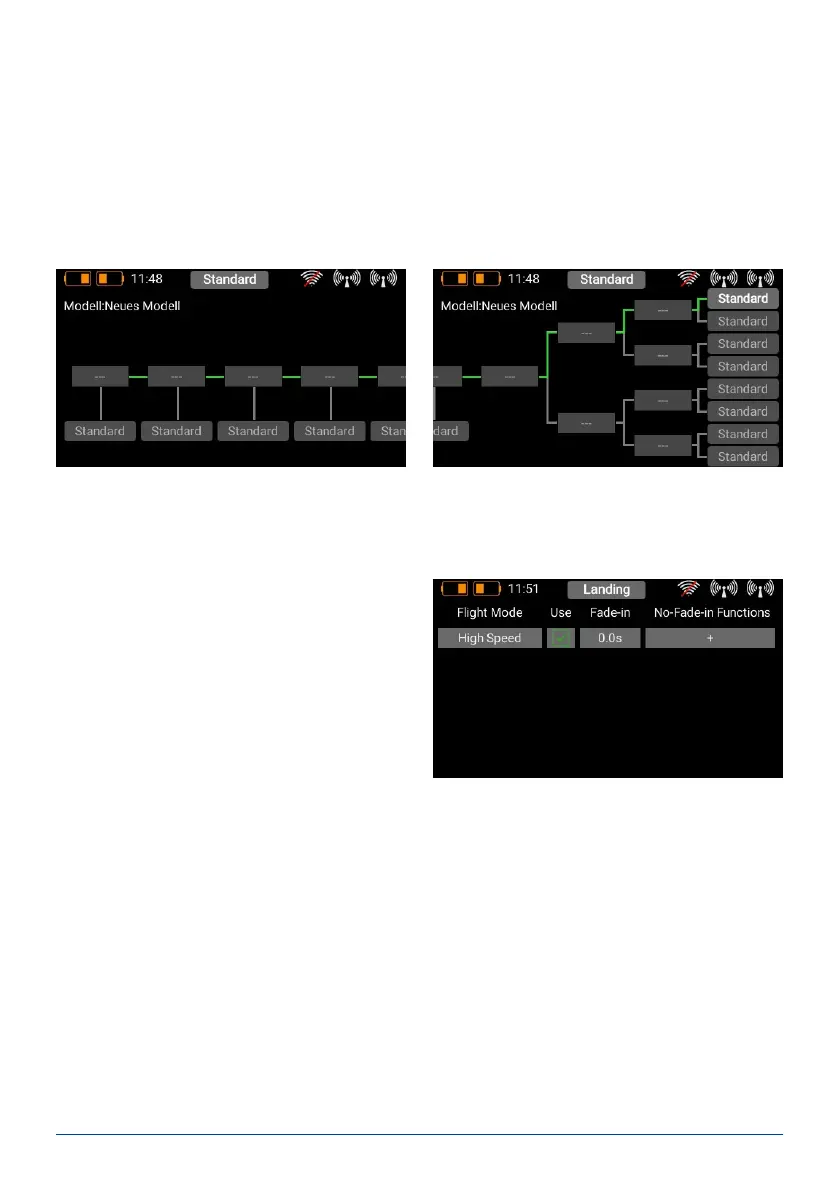
To create a ight mode, press briey on one of the bo-
xes labelled “Standard”, and you will see the following
screen display:
You can immediately assign an informative name to the new ight mode by briey pressing the left-hand eld.
Bear in mind that you should not use abbreviations here if you intend the ight mode names to be used for spe-
ech output later, as the TTS systems reads the text exactly as you have entered it!
In the eld below Fade-in you can set how fast the settings for the new ight mode are to affect the servos. For
example, if you lower the landing aps by selecting the appropriate ight mode, it makes sense to set a delay at
this point.
When you select the Flight Mode menu you will see a graphic representation of the Flight Mode tree structure.
8. FLIGHT MODES
Flight modes, also known as ight phases, are one of the CORE’s most powerful features, but they are still easy to
use! You can imagine a ight mode as a copy of a particular model memory, but one with slightly altered settings.
A switch can be used to select different modes when the model is ying. In the simplest case this might simply
be a different landing ap position and the appropriate elevator trim for that position.
The practical advantage of this feature is that you can adjust the trim when the landing aps are lowered, without
altering the trim in the normal “ight mode”.



 To Next Page