www.powerbox-systems.com
21
In contrast, selecting No-Fade-in Functions enables you explicitly to remove transmitter control functions from
the delay. Once you have entered all the settings, press the
-button to return to the Flight Mode tree diagram.
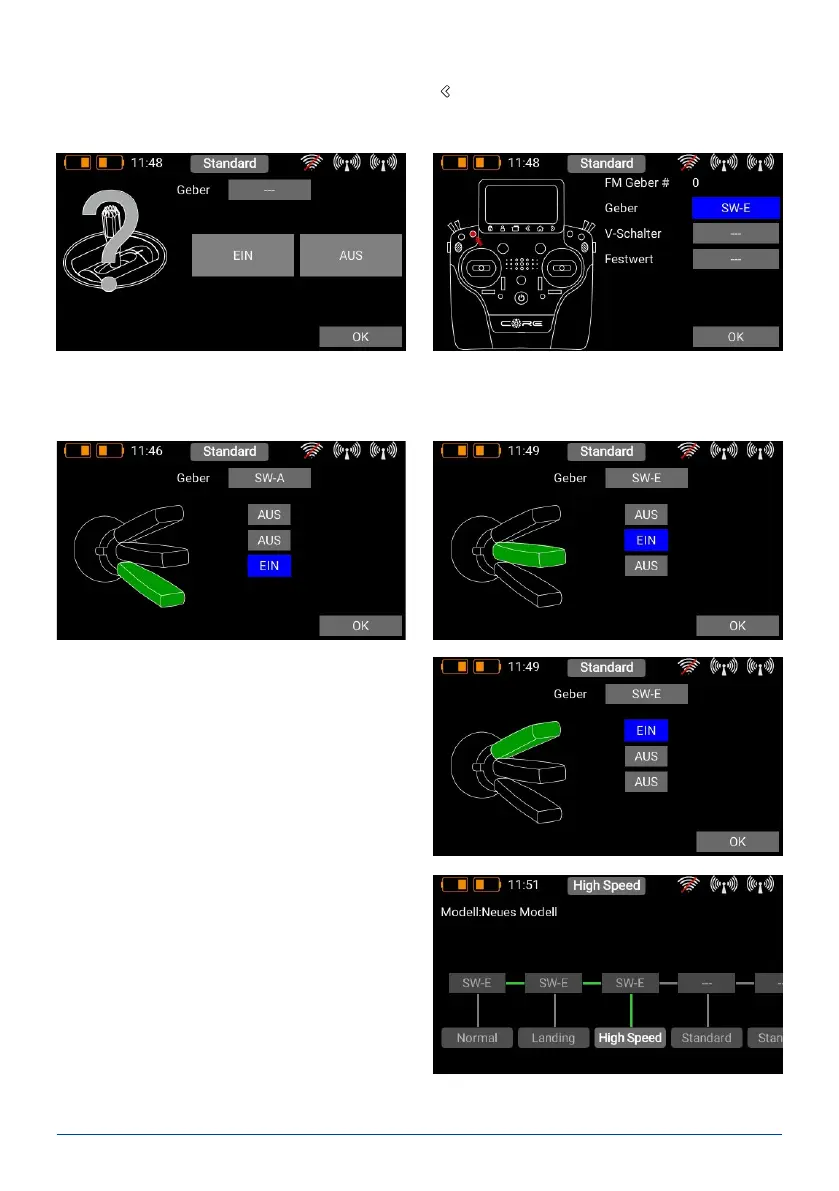
Now press the eld with the three dashes --- above the Flight Mode to select the transmitter control which you
want to use to activate this ight mode. In the next screen display press briey on Transmitter Control again.
At this point you can select the appropriate transmitter control. If you select a switch, you can activate one or
two switch positions. If you choose a linear control, you can set the switching threshold and hysteresis here. If
you have already set up virtual switches, please note that you can also use these for selecting the ight mode.
Exactly the same procedure is used to set up additi-
onal ight modes. The picture below shows a switch
which is used to select three ight modes; FM Normal
has the highest priority.
When you have set up multiple ight modes, you will
see green dashes in the Flight Mode tree which indica-
te which ight mode is currently active. You can now
select various settings for the different ight modes in
the Transmitter Control, Trim and Mixer menus after
selecting the Single setting at Flight Mode.



 To Next Page