22
5. If the limit nut depresses the open limit switch but does not stop the gate, press the stop
button or turn o the power immediately and consult the factory (1-800-243-4476).
6. If the operator functions properly, run the operator to the open limit switch and turn o
the power.
7. If there is still a distance before the gate is fully open, turn o power, move the open limit
nut away from the open limit switch a few turns, and turn on the power.
8. Press the Open button again to check how much further the gate opened. Continue this
procedure until the Open Limit is set.
*When making ne adjustments, turn the limit nut 1/4 to 1/2 turn at a time. Reconnect power
and test run the gate.
NOTE: Open and Close Limit Switches are reversed for Slide Left to Open operation.
9. Repeat procedure for the Close limit adjustment.
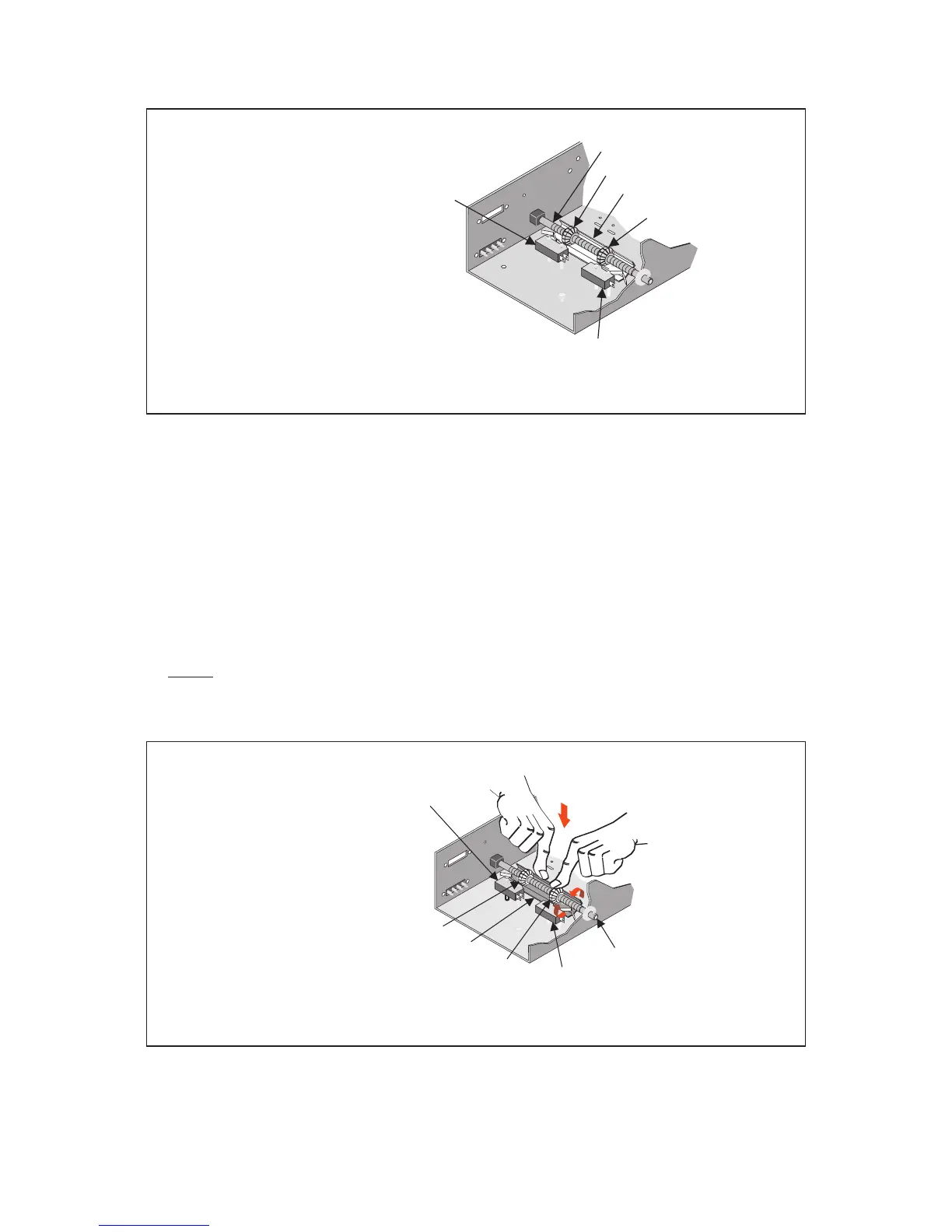
Limit Shaft
Limit Nut
Limit Nut
CLOSE LIMIT SWITCH for
Slide Right to Open operation
OPEN LIMIT SWITCH for
Slide Right to Open operation
Pressure Plate
Limit Shaft
Limit Nut
Limit Nut
CLOSE LIMIT SWITCH for
Slide Right to Open operation
OPEN LIMIT SWITCH for
Slide Right to Open operation
10. After the desired open and close position of the gate has been obtained, make certain
that a groove in both limit nuts are engaged by the pressure plate.



 To Next Page