21
STAY CLEAR OF ALL MOVING PARTS
AND ELECTRICAL COMPONENTS OF
THE OPERATOR WHILE TESTING!
WARNING
TURN OFF INCOMING POWER AT
OPERATOR POWER BOX BEFORE
MAKING ANY ADJUSTMENTS!
WARNING
LIMIT ADJUSTMENT PROCEDURE
1. After the gate is mechanically installed, disengage operator drive with the manual
disconnect lever. Move the gate to a midway position.
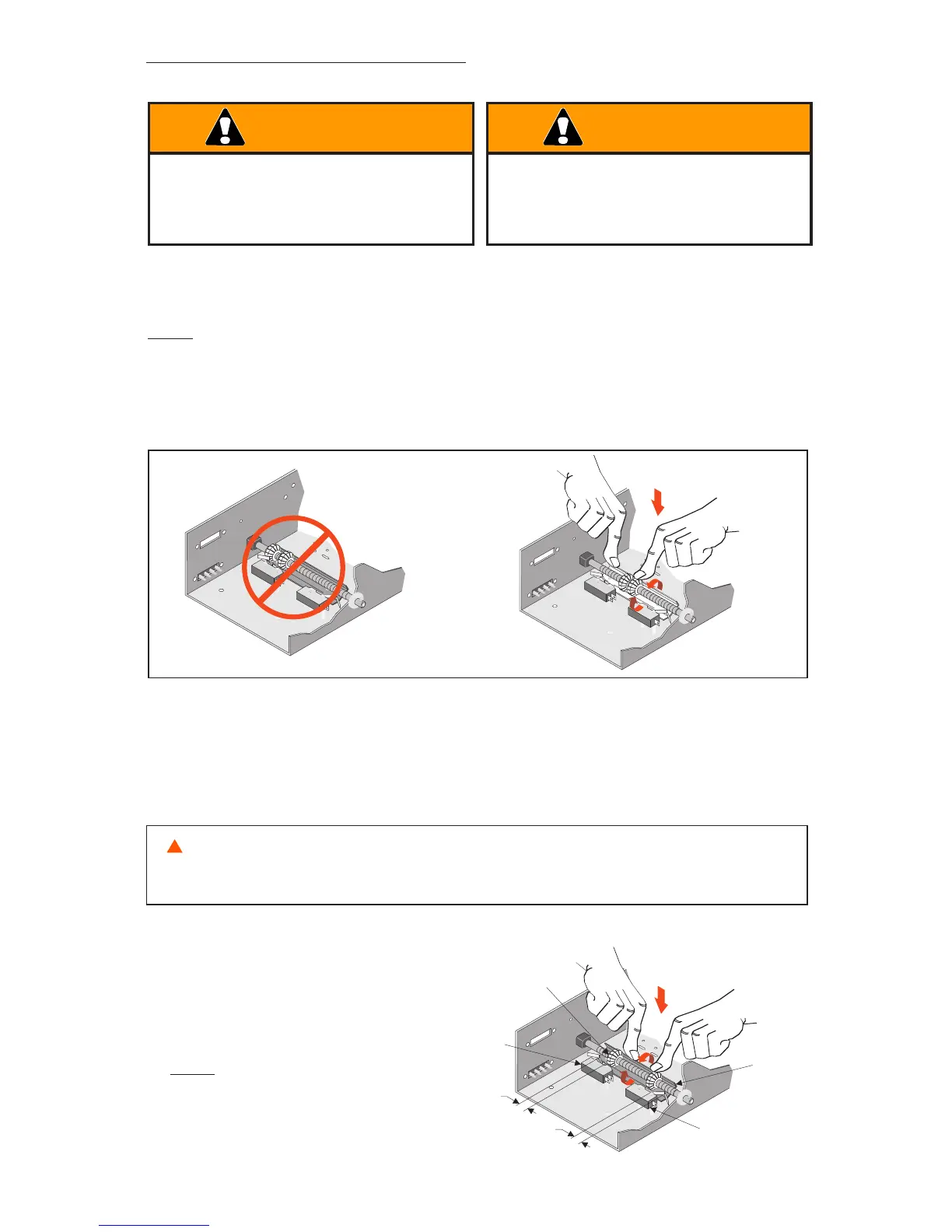
NOTE: When moving the gate with the operator disengaged, the limit nuts in the electric
box can be driven passed their normal position. Reset the limit nuts as necessary by
depressing the pressure plate and rotating the limit nuts until they are both positioned near
the center of the limit shaft.
2. With the gate at mid travel, depress the pressure plate and set the grooved limit nuts
approximately 1 inch from the limit switches on each side.
3. Open the gate electrically using the 3-button control station mounted.
WARNING: UNDER NO CIRCUMSTANCES SHOULD THE CONTROL STATION WIRING BE ALTERED IF
THE ROTATION IS INCORRECT. TO DO SO WILL CAUSE SOME CONTROL FUNCTIONS TO BE INOPERATIVE
AND MAY RESULT IN PERSONAL INJURY OR DAMAGE TO THE GATE AND/OR OPERATOR.
Limit Nut
Pressure
Plate
Close Limit
Switch
Open Limit
Switch
1”
1”
4. If the gate travels in the correct
direction and stops on the open
limit switch, proceed
to Step 6.
NOTE: Open and Close limit
switches are reversed for Slide
Left to Open operation.



 To Next Page