3
System Startup
1. Remove all packing materials.
2. Place the computer on a stable surface.
3.
Do not attach any external devices except the power cord and
AC adapter to the system until Windows is fully configured..
4. When first setting up the computer use the following
procedure (as to safeguard the computer during shipping, the
battery will be locked to not power the system until first
connected to the AC/DC adapter and initially set up as below):
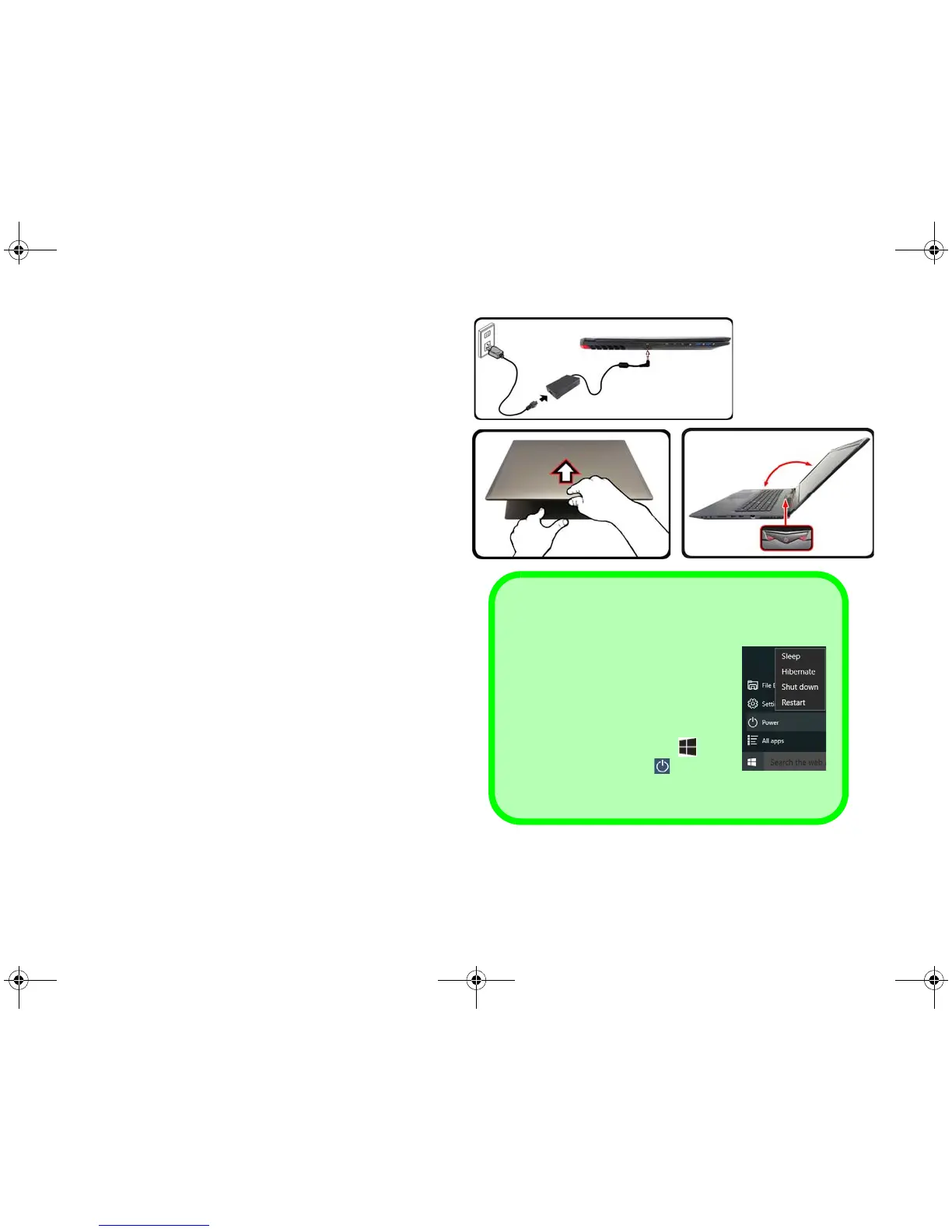
• Attach the AC/DC adapter cord to the DC-In jack on the left
of the computer, then plug the AC power cord into an outlet,
and connect the AC power cord to the AC/DC adapter and
leave it there for 6 seconds or longer.
• Remove the adapter cord from the computer’s DC-In jack,
and then plug it back in again; the battery will now be
unlocked.
5. Use one hand to raise the lid/LCD to a comfortable viewing
angle (do not to exceed 135 degrees);
use the other hand (as
illustrated in Figure 1) to support the base of the computer
(Note: Never lift the computer by the lid/LCD).
6. Press the power button to turn the computer “on”.
135°
Figure 1
Opening the Lid/
LCD/Computer
with AC/DC Adapt-
er Plugged-In
Shut Down
Note that you should always shut
your computer down by choosing the
Shut down command in Windows
(see below). This will help prevent
hard disk or system problems.
1. Click the Start Menu icon .
2. Click the Power item .
3. Choose Shut Down from the
menu.


 To Next Page