PQR
Series Model D52
Page 26
www.Powertronics.com
V2.1
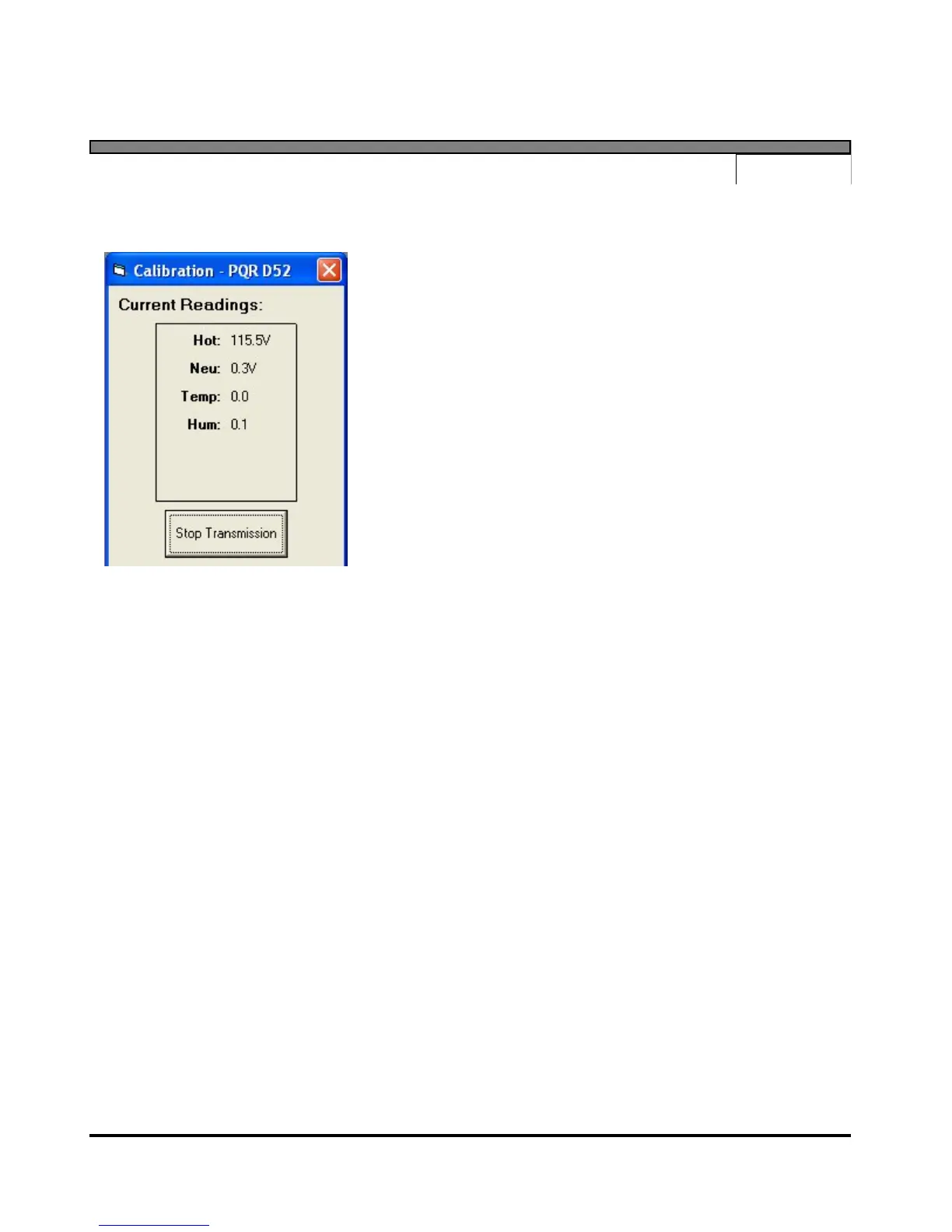
Calibration Mode
Selecting the "Calibration Mode" menu item will
command the device to begin transmitting the current
voltage readings to the computer. The voltage readings
are then displayed in a special window. The voltage
readings will be updated approximately once a second.
No other command can be performed while the
program is in calibration mode. To end the
transmission, user must press the "Stop Transmission"
button; otherwise, the transmission will automatically
stop after about two minutes.
Clear Data
Selecting the "Clear Data" menu item will clear all of the events and data log information stored
in the internal battery backed RAM in the device. The summary report quantities will be reset
to zero, and the data logging will start tracking voltage again. The program will ask the user for
confirmation before transmitting the "Clear" command to the device.
Note: A large amount of time may be necessary in the cases where data is transmitted from the
device to the computer. The exact duration is dependent upon the baud rate setting and the
amount of data being downloaded. In these cases ("Data Log", "Detail Report", and "Summary
Report"), a status window is displayed allowing the user to modify the progress of the
transmission. The status window shows a running count of blocks written to disk during the
current transmission. The block count provides an approximate measure of the amount of data
that has been transferred, and the actual size of a block depends on the baud rate setting. The
user can cut a transmission short by simply pressing the "Cancel" button.


 To Next Page