Powertronix spa reserves the right to modify this document without notice
Page 26 of 46
R&D – USER MANUAL DT0430-E04
STATUS UPS OK Alarm present Alarm stopped
GREEN LED On Off On
RED LED Off On Flashing **
**Configurable (paragraph 3.2.4 )
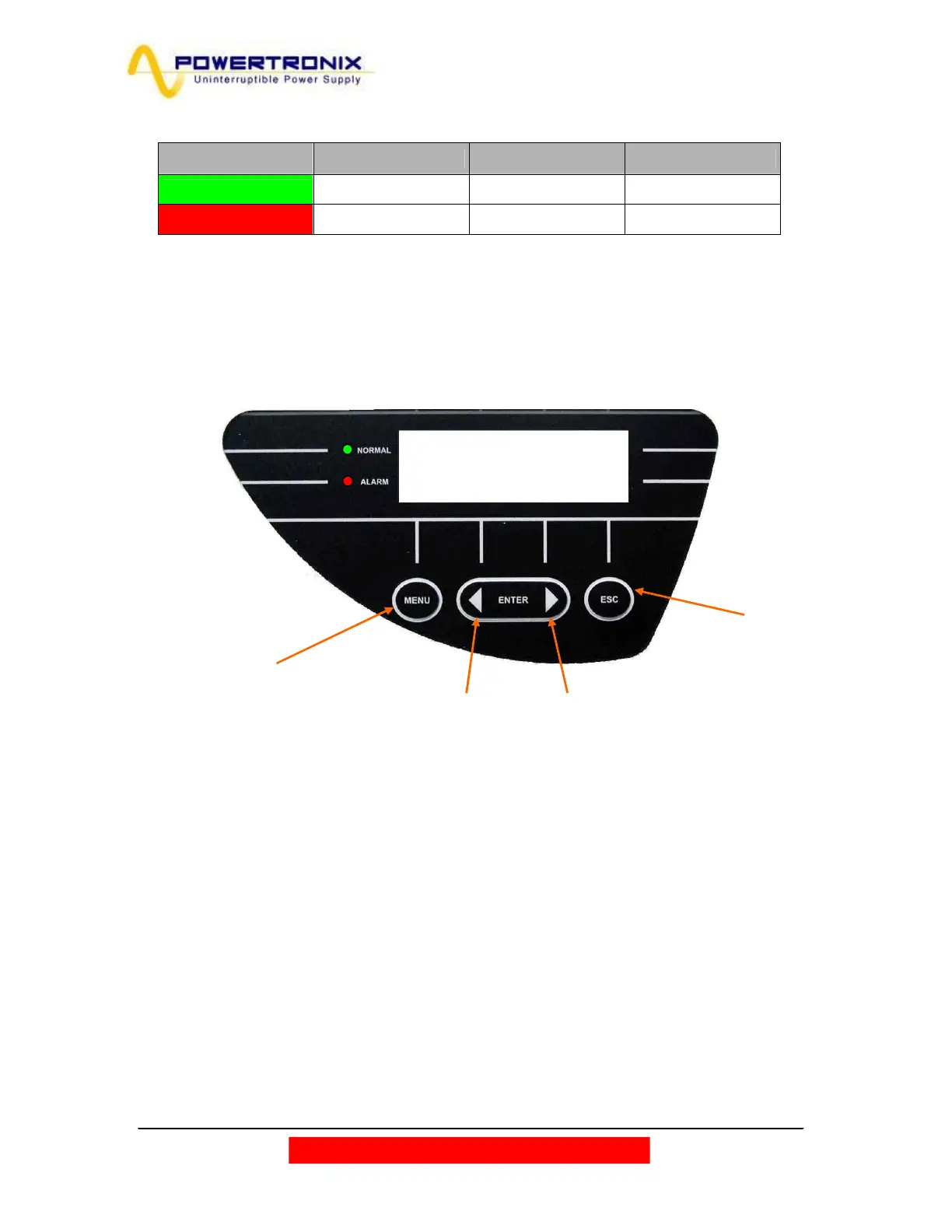
3.2. LCD CONTROL PANEL
During normal UPS operation the control panel uses a series of messages to display the operating status of
the single component blocks of the system, thus the operator is informed in real time (also with sound signal)
of any faults occurred in the system.
Table 3.1a
Figure 3.2
MENU’ PUSH BUTTON
To return to the previous
menu or to enter into
main menu from the
alarm display
BACK PUSH BUTTON NEXT PUSH BUTTON
To scroll among the menu and the sub menu.
Pressing them both at the same gives
ENTER command
ESC PUSH BUTTON
To switch off the buzzer



 To Next Page