Operation
11
Powerware
®
5105 User’s Guide S 05146193 A Uncontrolled Copy
AC Input LEDs
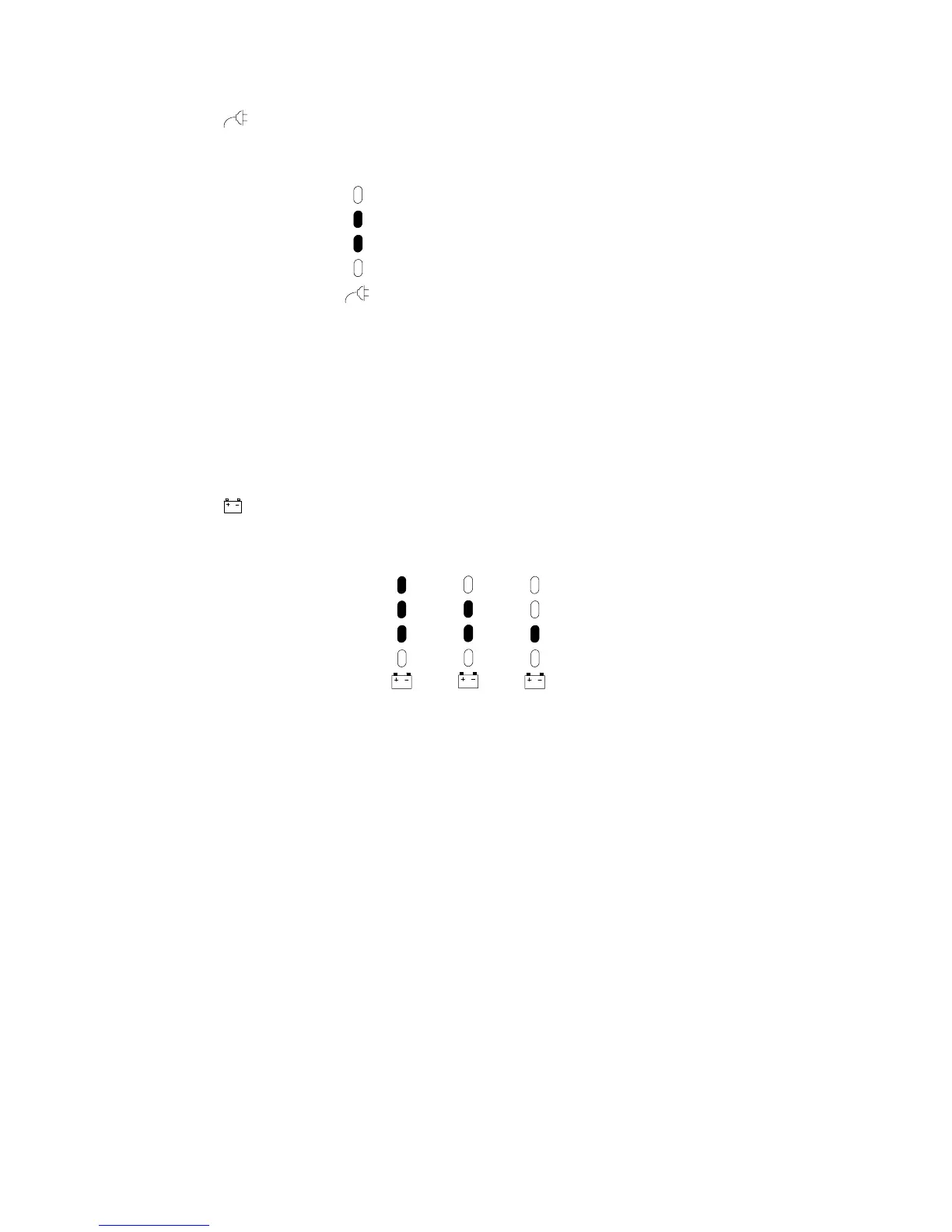
The AC Input LEDs show information about the utility power coming
intotheUPS(seeFigure9).
Normal Utility Input (Buck and Single Boost)
Double Boost is on
Figure 9. AC Input LEDs (Normal Mode)
The second LED indicates that the UPS is operating normally from
utility power. The UPS provides consistent voltage with the Buck and
Single Boost feature.
The third LED indicates that the UPS is using the Double Boost feature
to automatically correct voltage fluctuations.
If any AC Input LEDs are red, see page 32 for more information.
Battery Charge LEDs
The Battery Charge LEDs show information about the UPS batteries (see
Figure 10).
66–90% 33–66%>90%
Figure 10. Battery Charge LEDs (Normal Mode)
Each LED represents the approximate percentage of battery char ge.
When the battery is fully charged (greater than 90%), the top three
LEDs illuminate. If the battery capacity is between 66% and 90%, the
second and third LEDs illuminate. The third LED illuminates if the
battery charge is between 33% and 66%.
If any Battery Charge LEDs are red, see pages 32 and 33 for more
information.



 To Next Page