Home
PPC
Printer
ID-2000 Series
Page 11 (Card Feeding Hopper)
PPC ID-2000 Series - Card Feeding Hopper
39 pages
Manual
Save Page as PDF
To Next Page
To Next Page
To Previous Page
To Previous Page
Loading...
10
1.5
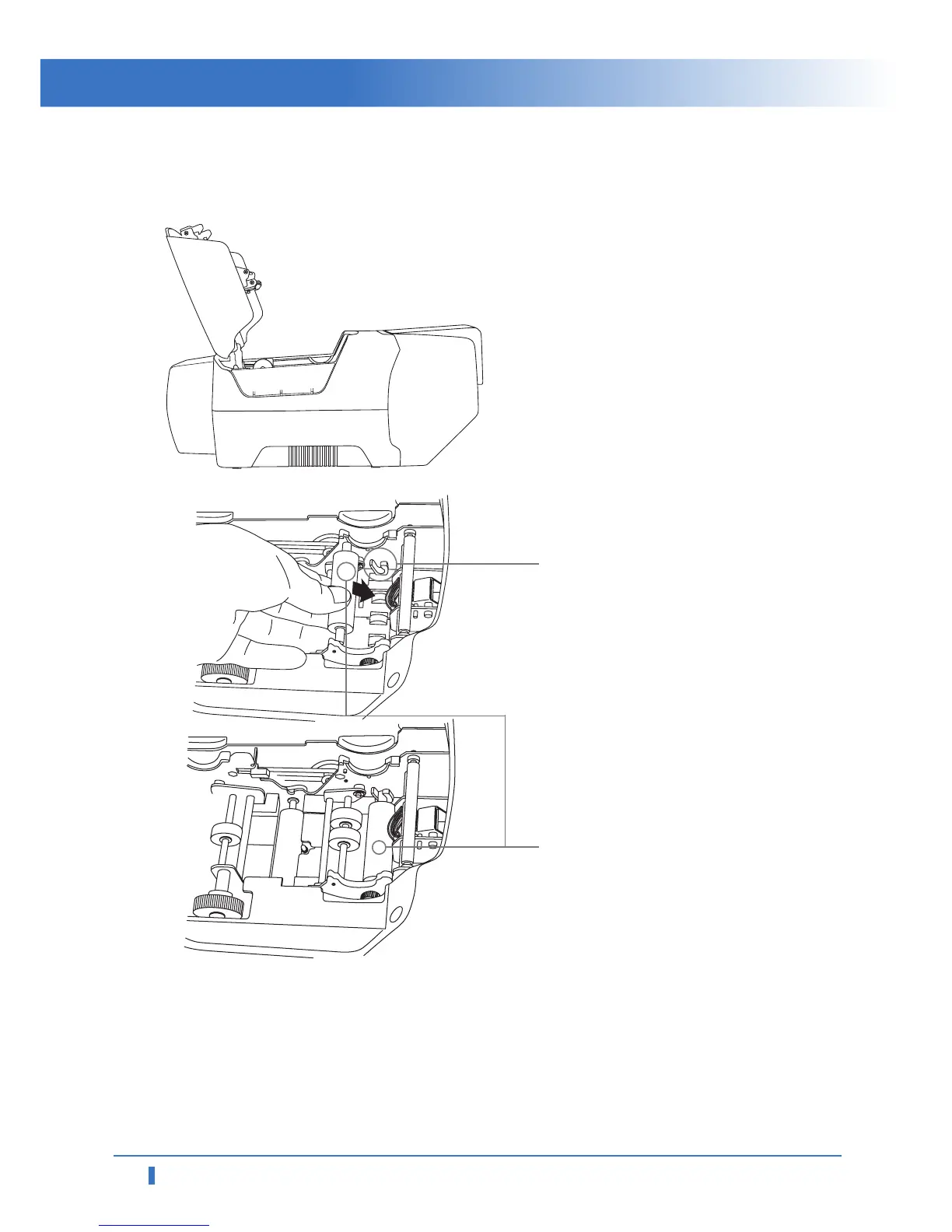
Loading Cleaning Rollers
1
Open
printer
lid
by
pressing
Cover
Release Button and raise it fully
.
2
Slide
the
cleaning
roller
into
the
loading
part
and
insert
roller
bar
into
U-shaped slots until it locks in place.
U-shaped Slot
Cleaning Roller
Car
d Printer ID-2000 Series
10
12
Table of Contents
Main Page
Default Chapter
2
Table of Contents
2
Caution
3
1 Getting Started
6
Introduction
6
Contents in Package
6
Product Features
7
Loading Ribbon
10
Loading Cleaning Rollers
11
Card Feeding Hopper
12
Card Output Stacker
13
Power Device, Power Cable, Communication Cable
13
2 Software Installation
14
Installing Ftd2Xx Direct USB Driver
15
Installing Microsoft Windows Application Software / Driver
18
Removing Ftd2Xx Direct USB Driver
21
Removing Application Software / Driver
22
Printing with ID-2200 on Microsoft Windows Application Software
23
Printer Settings in Microsoft Windows
27
Printer Driver Settings
28
3 Instructions on Maintenance
32
Maintenance of Product
32
How to Replace Ribbon
33
How to Clean the Printer
34
How to Replace TPH(Thermal Print Head) and Consumables
35
Troubleshooting
36
Other Problems
37
Technical Specifications
38
Related product manuals
PPC 300
52 pages



 To Next Page