8.4
a)
b)
c)
8.4
a)
b)
c)
d)
e)
.2.2. Edit Image.
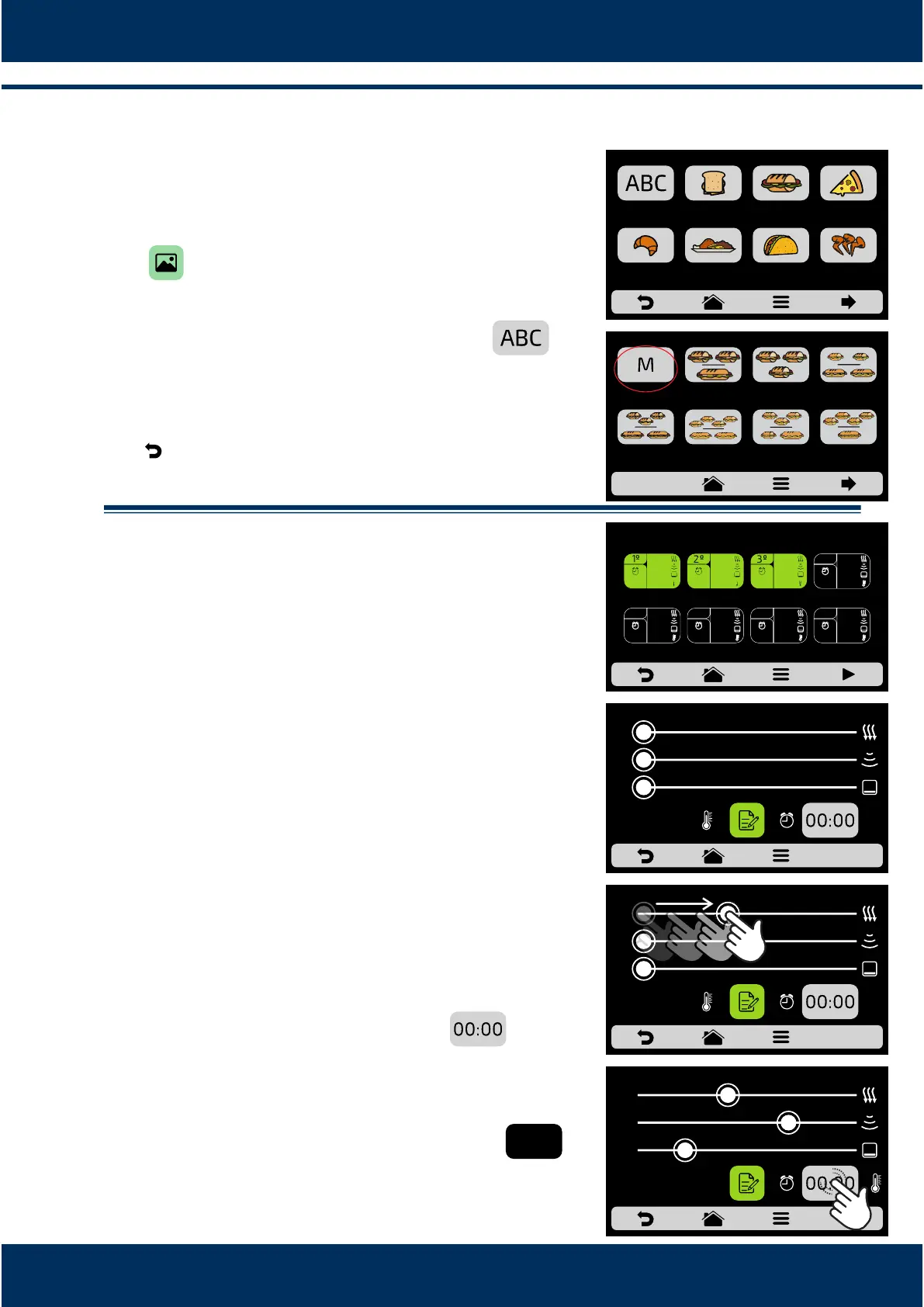
Rocket Express has an image gallery that enables the
user to change the images of the recipes. Press the
icon .
Browse through the groups of the image library to
select the desired icon or press the buon
to transform the first leer of the recipe name into an
icon. As shown in the adjacent example:
Use to return to the recipe eding opons.
.2.3. Edit Steps.
Every recipe supports up to 8 steps. The acve steps
will appear in green on the Edion screen. The other
ones will be transparent, according to the opposite
image. Click on a step to edit it.
For each step, it is necessary to inform:
- Speed of hot air;
- % of microwaves;
- % of the lower resistance (infra-red);
- Temperature
- Time.
To change the Speed of Hot Air, Microwaves and
Lower Resistance (Infra-red), just swipe the finger
over the bar of each parameter or click on the desired
locaon.
To define the me click on the icon .
A keyboard will appear on the opposite side, define
the desired value and click on OK.
To define the temperature click on the icon . A
keyboard will appear on the opposite side, define the
desired value and click on OK.
INSTALLATION AND OPERATION MANUAL
28
250°C
GROUP1
BREAKFAST
SANDWICH
SUBS PIZZA
BAKERY MEAL FINISHING TEX-MEX CHICKEN
WINGS
CHOOSE AN IMAGE FOR THE RECIPE
FIRST
CHARACTER OF
RECIPE NAME
2 SUB 15cm
or 2 SUB 30cm
MIXED 2 SUB 15cm
1 SUB 30cm
3 SUB 15cm
3 SUB 15cm
2 SUB 30cm
SUBS - pag. 1
4 SUB 15cm
2 SUB 30cm
3 SUB 15cm
or 1 SUB 15cm
and 1 SUB 30cm
4 SUB 15cm
1 SUB 30cm
0 10 20 30 40 50 60 70 80 90 100
0
0
40
EDIT STEPS - SNACK: 1 SUB 15cm
30%
100%
20%
00:05
40°C
70%
50%
60%
80°C
00:20
10%
90%
100%
20°C
00:15
0 10 20 30 40 50 60 70 80 90 100
70
20
40
0 10 20 30 40 50 60 70 80 90 100
0
0
0
250°C
GROUP1
250°C
GROUP1
250°C
GROUP1



 To Next Page