29
5 Buses and Routing
5.1 FlexMixes
StudioLive™ Series III
Owner’s Manual
5 Buses and Routing
StudioLive Series III mixers were designed to be highly adaptive to your mix
environment. At the core of this design philosophy are the FlexMixes, however,
dedicated Internal FX buses, four fixed subgroups (32-channel models), and a main
mono bus (StudioLive 64S) round out the complement of routable outputs on your
StudioLive mixer.
5.1 FlexMixes
StudioLive Series III mixers provide FlexMixes that can be used for a variety
of applications. The StudioLive 64S is equipped with 32 FlexMixes; all other models
are provided with 16. Regardless of model, FlexMixes all function exactly the same
way and can be configured as follows:
• Aux Mix. Sums the input channels after they routed to the bus, pre- or post-
main mix level. Each channel is equipped with its own level control to create a
completely independent mix. Aux mixes can be used for many applications. The
two most common applications are creating monitor mixes and inserting external
effects processors into the mix.
• Subgroup. A subgroup allows you to combine multiple channels into a single
bus so that the overall level for the entire group is controlled by a single fader
and processed by the Fat Channel. Subgroups can be routed to the main mix, to a
dedicated output, or both.
• Matrix. A variant of the Aux, a Matrix can combine signals from inputs, other
mixes, buses, the main output bus, and so on. Matrix mixes are more commonly
used to send audio to different loudspeaker zones, create a front fill, or to provide
a producer or director a different mix.
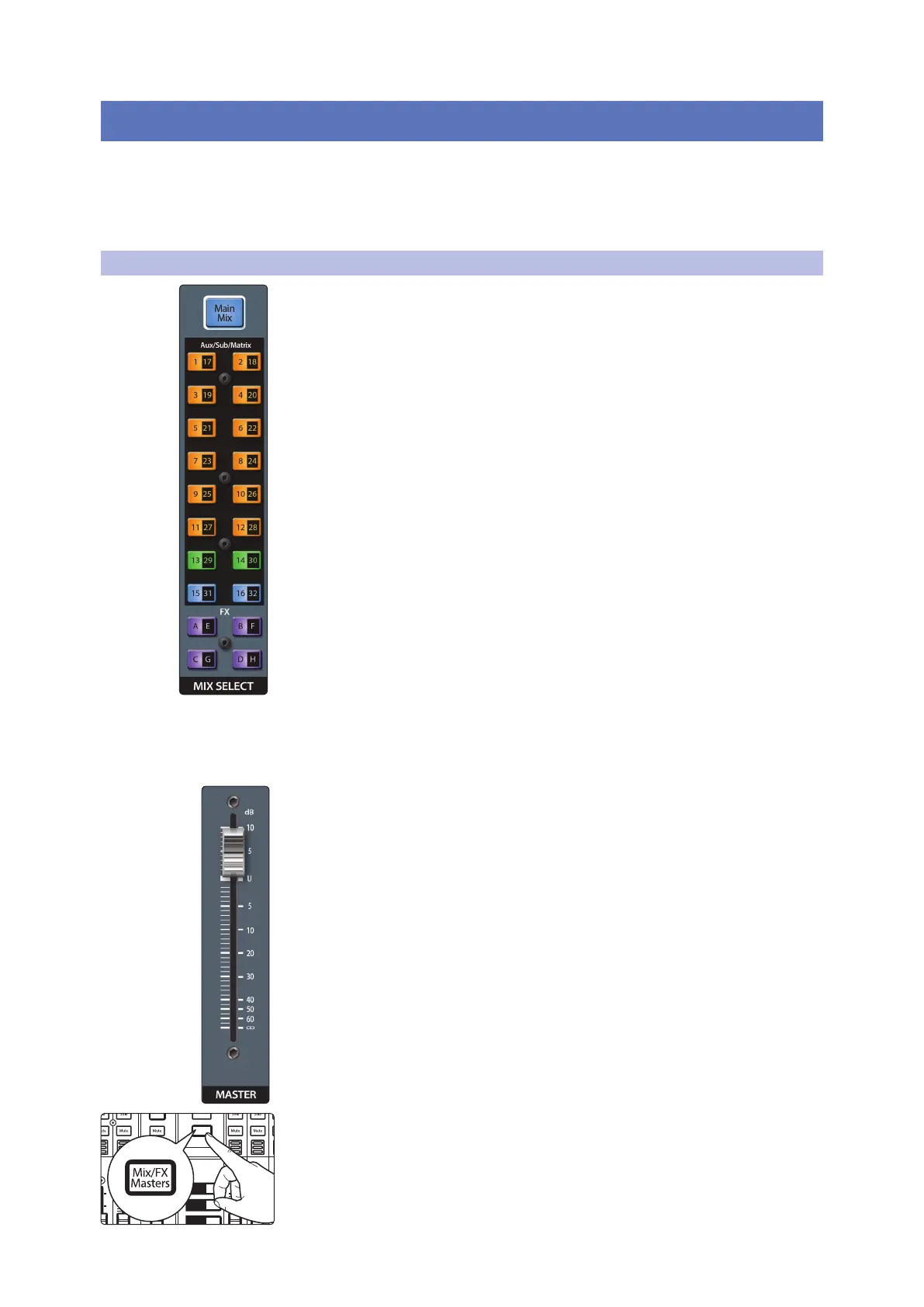
The Mix Select buttons allow you to choose the mix you’d like to control. When a mix
is selected, the channel faders will display the level for that mix only. These buttons
will change color depending on how they are configured.
StudioLive 64s Users: To access the second mix layer for any Mix button, press the button
a second time. For instance, if you press the Mix 1|17 button once, you will be viewing Mix
1. A second press of this button will show Mix 17. The button will toggle between the two
mixes with each consecutive press until another Mix button is selected. When the first
layer Mix is selected for any Mix button, the button light is solid and it will blink when the
second layer is selected for visual reference.
When a mix is selected, the Master fader will control its output level.
Power User Tip: While having the Master fader follow the currently selected mix is most
commonly needed, occasionally, it will be beneficial to lock the Master fader to the Main
mix. To do this, simply press and hold the Master Select button. The Select button will
cease to illuminate, indicating that the function is now locked to the Main Mix. To unlock
the fader and return to normal functionality, press and hold the Select button.
StudioLive 64S Users: Press the Main Mix Select button a second time while focused on
the Main Mix to access the Center bus Master.
To view the master output level for every mix, press the Mix/FX Masters button.
AUX
Inputs
DCA
Groups
Mix/FX
Master
GEQ
Talk
1
2
3
4
10
U
10
5
5
dB
U
10
U
10
5
5
dB
U
BANK
10
U
10
5
5
dB
U
10
U
10
5
5
dB
U
10
U
10
5
5
dB
U
Hold to
Lock Main
( )













 To Next Page