30
5 Buses and Routing
5.2 Aux Mixes
StudioLive™ Series III
Owner’s Manual
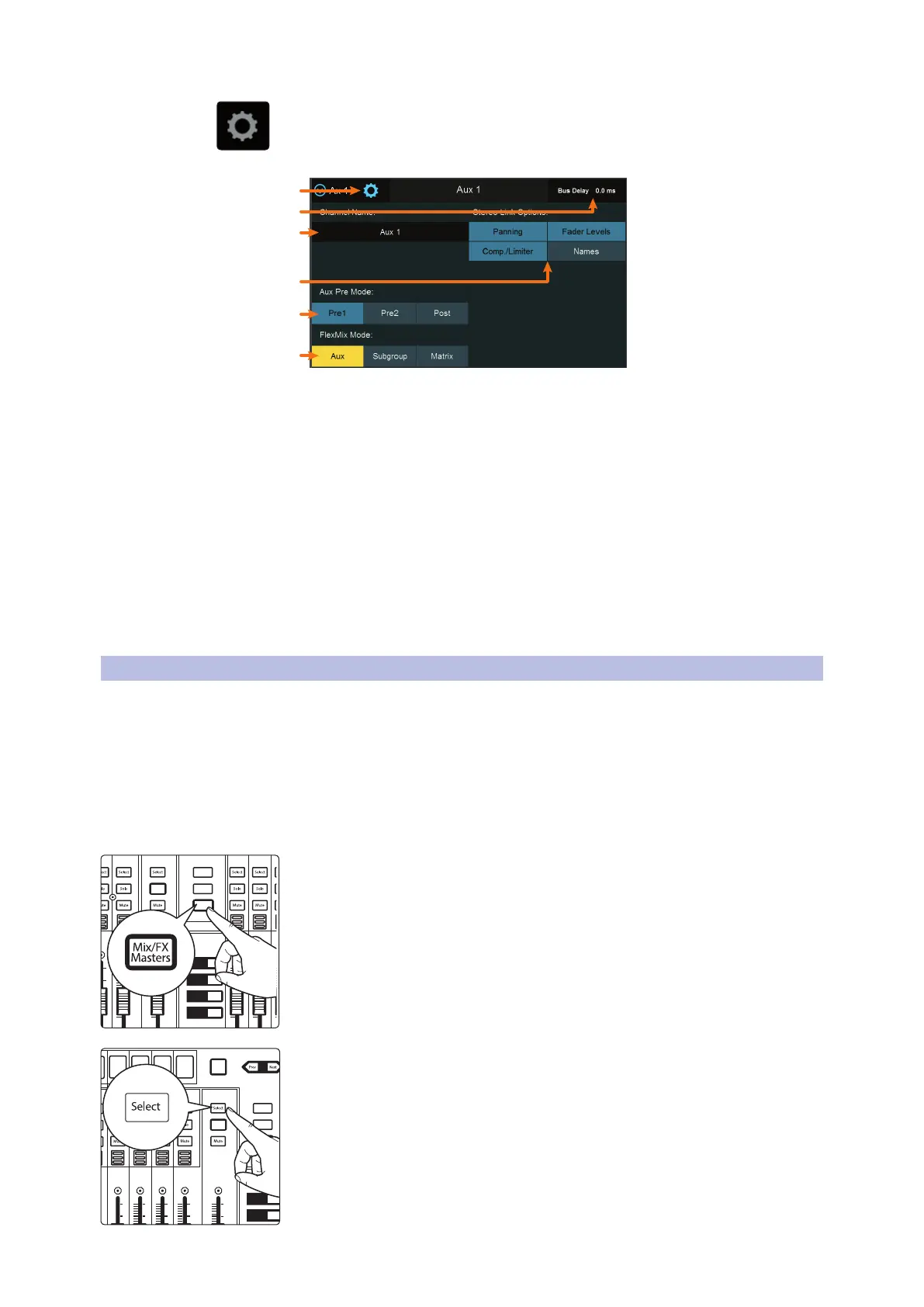
To select the type of FlexMix functionality (Aux, Subgroup, or Matrix), touch the
gear-shaped button to open the FlexMix Settings screen and make your selection
from the menu. Once you’re done, exit the FlexMix Settings screen and create your
mix.
3
4
6
5
1
2
1. Close Settings. Tap to exit the Settings menu.
2. Current Parameter. Displays the currently selected parameter and its
current value.
3. Mix Name. Tap to customize name.
4. Stereo Link Options. You can choose to link the four functions when creating a
stereo bus, or leave them independently controllable: Fader Level, Compressor/
Limiter, Names, and Bus Panning (Stereo Matrix Mixing only).
5. Aux Pre Mode (Aux and Matrix Modes only). Sets the Channel Send position
when a FlexMix is designated as an Aux Mix. See Sections 5.2 and 5.4 for details.
6. FlexMix Mode. Sets the functionality of the FlexMix: Aux, Subgroup, or Matrix.
A note to StudioLive 64S users: The Matrix Mix option is only available on FlexMixes
17-32. Aux and Subgroup options are available on every FlexMix.
5.2 Aux Mixes
As its name implies, an Aux mix allows you to create an alternate, or “auxiliary,” mix
that can be routed to an output separate from the Main bus. Aux buses have many
applications, the two most common of which are creating monitor mixes and
inserting external effects processors into the mix. When you turn up the aux send
level on a channel, its signal is sent to the corresponding aux output at the level you
choose. In this way, the same channel can be used to create several alternate mixes to
the main mix.
To create an Aux Mix:
1. Press the Mix/FX Master button. This will bring up the FlexMix Masters onto
the channel strips.
2. Press the Select button for the FlexMix Master you’d like to make an Aux
Mix.
AUX
Inputs
DCA
Groups
Mix/FX
Master
GEQ
Talk
1
2
3
4
10
U
10
5
5
dB
U
10
U
10
5
5
dB
U
BANK
10
U
10
5
5
dB
U
10
U
10
5
5
dB
U
10
U
10
5
5
dB
U
Hold to
Lock Main
( )
AUX
Inputs
DCA
Groups
Mix/FX
Master
GEQ
Talk
1
2
3
4
BANK
10
U
10
5
5
dB
U
10
U
10
5
5
dB
U
10
U
10
5
5
dB
U
10
U
10
5
5
dB
U
10
U
10
5
5
dB
U
Hold to
Lock Main
( )
10
U
10
5
5
dB
U













 To Next Page